If your company wants to improve service delivery across departments, Enterprise Service Management software is the answer you are looking for.
Gartner’s ITSM Market Guide for 2025 points to Enterprise Service Management (ESM) as one of the key factors shaping the future of ITSM. And we must say, the shift makes sense. Standardizing Service Management across departments improves efficiency, enhances collaboration, and provides unified metrics for better decision-making.
To help you find the right fit, we’ve put together a list of the best ESM software options available today. The right choice will make a difference in both performance and cost, so read on to make sure you get it right!
The 8 best ESM platforms at a glance
Methodology note: Our reviews are based on publicly available information, including vendor websites, product documentation, user reviews from sites such as Gartner Peer Insights, G2, and Capterra, and analyst reports.
InvGate creates and sells ITSM/ESM software, so we're part of this market. Still, our goal is to give accurate, honest, and useful information.
Information accurate as of September 2026. Subject to change without notice.
What is Enterprise Service Management Software?
Enterprise Service Management (ESM) software is a platform that helps multiple departments manage employee and business services through structured processes, requests, and workflows. It typically provides a shared service portal, service catalog, knowledge base, workflow automation, and reporting, with each team able to configure them for its own services.
ESM builds on practices commonly used in IT Service Management (ITSM), extending them to areas such as HR, finance, facilities, and other business functions. Using a shared platform can also reduce the number of separate tools teams need to manage and give employees a consistent way to request and track services.
What to look for in Enterprise Service Management software
Enterprise Service Management platforms vary widely in how well they support non-IT teams, workflow automation, reporting, and operational scalability. The evaluation process usually comes down to how much autonomy departments actually get once the platform is deployed. Organizations comparing how ITSM and ESM differ often find that many “ESM” tools still depend heavily on IT administration.
1. Multi-department configurability
Departments like HR, Facilities, Finance, and Legal should be able to manage their own services without relying on IT for every catalog or workflow change. Look for visual configuration tools that allow non-technical teams to create forms, approval flows, request types, and automations independently.
Diagnostic question: Can HR or Facilities teams create and update workflows without opening tickets to IT?
2. Unified service portal
Employees should have one place to request services across departments instead of separate portals for IT, HR, and Facilities. The portal should centralize requests, approvals, knowledge articles, and service tracking while keeping permissions segmented by role.
Diagnostic question: Can employees access services from all departments through a single portal?
3. Cross-team SLA tracking
Centralized reporting becomes difficult when each department tracks service performance differently. A strong ESM platform should provide shared SLA dashboards with visibility into response times, resolution targets, backlog trends, and workload distribution across teams.
Diagnostic question: Can the platform measure SLA performance across departments in one dashboard?
4. No-code workflow automation
Processes like onboarding, offboarding, procurement approvals, or office moves often involve multiple departments. The platform should support drag-and-drop workflow builders so teams can automate those processes without scripts or vendor consulting.
Diagnostic question: How long does it take to configure a multi-department onboarding workflow without code?
5. Integration depth
Most organizations already rely on collaboration tools, identity providers, HR systems, and communication platforms. Native integrations with systems like Slack, Microsoft Teams, Active Directory, and HRIS platforms reduce manual work and simplify adoption.
Diagnostic question: Does the platform integrate directly with your existing stack?
6. Pricing model
Licensing costs can increase quickly once additional departments adopt the platform. Review how pricing changes when HR, Facilities, Finance, Legal, or Operations teams begin using the system beyond IT.
Diagnostic question: Does pricing still make sense when non-IT departments adopt the platform?
The best Enterprise Service Management software
The tools below were selected based on their support for cross-department Service Management, including capabilities for requests, workflows, service catalogs, self-service, and reporting.
1. InvGate Service Management
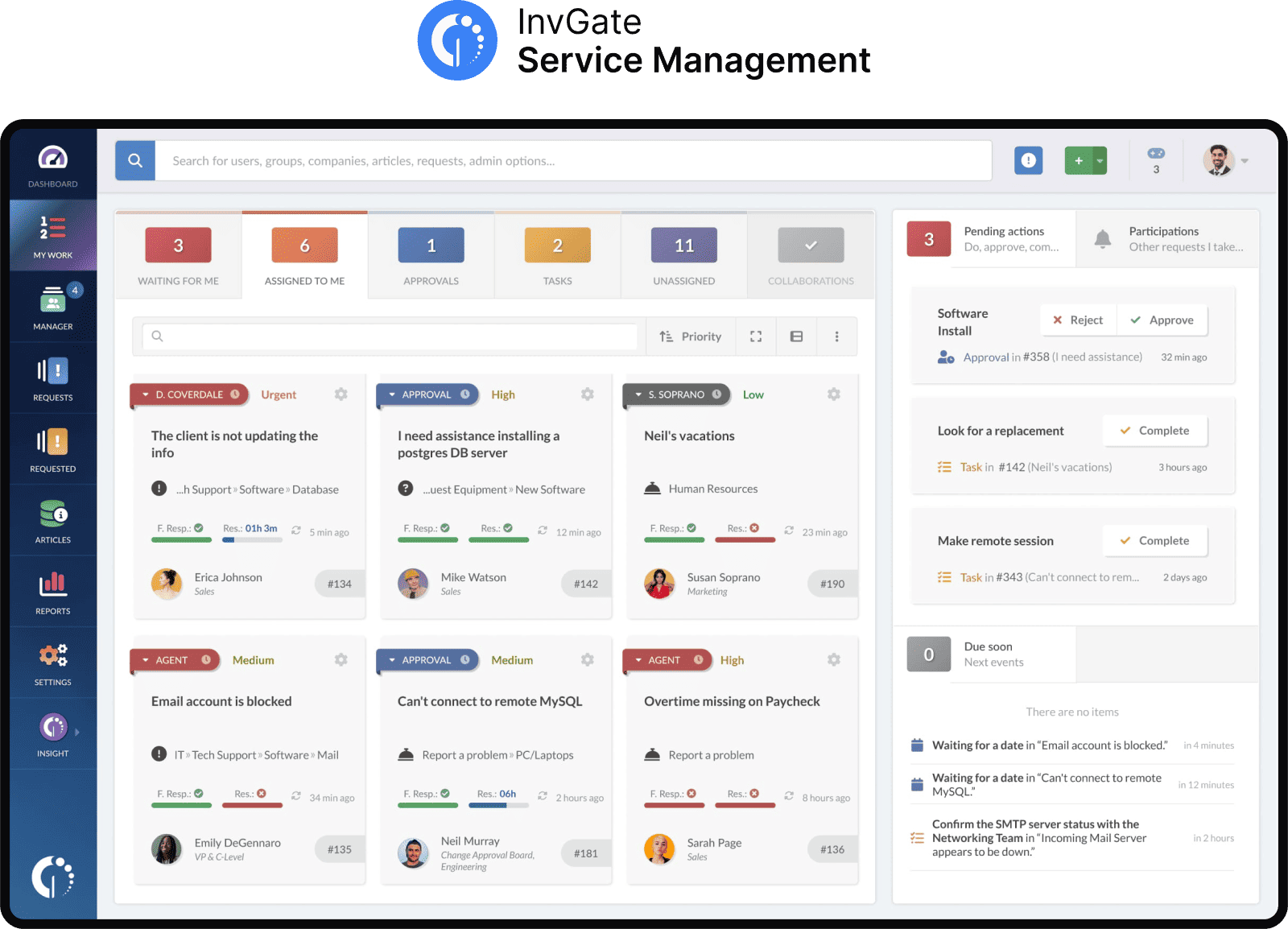
InvGate Service Management is a complete Service Management solution with strong ESM capabilities that enable cross-departmental digital transformation through streamlined workflows and self-service tools. Its easy-to-use interface and simple implementation are ideal for non-technical users to request and offer services through it.
Organizations can manage services across different business functions, allowing for the integration of IT, HR, Facilities, and more. The help desk structure is designed to allow you to branch them among all the areas in your organization and create different levels of service.
As for deployment, it allows for cloud-based for Starter/Pro tiers while Enterprise supports on-premise or hybrid.
InvGate Service Management features
- Service Catalog and Request Management - It provides you with the possibility to build a robust service catalog, enabling the creation and management of service offerings for different departments within an organization.
- Multiple help desks - You can set up separate help desks for different departments or teams, each with its own workflows, SLAs, and reports, so every area can operate independently while still working within the same platform.
- Multiple channels of communication - You can offer omnichannel communication for the different areas across the organization, including e-mail, Microsoft Teams, Slack and Whatsapp.
- Self-service features - The self-service portal and Virtual Service Agent gives employees a single point of access to find answers, resolve issues, and request services across departments.
InvGate Service Management pricing details
InvGate Service Management has flexible pricing options based on the number of agents and the features required.
- Starter: 24.98/agent/month billed annually and 5 agents minimum - $1499/year.
- Pro: $500/agent/year. 5 - 50 agents
- Enterprise: Custom pricing for larger organizations.
If you want to test the software before making a purchase, you can sign up for a 30-day free trial.
All prices are subject to change and provided for informational purposes only. Final pricing depends on a formal evaluation; a signed quote from an authorized Sales Representative is required for all binding agreements.
InvGate Service Management customer testimonials and rating:
InvGate Service Management has all the capabilities and power needed to boost services across the whole organization. And that’s exactly what Peoples Bank and the retailer Farmacity did. The first currently handles more than 65 help desks across ten areas of the company, while the second one has onboarded 24 departments and has almost eliminated the use of email to submit requests.
2. ServiceNow
ServiceNow® IT Service Management (ITSM) is a widely used platform designed to manage IT and business services at scale. With strong ESM capabilities, it enables organizations to extend structured Service Management beyond IT to departments like HR, finance, and customer support. It’s scalable for large enterprises with hybrid/multi-cloud environments.
ServiceNow ITSM integrates natively with platforms like Microsoft Teams, Slack, Jira, and SAP, allowing businesses to connect IT and business services seamlessly. It is available as a cloud-based SaaS solution.
ServiceNow features
Here are some of the functionalities mentioned in their official features overview (accessed september 2026).
- Employee Center. A single portal where employees can request help from IT, HR, Finance, and other teams without jumping between systems.
- AI-powered incident support. AI helps sort incoming issues, create clear summaries, and offer recommended actions.
- Digital Portfolio Management. One workspace that brings together services, applications, and products so teams can plan, build, and operate them with access to operational data.
- Knowledge Management. AI and machine learning assist with creating, organizing, and sharing articles across the organization.
- Virtual Agent. A chatbot that understands everyday language and can resolve common issues.
ServiceNow pricing details
ServiceNow doesn't disclose its pricing, but it offers various licensing packages based on several factors, including the number of users, the types of licenses required, and the level of support needed.
ServiceNow user reviews and ratings
3. BMC Helix
BMC Helix® Service Management works as a cloud-based platform designed to support both traditional ITSM needs and broader ESM initiatives. Teams like HR, Finance, or Facilities can use it to manage requests, track issues, and keep their work organized in one place.
The platform can run in the cloud, on-premise, or in a hybrid setup, which suits large companies with mixed environments. It also integrates with development tools, cloud providers, and monitoring systems, so different teams can work together without switching between disconnected tools.
BMC Helix features overview
According to their website (accessed September 2026), these are some BMC Helix features.
- Unified service request catalog. Present services from multiple business units (IT, HR, Facilities, etc.) in one centralized catalog with automated approvals and SLA tracking.
- Advanced incident and problem handling.
- Integrated Knowledge Management with lifecycle controls and recommendations.
- Cross-cloud and cross-team brokering that connects internal teams and external vendors.
- Analytics and reporting for all departments.
BMC Helix pricing details
Pricing not disclosed publicly, available upon request.
BMC Helix user reviews and ratings
4. Jira Service Management
Jira Service Management is an ITSM and enterprise service management platform designed to support service delivery across IT, HR, Finance, Legal, and Facilities teams. It combines request management, workflow automation, and collaboration features in a shared environment, making it suitable for organizations extending service management practices beyond IT.
The platform integrates with Slack, Microsoft Teams, Confluence, Opsgenie, and hundreds of third-party applications through the Atlassian Marketplace. It is available as a cloud-based and self-managed solution.
Jira Service Management features overview
According to their official documentation (accessed September 2026), the platform supports these functionalities.
- Multi-team Service Management. Organizations can create separate service projects for departments like HR, Legal, or Facilities while keeping workflows connected in one system.
- Automated workflows. Teams can automate approvals, escalations, request routing, and repetitive tasks.
- Employee self-service portal.
- Delegated administration permissions to project owners.
- Customizable form builder for teams to collect and validate all the information they need, including ready-to-use templates.
Jira Service Management pricing details
Jira Service Management offers four pricing tiers billed per agent, per month. Pricing varies depending on the number of agents, with lower per-agent costs available at higher volumes. For example, the following rates apply to a 50-agent deployment:
Plus, they offer a free tier for up to 3 agents. The enterprise tier requires a quote.
Checked on: September 2026 (US), official web.
Jira Service Management user reviews and ratings
5. Matrix42 Enterprise Service Management
Matrix42 Enterprise Service Management is an Enterprise Service Management platform built to support shared services across IT, HR, Finance, Facilities, and other business functions. The platform focuses on centralized service delivery, workflow automation, and employee experience through a unified service portal.
Matrix42 integrates with Microsoft 365, Microsoft Teams, SAP, Active Directory, and endpoint management tools, helping organizations connect service operations with existing enterprise systems. It is available as a cloud-based or on-premise solution.
Matrix42 features overview
According to their website (accessed September 2026), the platform includes the following capabilities.
- Cross-department service delivery. Organizations can manage requests from multiple departments within the same platform while maintaining separate workflows and permissions.
- Workflow automation. Teams can automate approvals, onboarding tasks, escalations, and recurring operational processes.
- Service catalog and portal.
- Role-based access controls.
- Analytics and dashboards.
Matrix42 pricing details
Matrix42 does not publicly disclose pricing. Organizations interested in the platform must contact the vendor for a custom quote.
Matrix42 user reviews and ratings
6. Freshservice
Freshservice is a cloud-based ITSM and ESM platform designed to support service operations across IT, HR, Facilities, Finance, and other internal teams. It combines workflow automation, AI-powered support, and a configurable employee service portal to help organizations centralize internal services in one platform.
The platform integrates with Microsoft Teams, Slack, Jira, Okta, Azure AD, and Google Workspace, allowing organizations to connect service operations with existing business systems. It is available as a cloud-based solution.
Freshservice features overview
According to their official documentation (accessed September 2026), the platform includes the following capabilities.
- Unified service catalog. Organizations can create service catalogs for different departments
- Workflow automations.
- AI-powered support. Freddy AI assists agents with ticket summaries, suggested responses, and conversational support features inside the workspace.
- Employee self-service portal.
- Analytics and reporting.
Freshservice pricing details
Freshservice offers four pricing tiers billed per agent, per month.
- Starter: $19 per agent / per month.
- Growth: $49 per agent / per month.
- Pro: $95 per agent / per month.
- Enterprise: Custom pricing.
Checked on: September 2026 (US), official website.
Freshservice user reviews and ratings
7. SolarWinds Service Desk
SolarWinds Service Desk® is a cloud-based ITSM platform that provides Service Management capabilities beyond IT, making it a practical choice for organizations adopting ESM. It focuses on enterprise automation, Asset Management, and streamlined service requests.
The platform offers native integrations with Google Workspace, Microsoft 365, Slack, and Zendesk, allowing organizations to streamline operations. It is a fully cloud-based solution.
SolarWinds features overview
Based on their official documentation (accessed September 2026), the platform supports these functionalities.
- Category-based ticket routing. Administrators can set up broad ticket categories, such as HR or Facilities, to direct requests to the right team without extra steps.
- Permission controls. Visibility and access can be limited by category or subcategory, so only the right teams can view or work on specific tickets.
- Dashboards. Real-time views of service desk activity with customizable widgets that highlight work queues, trends, and performance.
- Employee service portal. A customizable portal where employees can submit requests and find helpful information or resources.
- Reporting. Options to create tailored reports that show KPIs and team performance, with the ability to expand analysis through Power BI.
SolarWinds pricing details
SolarWinds Service Desk offers three pricing tiers. Keep in mind that the Essential tier might not be the right option for accessing the features you need for ESM. Asset pricing is not included; it is available upon request.
- Essentials: $39 per month / per technician.
- Advanced: $99 per month per technician.
- Premier: $124 per month / per technician.
- Checked on: September 2026 (US), official website.
SolarWinds user reviews and ratings
8. SysAid ITSM
SysAid® is an ITSM and ESM platform that helps organizations manage internal services in a single system. IT, HR, Facilities, and other teams can use it to handle requests, track issues, and keep service information organized. It also connects with Microsoft Active Directory, VMware, Google Workspace, and Azure, ensuring compatibility with existing enterprise environments.
SysAid features overview
These are some of the platform's functionalities according to their official web (accessed September 2026).
- Workflow automation for end-to-end tasks like onboarding, change approvals, and escalations.
- Reporting and analytics to track KPIs, spot patterns, and make decisions.
- Self-service portal for employees to submit requests, follow their status, and search a knowledge base.
- SysAid Copilot for agents. Provides real-time help inside the agent workspace, offering summaries, suggested replies, and priority cues.
SysAid ITSM pricing details
SysAid ITSM pricing starts at $89 per agent/month for the Professional plan, and the Enterprise plan is custom-priced with a sales consultation.
- Checked on September 2026 (US) official website.
SysAid ITSM user reviews and ratings
How to choose the right ESM platform for your organization
The evaluation process usually becomes clearer once organizations stop comparing feature lists and start testing how the platform fits existing operations, teams, and workflows. If you're wondering why ESM projects fail, it usually comes down to choosing platforms that looked flexible during demos but became difficult to expand after deployment.
-
Start by identifying which departments already manage high volumes of informal requests through email, chat, spreadsheets, or shared inboxes. HR and Facilities are often the first candidates because they typically handle onboarding, approvals, access requests, office issues, and employee documentation without centralized tracking. Those teams usually provide the clearest early use cases for ESM adoption.
-
The next step is evaluating who will configure and maintain the platform internally. Some organizations have dedicated ITSM administrators or platform teams, while others rely on small IT groups with limited bandwidth. In those cases, platforms with visual workflow builders, no-code configuration, and implementation support reduce operational overhead significantly.
-
Start by identifying which departments already manage high volumes of informal requests through email, chat, spreadsheets, or shared inboxes. HR and Facilities are often the first candidates because they typically handle onboarding, approvals, access requests, office issues, and employee documentation without centralized tracking. Those teams usually provide the clearest early use cases for ESM adoption.
-
The next step is evaluating who will configure and maintain the platform internally. Some organizations have dedicated ITSM administrators or platform teams, while others rely on small IT groups with limited bandwidth. In those cases, platforms with visual workflow builders, no-code configuration, and implementation support reduce operational overhead significantly.
-
Testing a pilot department often reveals more than vendor demos. Configuring a basic service catalog, approval flow, and request workflow for a non-IT team gives a realistic picture of how difficult the platform will be to expand later. One of the best
tips for getting started with ESM is to onboard one department at a time and to make smaller internal deployments before expanding into enterprise-wide service operations.
Final thoughts
In many organizations, Enterprise Service Management has become part of a broader operational strategy focused on standardizing internal services, reducing manual work, and giving departments better visibility into requests and workloads. The right platform depends on several factors: the size of the organization, the maturity of the existing ITSM practice, the complexity of internal workflows, and how much autonomy non-IT teams need to manage their own operations without depending constantly on IT administrators.
InvGate Service Management is an ESM-ready option for organizations aiming to centralize requests and workflows across IT and other areas. Explore it with a 30-day free trial to evaluate how it fits your operational requirements.
Frequently asked questions
What's the difference between ITSM and ESM?
ITSM applies service management practices specifically to IT — ticketing, incident management, and asset tracking for internal tech teams. ESM takes that same framework and extends it to other departments, like HR, facilities, and finance. In short, ESM is ITSM's approach applied organization-wide.
Which departments usually adopt ESM first?
HR and facilities are typically the earliest adopters, since their request volume and workflows closely resemble IT's own (onboarding, equipment, maintenance). Legal and finance often follow once the initial rollout proves its value. IT usually stays the anchor department that champions the expansion.
How much does an ESM platform cost?
Pricing varies widely depending on the vendor, number of agents, and departments included, so there's no single standard figure. With InvGate Service Management, plans start at $24.98/agent/month billed annually, with a 5-agent minimum. Enterprise-level ESM deployments across multiple departments are typically quoted with custom pricing.
Disclaimer: All product names, logos, and brands are property of their respective owners. All company, product, and service names used on this site are for identification purposes only. Use of these names, trademarks, and brands does not imply endorsement. Comparisons are based on publicly available information as of September, 2026 and are provided for informational purposes only.
ServiceNow is a registered trademark of ServiceNow, Inc. InvGate is not affiliated with, sponsored by, or endorsed by ServiceNow.