













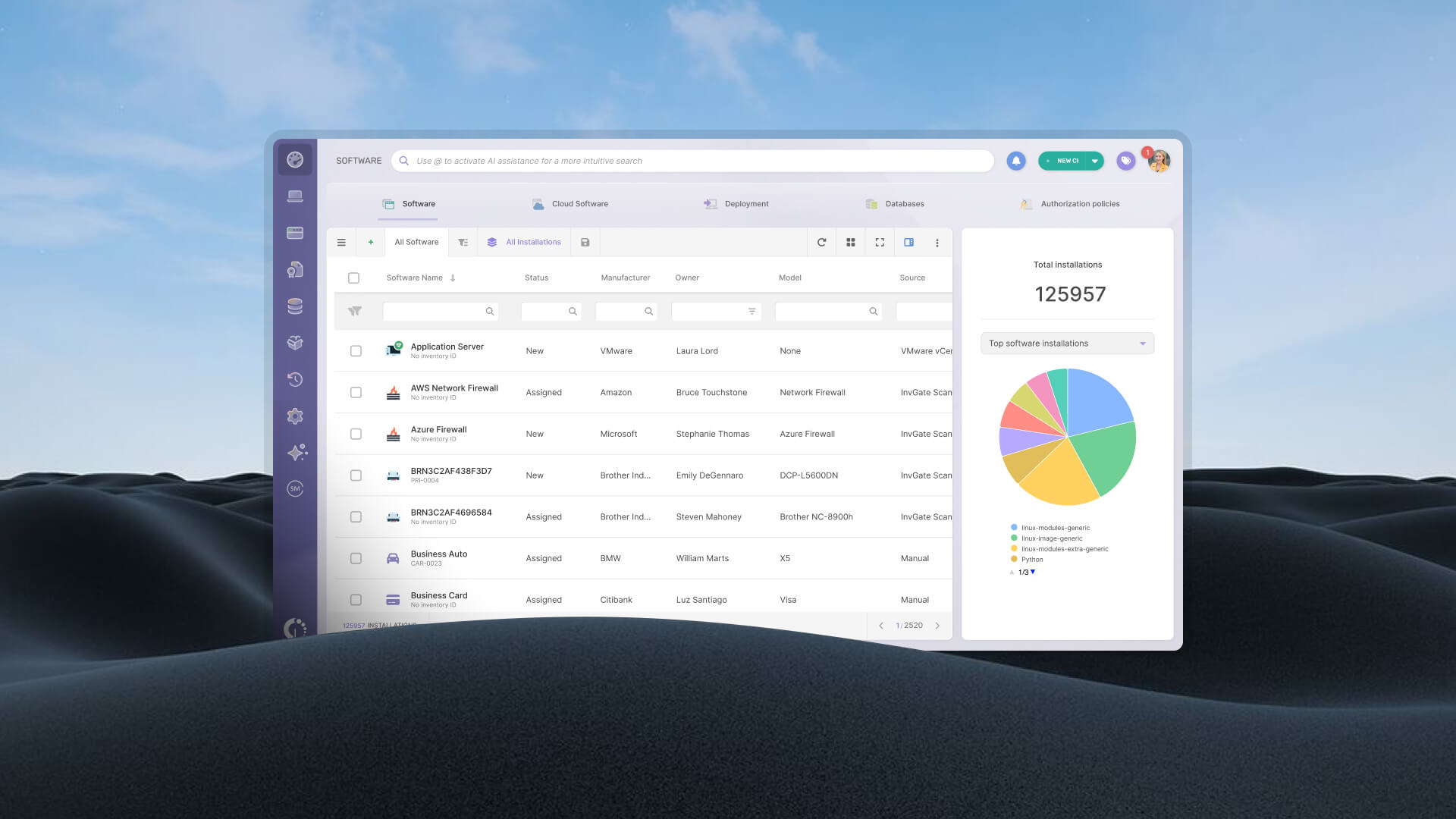

Most IT teams don't have a complete picture of what software is installed across their environment. Not because they haven't tried to track it, but because the software landscape shifts constantly: users install applications on their own, devices get reassigned, hybrid environments grow, and no spreadsheet can keep up with that pace of change.
That gap matters more than it might seem because an outdated software inventory is an active compliance risk. License audits can expose installations that aren't covered. Shadow IT that goes undetected opens security vulnerabilities. And spend on unused licenses keeps accumulating with no one flagging it. Automated software discovery exists to close that blind spot systematically, without relying on manual effort from the IT team.
This post explains what automated software discovery is, how the underlying mechanism works, and how to implement it with InvGate Asset Management to build a software inventory that stays complete, normalized, and actionable over time.
Automated software discovery is the process of automatically identifying all applications installed across an organization's devices, without relying on manual records, self-reported inventories, or static spreadsheets. It covers software installed on endpoints (desktops, laptops, servers), and depending on the platform, extends to virtual environments and cloud-connected assets as well.
The operative word is automated. The process runs in the background, continuously, without requiring the IT team to manually trigger a scan or update a record every time something changes. New software gets installed, it gets detected. An application gets removed, the inventory reflects that. The state of your environment stays accurate in near real-time.
Within the broader discipline of IT Asset Management (ITAM), the practice of tracking, managing, and optimizing an organization's technology assets across their full lifecycle, automated software discovery is a foundational input. You can't manage licenses you haven't found, and you can't govern software you don't know exists.
For small environments with a handful of devices and a stable application stack, a manually maintained inventory can work, barely. But most IT environments aren't small, and none are stable. Users install personal tools, teams adopt SaaS apps without IT sign-off, laptops get wiped and redeployed, and the gap between what's documented and what's actually running grows wider every quarter.
The consequences aren't abstract. When a software vendor conducts a license audit, they compare their records against what's installed across your environment. If your own records are incomplete, you're negotiating blind. Installations without license coverage generate penalties. Duplicate purchases for tools that already exist in the environment go unnoticed. And how shadow IT ends up in your environment, through individual installs or department-level SaaS adoption, creates both compliance exposure and security risk that manual tracking simply can't surface.
Platforms like InvGate Asset Management solve this by automating the entire discovery process across endpoints, replacing static records with a continuously updated inventory. The shift isn't just operational efficiency; it changes what questions IT can confidently answer.
The mechanism behind automated software discovery varies by method, but the core logic is consistent: something scans your environment, collects data about what software is present, and reports it back to a central system. The main differences come down to where the scanning happens and how the data gets collected.
An agent is a lightweight piece of software installed directly on each endpoint. Once deployed, it runs in the background and periodically sends data back to the central platform: what software is installed, which versions, how recently the application was used, and other relevant attributes.
The key advantage of agent-based discovery is persistence and depth. Because the agent lives on the device, it can report even when the endpoint is off the corporate network, which matters for remote workers and field devices that rarely connect through VPN. It also captures more granular data than network-based methods, including usage frequency and installation paths.
In InvGate Asset Management, this is handled by the InvGate Asset Management Agent, which collects endpoint data continuously and feeds it into the central asset inventory.
Agentless discovery scans the network without requiring software on each target device. It uses standard protocols (SNMP, WMI, SSH) to query connected devices and retrieve information about installed software and system configuration.
The main advantage is deployment speed. There's no agent rollout to coordinate, which makes agentless discovery practical for initial network sweeps or environments where agent installation isn't feasible (certain servers, OT devices, or third-party managed endpoints). The tradeoff is coverage: agentless methods can miss devices that are offline at scan time, and generally return less granular software usage data than an agent. For a fuller picture of how network discovery works in practice, both approaches are typically complementary rather than mutually exclusive.
Modern IT environments don't consist of on-premises devices alone. Hybrid and cloud-native setups require discovery coverage that extends beyond what agents and network scans can reach on their own. To close those gaps, InvGate Asset Management integrates with directory services and Endpoint Management systems, such as Active Directory, Microsoft Intune, Amazon Web Services (AWS), and Azure, to pull software data from sources that already have visibility into those environments.
This approach is particularly valuable for detecting cloud-installed applications or software managed through MDM/UEM platforms that operate outside the traditional perimeter. InvGate's IT Asset Discovery tool supports these integrations to extend coverage across the full environment.
Connect our solutions with the apps you use every day.
Explore InvGate's integrations
A well-configured software discovery process surfaces more than a simple list of application names. Depending on the method and platform, it can identify:
The last category connects directly to shadow IT discovery. When the agent reports all installed software, not just what IT provisioned, it surfaces applications the team never approved or, in some cases, never knew existed. Those findings feed directly into Software License Management workflows, where the inventory data can be crossed against entitlements to quantify the compliance gap.
You can't manage what you haven't discovered. The following steps walk through how to configure and run automated software discovery in InvGate Asset Management, from defining the scope through acting on the results.
For endpoints where you need continuous, detailed visibility, such as user workstations, laptops, and critical servers, deploy the InvGate Asset Management Agent. It runs silently on each device and reports back automatically on a defined schedule.
For the rest of the network, configure the agentless InvGate Discovery to scan connected devices using network protocols. Both methods can run in parallel, and for most environments, combining them is the right approach: agent coverage where depth matters, agentless where breadth and deployment speed are the priority.
 While this article focuses on software discovery, it's worth noting that InvGate Asset Management detects all types of IT assets, not just software, helping you identify, build, and manage your entire IT ecosystem from a single platform.
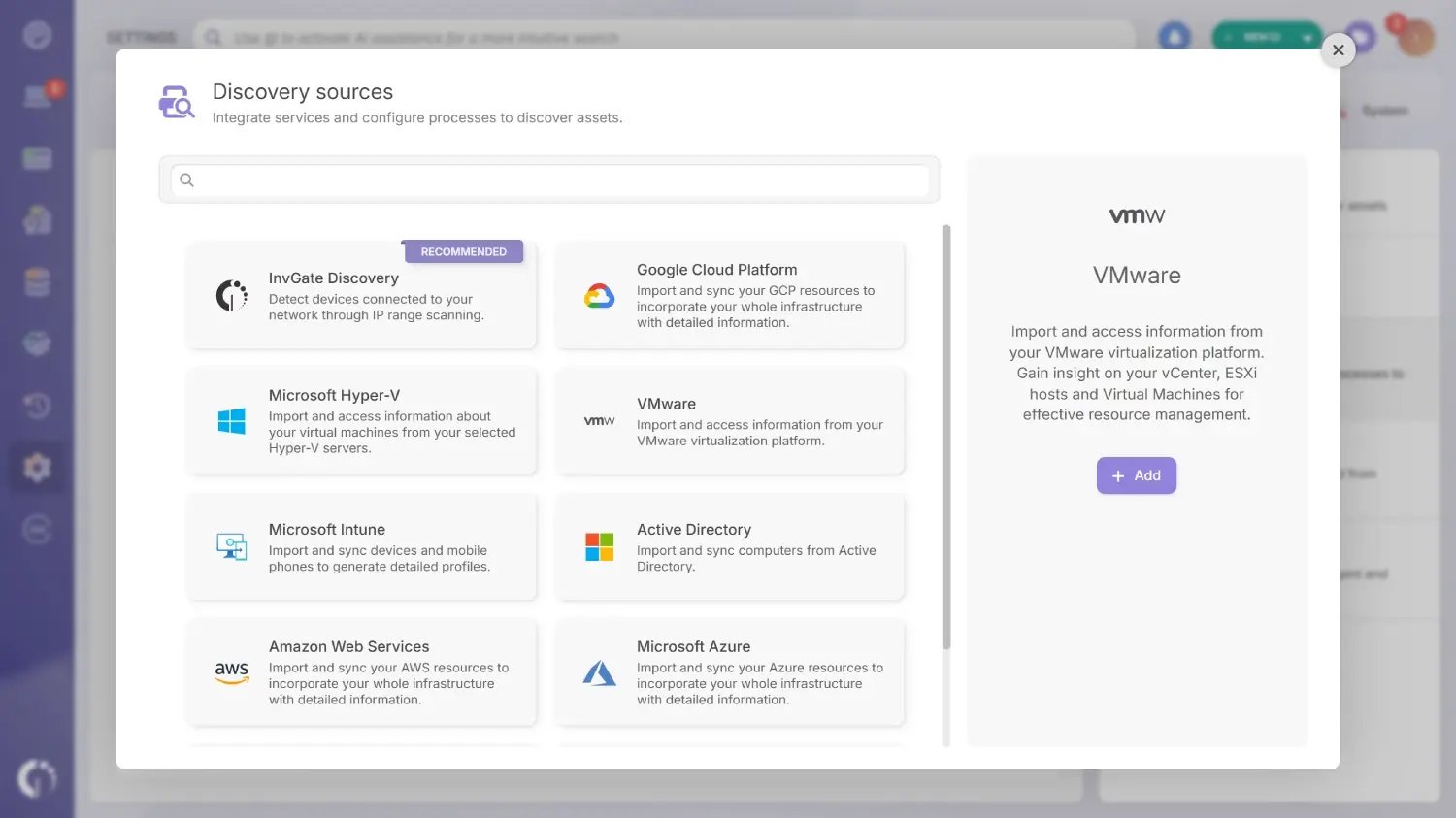
To do that, it combines three complementary methods: the InvGate Asset Management Agent for continuous endpoint-level visibility, InvGate Discovery for network scanning across the IP ranges you define, and integrations with external services that extend coverage to hybrid and cloud environments. Each integration is configured separately from Settings > Discovery > Discovery sources.
For cloud software specifically, InvGate Asset Management supports a dedicated Cloud Software CI type: you can create cloud subscriptions manually or connect them automatically through existing integrations, such as the native Microsoft 365 integration, which pulls subscription plans, assigned users, and activity data directly from your tenant.
Once the network scan runs, results appear in Assets > Discovery, where the IT team can review what was detected and decide which assets to formally incorporate into the managed inventory.
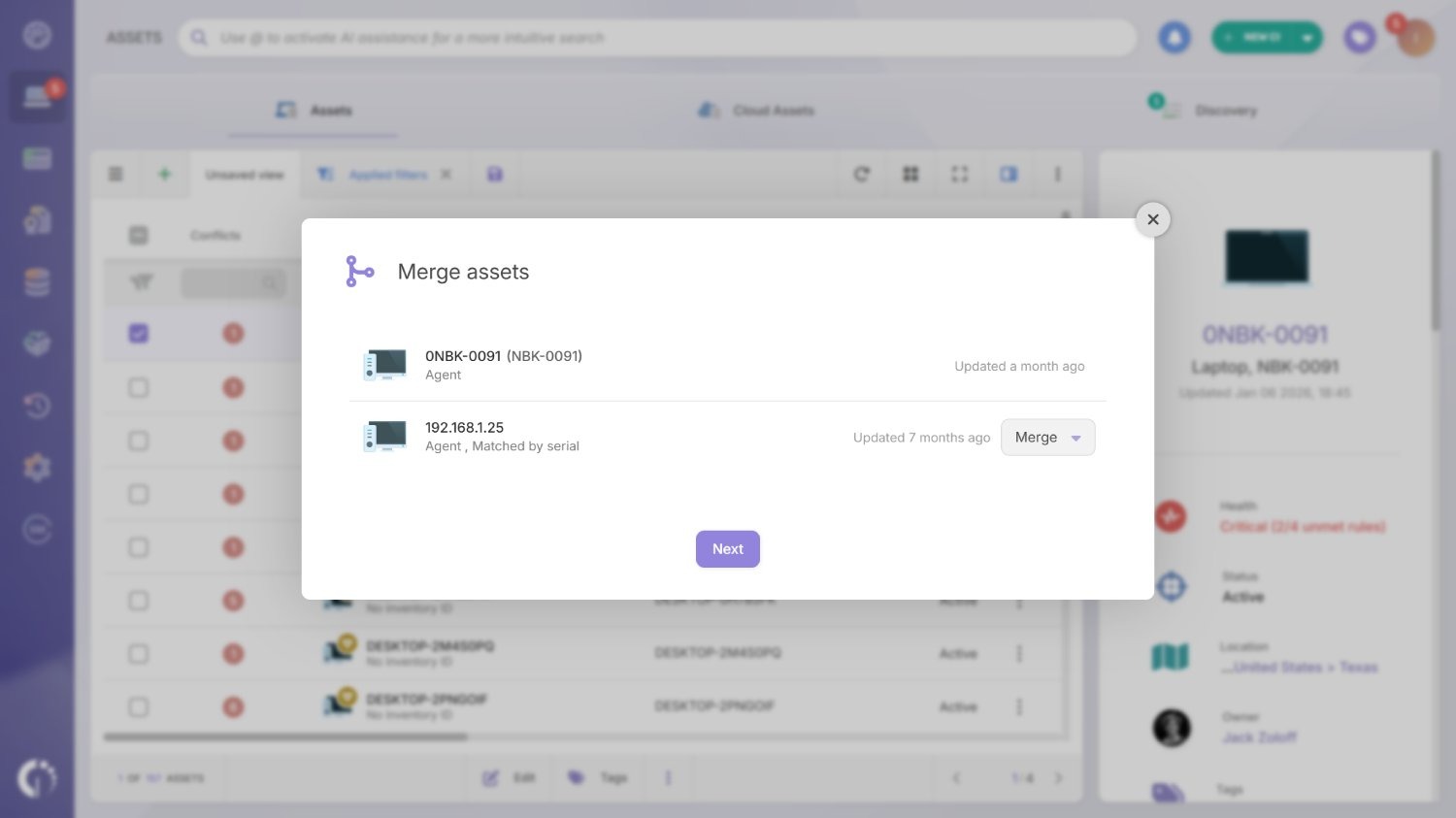
Raw discovery data rarely comes in clean. The same application might appear as "Microsoft Office 365," "Office 365 ProPlus," and "Microsoft 365 Apps for Enterprise" depending on how it was installed and what the source captured. The same logic applies to hardware: two records with slightly different identifiers may refer to the same physical device.
InvGate Asset Management addresses this automatically. Software normalization runs using a ruleset that standardizes name, version, manufacturer, and category, collapsing variations into a single, deduplicated record. On the hardware side, the platform flags potential duplicates as conflicts so the IT team can review and merge them without leaving gaps in the inventory.
With normalized data in place, the Software module allows teams to view installations by device, cross-reference against contracted licenses, and configure automated alerts for software detected outside the approved catalog. That's where discovery becomes actionable: not just a count of what's installed, but a reliable foundation for compliance, spend, and governance decisions.
Ready to see what's actually installed across your environment? Request an InvGate Asset Management demo or try the 30-day free trial.
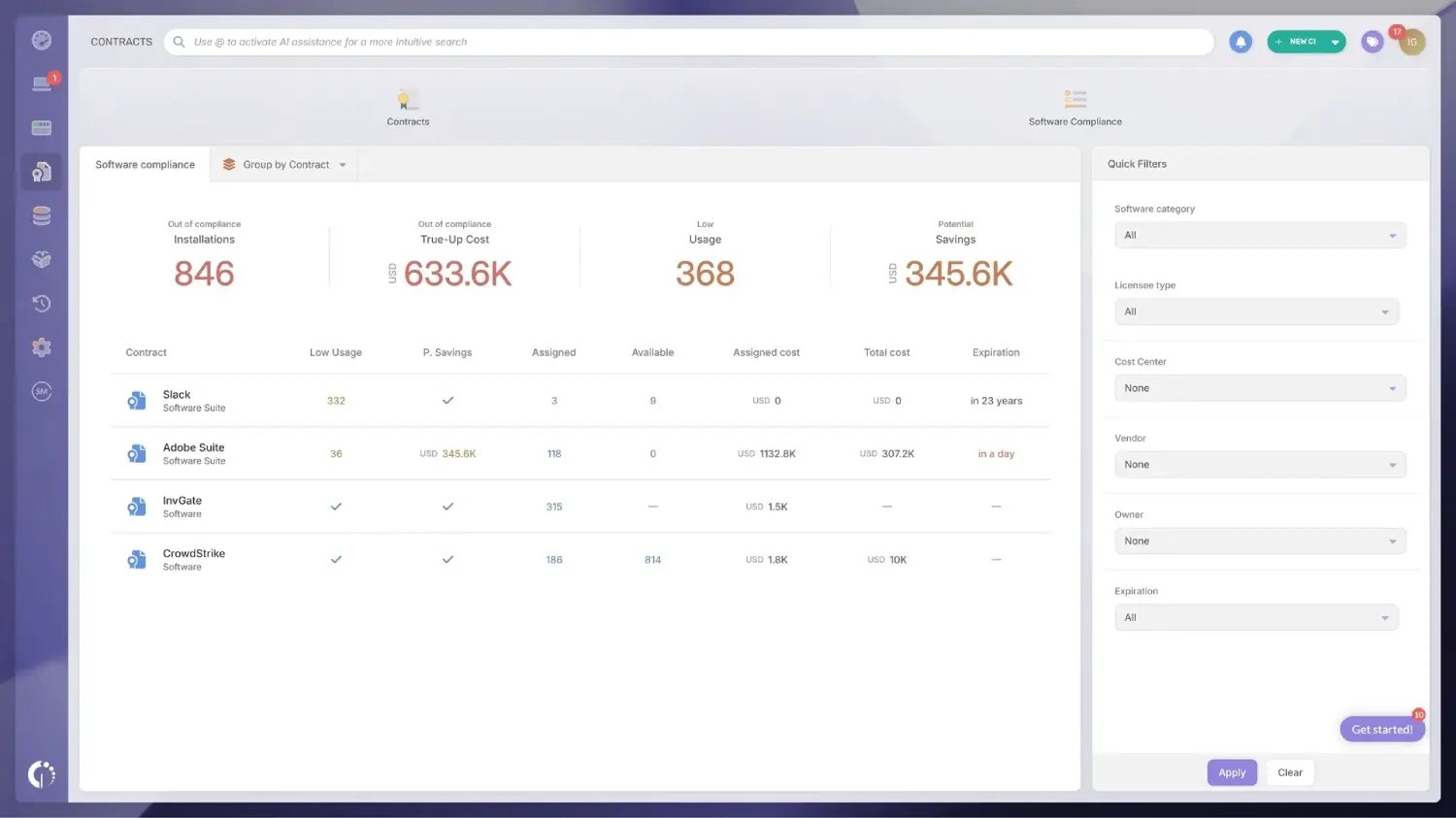
Finding software is the first step. Knowing whether you're covered for it is what drives the business decision.
The data that automated software discovery surfaces feeds directly into InvGate Asset Management's Software Compliance module, which crosses real installation counts against contracted license entitlements. If you're running 340 installations of an application you're licensed for 300 seats, the gap is visible immediately, before an audit surfaces it. If you're licensed for 500 seats and only 210 are actively in use, the module identifies the reclaim opportunity before the renewal cycle.
That second scenario, license reclamation based on usage data, is where software usage tracking, or software metering, pays for itself. Discovery tells you what's installed. Usage data tells you what's actually being used. Licenses attached to applications that haven't been launched in 90 or 180 days are candidates for reallocation, saving real spend without disrupting anyone who relies on those tools.
Both workflows depend on the same foundation: a complete, normalized, continuously updated software inventory. When preparing for a software audit, that foundation is the difference between walking in with accurate records and scrambling to reconcile inconsistent data under time pressure.

Shadow IT, in the context of software, refers to applications installed or used without IT's knowledge or approval. It's a common byproduct of how modern work actually happens: a team adopts a collaboration tool because it's faster than going through procurement, a developer installs a utility not on the approved list, a contractor leaves software behind on a device that gets reassigned.
The risk is twofold. From a compliance perspective, unauthorized software may lack license coverage or violate vendor terms. From a security perspective, it represents an unmanaged attack surface: software that hasn't been vetted, patched, or monitored by IT. Understanding how shadow IT ends up in your environment makes clear why passive or manual tracking consistently fails to surface it: by definition, shadow IT isn't being reported through official channels.
InvGate Asset Management addresses this through the Agent, which reports all installed software on a device, not just what IT provisioned. There's no opt-out for the end user; the Agent captures the full application inventory regardless of how the software was installed or by whom. That data surfaces in the discovery results alongside authorized software, giving the IT team a complete and unfiltered view.

Once shadow IT is visible, the next step is enforcing what's allowed. InvGate Asset Management's authorization policy feature lets IT teams classify any software title as allowed, prohibited, or under review, and apply those classifications across the entire device fleet or to specific groups using tags.
When a prohibited application is detected, the policy flags it automatically; titles marked as under review can be approved or blocked manually from the Software explorer. This turns discovery from a passive audit into an active governance mechanism, reducing security exposure and keeping the software environment aligned with internal policy and external compliance requirements.
The entire response process can be automated end-to-end, which significantly reduces the burden on the IT team. InvGate Asset Management Smart Tags can label devices where non-approved software is detected, alert rules can notify the right people the moment a flagged application appears, and with InvGate Asset Management's Software Deployment feature, prohibited software can be uninstalled automatically once detected, without requiring manual intervention on each device.
Running a discovery scan once is a starting point, not a strategy. Software inventories degrade quickly in active environments; a monthly snapshot can be significantly out of date within weeks. The following practices keep discovery working as a continuous process rather than a periodic exercise.
Combine methods based on device type. Deploy the Agent on user endpoints, servers, and any device where detailed, persistent visibility is critical. Use agentless scanning for infrastructure devices, network appliances, and environments where agent deployment isn't practical. The two approaches cover each other's blind spots and together produce more complete coverage than either method alone.
Set a defined scan frequency and stick to it. Agentless scans should run on a regular schedule, not ad hoc. The right frequency depends on how dynamic the environment is, but weekly or more frequent scans are common in environments with high device and application turnover.
Normalize before you cross-reference. Discovery data from multiple sources often contains naming inconsistencies for the same application. Running normalization before comparing against license records prevents false positives and gives you an accurate compliance picture rather than an inflated one.
Configure alerts for new or unauthorized software. Rather than reviewing discovery results manually, set automated rules to flag when a new application appears outside the approved catalog. This moves the shadow IT response from reactive to proactive.
Connect the software inventory to your Configuration Management Database (CMDB). Integrating discovered software data with the CMDB gives IT a complete dependency map: which applications run on which devices, how those devices relate to services, and what the blast radius of a change or failure looks like. Discovery without that context is useful; discovery with it is actionable across Change Management, incident response, and IT planning.
Automated software discovery isn't a one-time audit; it's an ongoing process that keeps your software inventory accurate as the environment changes around it. When it's configured correctly, it eliminates the blind spots that create compliance risk, inflate license spend, and allow shadow IT to accumulate undetected.
InvGate Asset Management combines agent-based and agentless discovery to cover the full environment: deep, continuous visibility on endpoints through the agent, and broad network-level coverage for everything else. The result is an inventory that reflects what's actually installed, normalized, deduplicated, and connected to the License Management and compliance workflows that turn discovery data into business decisions.
The alternative is managing a software environment you can only partially see. That's a risk that compounds quietly over time, and one that automated discovery is specifically designed to prevent.
Ready to see what's actually installed across your environment? Start a 30-day free trial of InvGate Asset Management, no credit card needed, or talk to our team to get a guided demo.
Agent-based discovery requires installing a lightweight agent on each endpoint, which runs continuously and reports detailed data (installed applications, versions, usage frequency) back to the central platform, even when the device is off the corporate network. Agentless discovery scans the network using standard protocols (SNMP, WMI, SSH) without requiring software on each target device: faster to deploy, but less granular and prone to missing devices that are offline at scan time. Most enterprise environments use both methods in combination.
Discovery provides the raw data that compliance decisions depend on: an accurate count of what software is installed, on how many devices, and in which versions. Once that data is normalized and connected to the License Management module, the platform can automatically flag where installations exceed entitlements (compliance gap) and where licenses are assigned to software that isn't being used (reclaim opportunity), both of which have direct cost implications.
Yes. Agent-based discovery reports all installed applications on a device, not just software provisioned through IT, so if a user installs something on their own, the agent captures it the same way it captures any other installation. The results surface unauthorized applications alongside approved software, and automation rules can then tag devices, trigger alerts, and feed the data into a remediation workflow without requiring manual review of every scan.
For most enterprise environments, continuous or daily scanning via the agent combined with frequent scheduled agentless scans is the baseline. Annual or quarterly snapshots aren't sufficient; a software inventory updated once a year reflects how the environment looked months ago, not today. The goal is a living inventory that's already current by the time a compliance question or audit request surfaces.
Yes. InvGate Asset Management supports both agent-based and agentless discovery, which can be used independently or in combination. The InvGate Asset Management Agent handles continuous endpoint scanning, while the agentless InvGate Discovery covers network-connected devices without requiring agent deployment. The platform also integrates with directory services and Endpoint Management tools to extend coverage to hybrid and cloud environments.

