














Data normalization plays a critical role in how organizations manage, understand, and trust their data. While the concept is often associated with database design, it takes on a very practical meaning in IT environments, where asset data is constantly collected from multiple tools, systems, and sources.
In IT Asset Management, data normalization is what turns raw, fragmented asset data into reliable information that IT teams can actually use. Without it, inventories become inconsistent, reports lose accuracy, and decision-making becomes harder than it needs to be.

Data normalization is commonly used as a technical concept to describe the process of organizing and structuring data within a database to improve data integrity and reduce redundancy. In the context of ITAM, however, data normalization refers to the process of standardizing, cleaning, and unifying IT asset data from multiple sources, so that the same asset is consistently represented without duplicates.
In practice, this means normalizing data related to hardware and software assets that are discovered or recorded by different sources. For example, a single vendor may appear as “Dell,” “Dell Inc.,” or “Dell Technologies,” or the same software product may be listed under multiple variations of its name and version. Data normalization consolidates these variations into a single, accurate asset record within the inventory.
Although these terms are often used interchangeably, data standardization and data normalization are not the same, especially in the context of ITAM. Standardization defines the rules, it establishes the accepted formats, naming conventions, and classifications for asset data, such as the official vendor name, product categories, or lifecycle statuses.
Data normalization, on the other hand, is the process of applying those standards to real-world data. It detects variations, inconsistencies, and duplicates across multiple data sources and resolves them so that asset information remains consistent over time. In ITAM, normalization ensures that asset data continues to follow defined standards even as new assets are discovered, updated, or imported from different systems.
In database design, denormalization is a technique used to improve query performance by intentionally introducing redundancy. In the context of ITAM, this approach is not relevant, since the objective is not database performance but maintaining a clean, consistent, and trustworthy IT asset inventory. For this reason, denormalization is intentionally avoided when discussing data normalization within ITAM.
IT teams rely on asset data to make daily operational decisions, from troubleshooting incidents to planning renewals, audits, and technology refresh cycles. When asset data is inconsistent, duplicated, or fragmented across tools, it quickly turns into a source of friction, making visibility, reporting, and decision-making more difficult.
Data normalization addresses these challenges by creating a consistent and reliable data foundation that IT teams can trust. With normalized data, asset information becomes easier to manage, easier to analyze, and more dependable across day-to-day operations. Organizations are also increasingly using AI Data to power machine learning models, automate asset classification, and generate more accurate operational insights. When AI datasets are clean, structured, and well-maintained, they complement data normalization efforts by improving automation and supporting more reliable decision-making across IT environments.
Key reasons to work with normalized data include:
InvGate Asset Management is an IT Asset Management platform designed to help organizations build a complete and reliable inventory of their IT environment, while providing the accurate data IT teams need to make informed decisions.
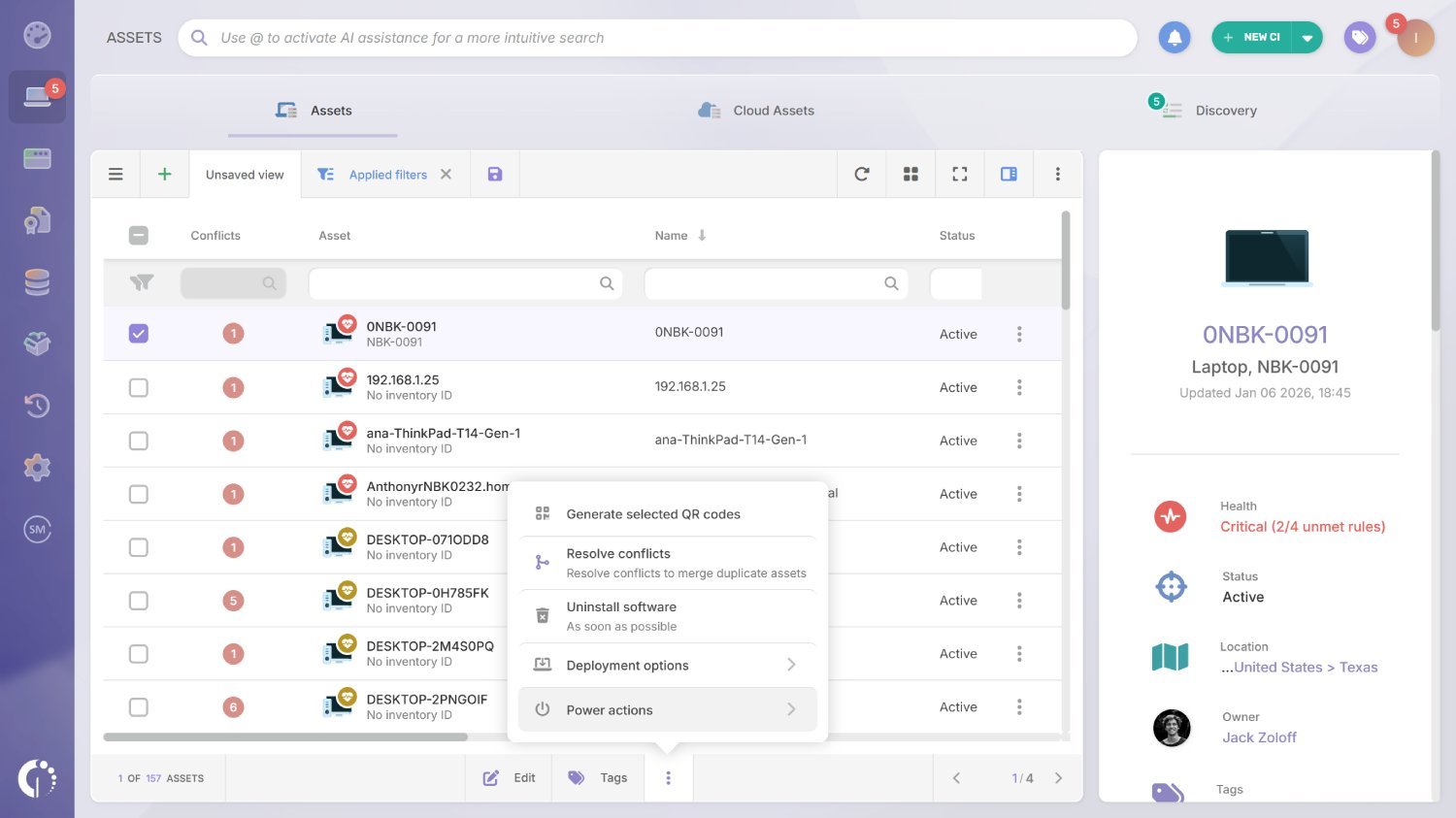
From a data normalization standpoint, it helps keep your inventory clean and trustworthy by detecting duplicate assets (flagging them as conflicts so you can review and merge them) and by automatically normalizing software data.
A simple process to normalize IT asset data:
Duplicate asset records usually happen when multiple sources report the same device at different times or with slightly different identifiers. When InvGate Asset Management detects those potential matches, it flags them as conflicts, allowing you to review the records and unify them into a single asset so your inventory stays accurate.
How to resolve conflicts step by step:
Note: You can always use our AI Smart Search. Just type “assets with conflicts” in the search bar and wait for the results.
This can be an automatic process, but it must be explicitly enabled. To do so, go to Settings > CIs and set Duplicate assets detection to Enabled. From there, you can choose between Basic detection (based only on the serial number) or Advanced detection (using serial number, manufacturer, and model).
You can also decide whether you want conflicts to be resolved manually or allow automatic merge, depending on how closely you want to monitor duplicate assets versus how much automation you want in place.
Data normalization is not a one-time cleanup, it is a discipline that keeps your asset inventory trustworthy as your environment evolves. The goal is to ensure assets are consistently identified across sources, duplicates are handled quickly, and software records remain standardized so reporting, automation, and compliance efforts don’t break over time.
Define which attributes will be considered authoritative for matching and conflict detection, typically serial number, and when needed, manufacturer and model. Clear identifiers reduce false positives and prevent the inventory from drifting as new sources are added.
Reduce variation before it enters your inventory by aligning naming conventions across discovery methods, imports, and integrations. The cleaner your inputs are, the less time you spend resolving conflicts downstream.
Do not let conflicts pile up. Set a recurring routine to review and resolve duplicates, and decide when manual control is required versus when automation is safe. The key is consistency: conflicts should have an owner and a cadence.
Use normalization rules that consistently align software name, version, manufacturer, and category. This is critical for reliable reporting and license-related decisions, since small variations can fragment the same product into multiple records.
Assume new software, vendors, and naming patterns will continuously introduce edge cases. Monitor for inconsistencies over time, adjust normalization rules as needed, and keep a feedback loop with the right internal stakeholders or your vendor’s support team to maintain accuracy as the environment changes.
Data normalization is the process of organizing, standardizing, and cleaning data so it is consistent, accurate, and free of duplicates. In IT Asset Management, it specifically means ensuring that hardware and software assets are represented in a single, unified way across the inventory, even when data comes from multiple sources.
Data should be normalized as soon as asset data is collected and continuously as new assets, software, and data sources are introduced. In IT environments, normalization is not a one-time activity but an ongoing process that keeps the inventory reliable over time.
Without normalized data, IT teams struggle with duplicate assets, unreliable reports, and inconsistent automation. Normalization creates a trustworthy foundation for decision-making, compliance, lifecycle management, and day-to-day IT operations.
No. Data standardization defines the rules for how data should look, such as naming conventions and categories. Data normalization applies those rules to real asset data, resolving inconsistencies and duplicates as the inventory evolves.
Normalization uses defined matching criteria, such as serial number, manufacturer, and model, to identify when multiple records refer to the same asset. These records can then be flagged as conflicts and merged, ensuring each asset is counted once in the inventory.

