















An AI agent and digital certificate inventory is a record of every AI agent and digital certificate an organization runs, with what each one does, who owns it, what it connects to and when it expires or needs a review. IT and IT Asset Management (ITAM) teams build one because both kinds of asset keep critical services running with no hardware to scan, no purchase order to trace and, very often, no owner on record.
This guide covers the fields each record needs, why these assets stay out of most inventories, how certificate lifetimes are changing, what to track for AI agents and the five steps to build the inventory. It closes with how InvGate Asset Management keeps certificates and AI agents in the same place as the rest of IT.
Both halves of the inventory answer the same questions: what the asset is, who answers for it, what depends on it and when it needs attention. The table sets the fields side by side, so a single process can cover agents and certificates alike.
Two fields do most of the work: the owner and the key date. The identity row is where both inventories meet, because an agent that authenticates with a certificate or a credential depends on an item with its own expiration date and its own record.
Most inventories are built from what scans and purchases can see: computers, servers, network devices and installed software. Asset discovery tools are designed to find those, and a certificate installed on a load balancer or an agent configured on a cloud platform has no device of its own and rarely goes through a purchase request.
Both kinds of asset are also created outside the usual request flow, by developers, platform teams or individual employees, and their details end up spread across certificate authority (CA) accounts, key vaults and AI platform consoles. When the person who set one up changes roles or leaves, the asset keeps running with nobody watching it, which is why it rarely appears in an IT Inventory Management process until something fails.
A digital certificate inventory lists every certificate the organization depends on, from the Transport Layer Security (TLS) certificates behind public websites, still widely called Secure Sockets Layer (SSL) certificates, to the ones a private CA issues for internal systems. Three things make it harder to keep than it looks: certificates live in many places, their lifetimes are getting shorter and their lifecycle crosses several teams.
Certificates show up wherever two systems need to trust each other. A first inventory pass usually finds them in these places:
The inventory records each certificate's details and where it is installed. Private keys stay in the key vault or on the server that uses them and never go into the record.
The CA/Browser Forum, the group of certificate authorities and browser makers that sets the rules for publicly trusted certificates, is cutting the maximum lifetime of public TLS certificates in stages. Its Baseline Requirements set these limits:
A certificate that used to be renewed once a year now needs about two renewals a year, and close to eight once the 47-day limit applies. Certificates from a private CA follow the organization's own policy, while public ones multiply the dates IT has to watch, and a spreadsheet with calendar reminders struggles to keep up.
Certificate Lifecycle Management covers everything that happens to a certificate from the request to its retirement. The stages are standard, although who handles each one and how long it takes varies by certificate type and by organization:
The inventory is the record every stage reads from and writes back to. SSL certificate expiration monitoring works best on top of it, with reminders that start about a month before the expiration date and go straight to the named owner, because a shared mailbox is where those warnings usually get lost.
AI agents reach company systems in three common ways: coding agents such as Claude Code and Codex running on employees' computers, agents built on cloud and automation platforms, and Model Context Protocol (MCP) servers that connect agents to tools and data. A complete AI agent inventory starts by detecting all three, including the shadow AI tools nobody requested, and then gives each record an owner and a review date.
Ownership and review are the base of any AI agent governance program, and a few agent-specific fields make both easier. These are the ones that answer most questions during a review or an incident:
The steps are the same for agents and certificates, which is the main reason to keep both in one inventory. Each step builds on the previous one, so the order matters more than the speed:
InvGate Asset Management is IT Asset Management software that offers an enterprise experience without the complexity or the price of one, with an intuitive interface, a no-code approach and fast deployment. It keeps AI agents and digital certificates in the same inventory as hardware, software and cloud assets, so the owner, the dates and the dependencies of each one sit next to everything else IT manages.
The capabilities behind that inventory work together. These are the ones that matter most for invisible IT:
Each certificate gets a record in the Digital Assets family with the fields IT needs during a renewal or an incident: Valid from and Valid to dates, subject, issuer, common name, Domain Name System (DNS) name, serial number, fingerprint, signature algorithm, type and format. The record also carries an owner, a status, tags, custom fields, notes and attachments, links to the business applications and CIs that depend on it, and an activity history.
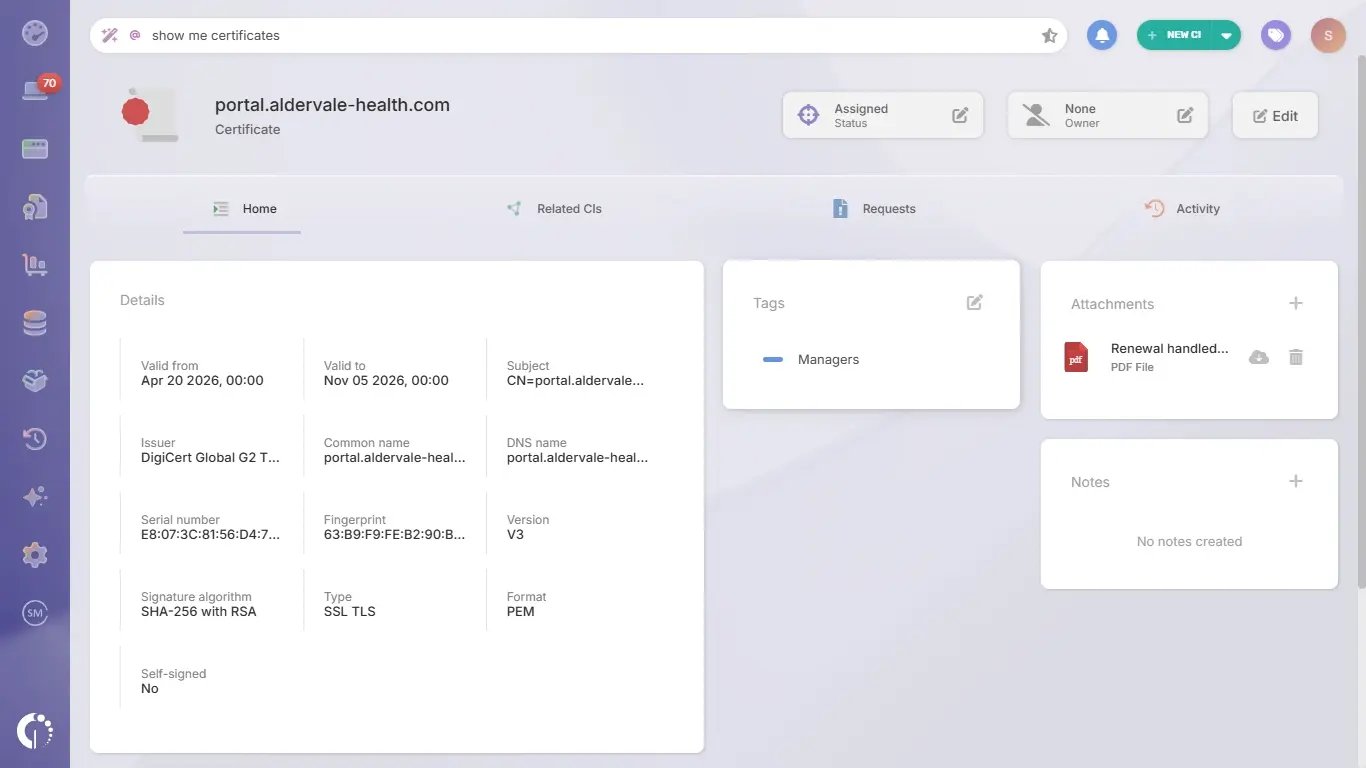
Certificates can be created one by one, imported from a CSV file or loaded through the public API, and the External ID field ties each record to the source it came from. Renewal itself stays with the certificate authority or the certificate manager that issued the certificate, and InvGate Asset Management holds the record, the owner and the reminder.
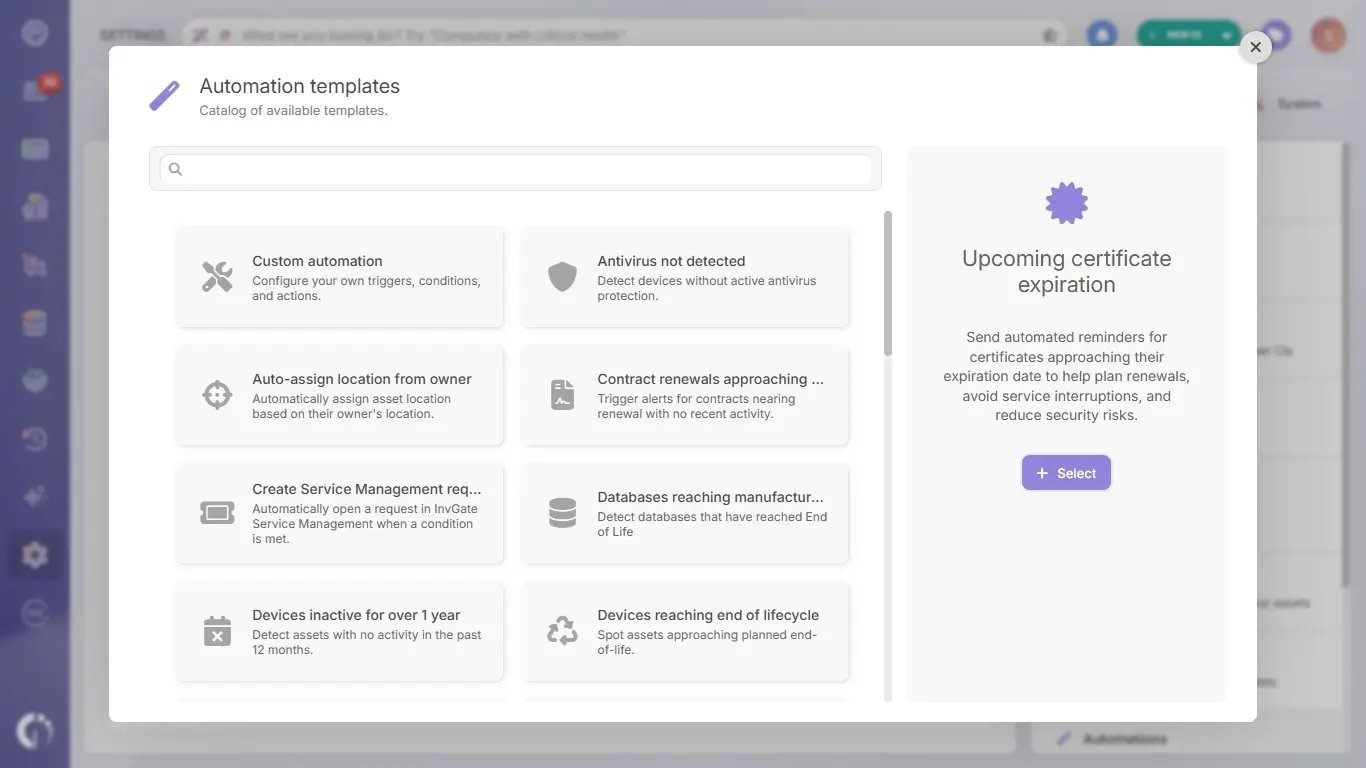 The "Upcoming certificate expiration template" sends automated reminders for certificates approaching their expiration date, so renewals get planned ahead and services keep running. It starts from the automation templates catalog and can be adjusted like any other automation, from how far ahead it looks to who receives it.
Because every certificate has an owner, the reminder and the follow-up land with the person who can act on them. The Digital Assets explorer lists every certificate with its status and owner, so the full picture is one view away when an auditor or a renewal planning meeting asks for it.
AI asset detection uses the InvGate Asset Management Agent to find Claude and Codex on company computers, along with the account each one is signed in with, its license level and whether that account is personal or corporate. It also lists the MCP servers, skills, plugins, marketplaces and subagents installed on top of each tool and the projects where it was used, in an AI tools tab on each computer and in an AI agents dashboard for the whole fleet.
Two Smart Recommendations flag personal AI accounts on corporate computers and corporate accounts running on free plans. For every other AI tool, the software inventory detects installed apps the same way it detects any program, as it does with ChatGPT Atlas and Perplexity Comet.
InvGate Asset Management is working toward AI agents, models and MCP servers as CIs of their own, each with an owner and a lifecycle status. The plan is for those records to relate to the devices, people and business applications each one touches, in the same inventory that already holds certificates.
In the meantime, every computer running an AI agent keeps its owner, location and tags like any other asset, and certificates already have owners of their own in Digital Assets. Ownership is the part that carries over, and it is the part most inventories are missing.
An AI agent and digital certificate inventory gives IT one answer to two questions that usually take days: what is running, and who answers for it. Certificates bring the deadline, with lifetimes getting shorter every few years, and AI agents bring the reach, with access to systems and data that grows with every connector.
InvGate Asset Management keeps both in the same inventory as the rest of IT, with owners, dates, dependencies and reminders in one place. To see it with your own certificates and agents, start a free trial or talk to Sales.
These questions come up often when IT teams start tracking AI agents and certificates together. The short answers below summarize what the guide covers in more detail.
Both run critical services without hardware, both are created outside the usual purchase flow and both fail on a date or a change nobody watched. Keeping them together lets one process handle owners, dates and dependencies, and links each agent to the certificate or credential it uses.
Under the CA/Browser Forum Baseline Requirements, public TLS certificates issued from March 15, 2026 can be valid for up to 200 days. The limit drops to 100 days from March 15, 2027 and to 47 days from March 15, 2029.
A named person on the team that runs the service the certificate secures, usually an infrastructure or platform engineer. The team can share the work, and one person receives the reminders and answers for the renewal.
Renewal happens in the certificate authority or the certificate manager that issued the certificate. An IT Asset Management tool such as InvGate Asset Management keeps the record, the owner and the dependencies, and sends the reminders that get each renewal started on time.

