














Last updated: October 21, 2026. We'll update this article as PHP and Linux distributions publish new information.
PHP2Shell is the nickname of two critical vulnerabilities in PHP that let an attacker run code on a web server without logging in. PHP released the fixes on October 21, 2026, and IT and security teams now need to know which of their servers and computers run a vulnerable PHP version, so they can patch those first.
This article explains what PHP2Shell is, which PHP versions are affected and which patch each one needs. Then it shows how to find vulnerable PHP versions across your inventory with InvGate Asset Management, using Smart Tags to build the work list and a dashboard to track the fix.
PHP2Shell is the nickname for two Common Vulnerabilities and Exposures (CVE) entries in the PHP core: CVE-2026-109618, a memory corruption triggered by out-of-memory errors, and CVE-2026-109619, a flaw that lets data from a previous request survive in memory and get reused. Both carry a Common Vulnerability Scoring System (CVSS) v4.0 score of 9.2, and PHP's advisories describe the impact as remote code execution without authentication, with the permissions of the web server's PHP process.
According to PHP's security announcement, every PHP installation that serves web requests is at risk, whether it runs as Apache mod_php, PHP FastCGI Process Manager (PHP-FPM), php-cgi, FrankenPHP or LiteSpeed. PHP considers the risk highest for mod_php, where its advisory confirms a working exploit with default settings. Linux distributions and long-term support vendors received the patches in advance, so check your vendor for updated packages.
Every PHP release older than the patched versions is affected, including the 7.x and 5.x branches. PHP only ships fixes for the branches it still supports, so the branch you run decides whether you patch or upgrade.
According to PHP's supported versions page, 8.2 reaches End of Life on December 31, 2026, so a server on 8.2.35 is protected from PHP2Shell and still needs an upgrade plan. Servers on 8.1 or older run deprecated software that stays exposed until it moves to a supported branch or gets a fixed package from its Linux distribution or long-term support vendor.
According to PHP's advisories, updating to a patched release is the only complete fix. On a supported branch, that means moving to the patched version of the same branch; on 8.1 or older, it means upgrading to 8.2 or later, or installing the fixed package your distribution or long-term support vendor provides. Restart the web server or the PHP processes afterwards so they load the new version.
PHP also lists temporary configuration changes, mostly around memory limits and upload settings, for teams that can't update right away, and it states that they don't make an installation safe. Until a server is patched, limit its exposure to the internet, and run the update through your usual Patch Management process so every unpatched server gets an owner and a deadline.
InvGate Asset Management is IT Asset Management software that offers an enterprise experience without the complexity or the price of one, and its software inventory records the PHP version installed on each computer the Agent covers. With a Smart Tag and a dashboard, you get the list of assets to upgrade, the list of assets to patch and a view of how the fix is progressing.
The inventory comes from four sources: the Agent, network discovery, integrations and manual or CSV import. This tutorial relies on the software installations the Agent reports, so the servers and computers you want to check need the Agent installed.
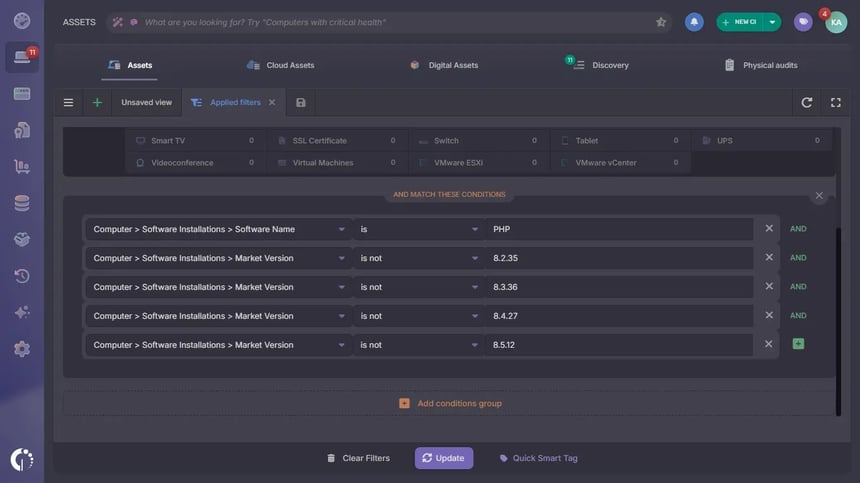 Start in the Asset Explorer with a filter that keeps every asset with PHP and leaves out the ones already on a patched release. All the conditions go in the same group, so an asset has to meet every one of them:
The filter uses Reported Version, which holds the exact release (8.3.36). Market Version holds the branch (8.3), and the dashboard uses it later to group the results by branch.
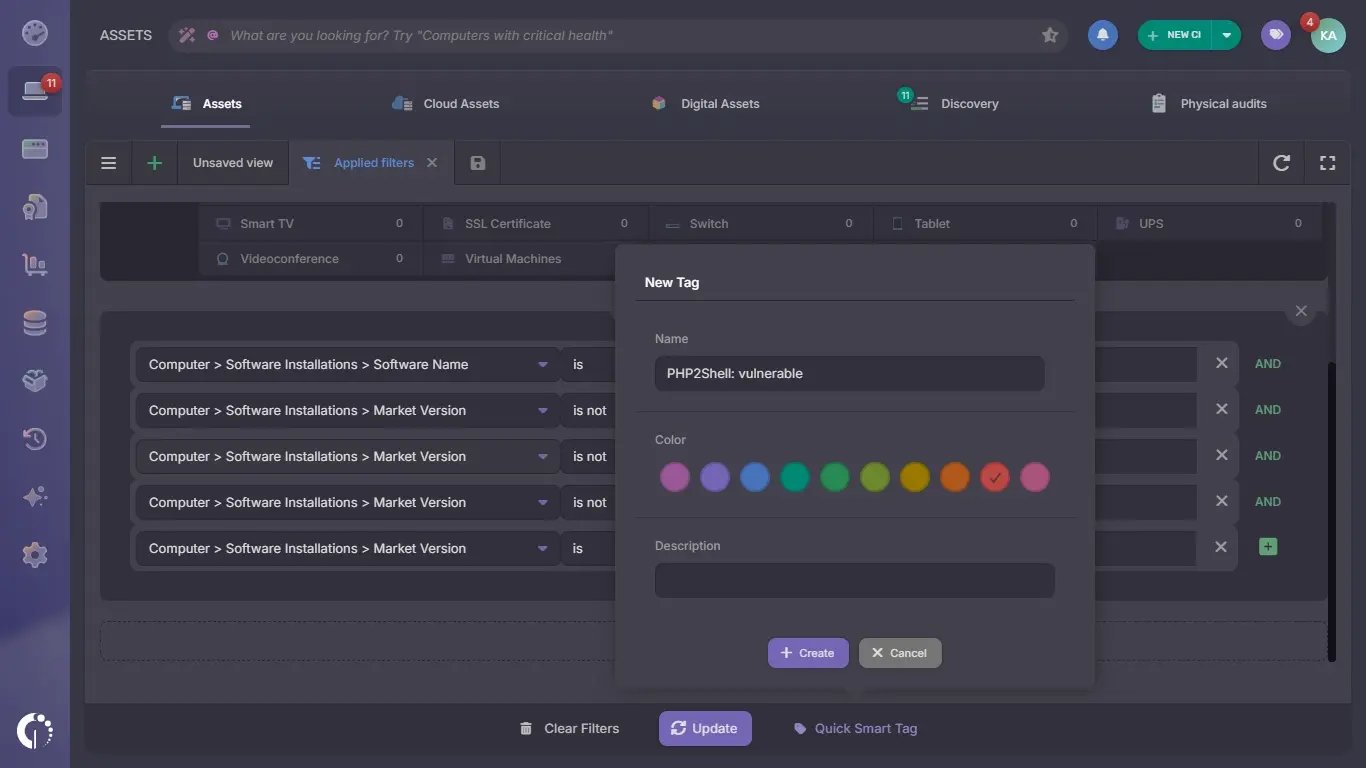 A Smart Tag turns the filter into a list that maintains itself. Assets join the tag when they match the conditions and leave it when they stop matching, for example after the Agent reports a patched version:
The tag is applied in the background, so the first assignment can take a while on large inventories, while the filtered view shows the results right away. When PHP publishes newer releases, add them to the excluded versions so patched assets leave the tag.
Together, the two tags are the list of assets your team needs to work on. Open each tag from the Asset Explorer to see the owner and location of every asset, and start with the internet-facing servers.
Check Linux servers against your distribution's security advisory before scheduling an upgrade. Distributions such as Ubuntu ship the fix under the original version number, so a server can appear in the tag and already be protected.
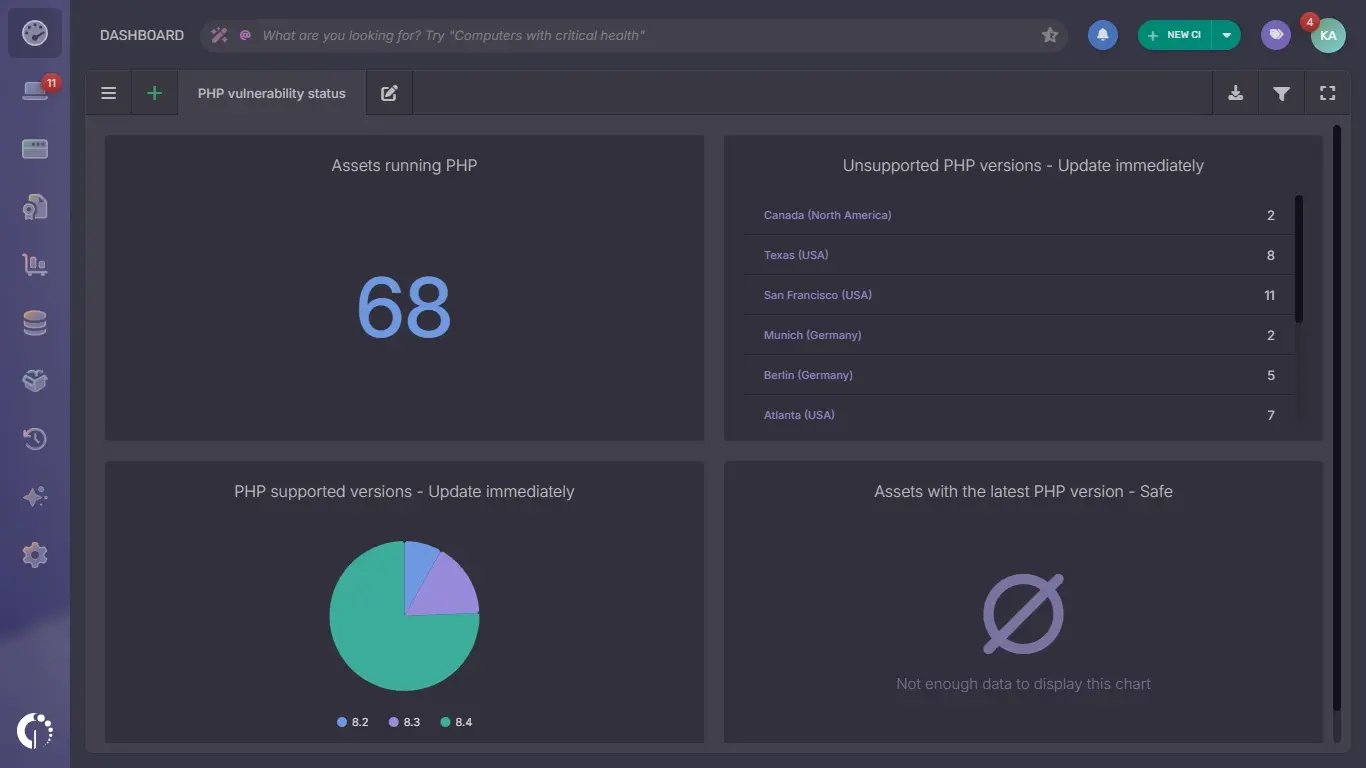 The Smart Tag gives your team the work list, and a dashboard shows the exposure by risk and the progress at a glance. Go to Dashboard, click + to create a custom dashboard and add one chart for each of these measures:
Grouping unsupported versions by location shows which sites carry the most exposure, and the pie shows which branches need the most patching. As your team updates servers and the Agent reports the new versions, the unsupported and missing-patch charts shrink and the patched chart grows, which gives you a progress report to share with security and management.
PHP2Shell affects every PHP release before 8.5.12, 8.4.27, 8.3.36 and 8.2.35, and updating is the only complete fix. The hard part for most IT teams is knowing where PHP runs, and a software inventory answers that: with InvGate Asset Management, a Smart Tags give you the assets to upgrade and patch, and a dashboard shows the progress.
The same approach works for the next critical vulnerability in a widely used component. To try it with your own inventory, start a free trial or talk to Sales.
These answers cover the questions that come up most while teams check their exposure to PHP2Shell. Each one points to the official source where it applies.
Run php -v in a terminal on the server: it prints the PHP version and the interface it runs as, such as cli, as PHP's manual shows. The web server can use a different PHP build, so also check it with phpversion() or phpinfo() in a page it serves, and delete that page afterwards. In InvGate Asset Management, the Reported Version field shows the exact PHP version of every computer that runs the Agent.
Linux distributions often add security fixes to the PHP version they already ship and keep its original number. On Ubuntu 24.04, for example, the fixed package is 8.3.6-0ubuntu0.24.04.13, so compare the package version with your distribution's security advisory, such as Ubuntu Security Notice USN-8948-1.
WordPress runs on PHP, so a WordPress site is exposed whenever its server runs a vulnerable PHP version. The fix happens at the server level: update PHP there, or ask your hosting provider to do it, since WordPress updates leave the PHP version as it is.

