














Most IT teams know they need a Hardware Asset Management tool. The disagreement usually starts when they build the shortlist.
A good Hardware Asset Management tool should help IT know what hardware exists and where it is. But that is only the starting point. It also needs to answer who is using each device, what was purchased and what actually arrived, what is in stock, which assets are approaching end of life (EOL), and what has been retired and how.
That means covering not just auto-discovered networked devices, but also physical assets that are not permanently connected, hardware in transit or storage, and the reconciliation layer that keeps all records accurate over time. The tools that miss those requirements tend to look identical to the ones that meet them until the first audit.
The criteria below are designed for IT teams actively evaluating platforms. Each one maps to a real operational gap: what breaks when that capability is missing, and what it looks like when a tool gets it right.
The inventory problem usually starts before the first device is deployed. When a Hardware Asset Management tool cannot record purchase orders, associate them with incoming assets, and confirm what was received versus what was ordered, the inventory starts with incomplete data from day one. IT ends up chasing discrepancies between what finance approved, what procurement ordered, and what actually landed in the stockroom.
In InvGate Asset Management, assets are created with financial and vendor data from the moment of purchase. Each asset record includes purchase date, cost, contract reference, and warranty period, so the IT hardware procurement process is captured as part of the asset's permanent history rather than living in a separate spreadsheet or email thread.
Network discovery solves a real problem, but it only covers devices that are on the network and communicating. Workstations in storage, hardware in transit, peripherals, and devices that connect intermittently fall outside that scope. A tool that only surfaces networked devices is not a complete inventory. It is a partial one with a clean interface.
InvGate Asset Management supports both IP devices and non-IP devices. Each IP device includes capacity for non-IP devices at no additional cost, which means monitors, headsets, and similar peripherals are trackable within the same asset records as the machines they belong to.
Automated reports tell you what the system thinks exists. Physical audits tell you what actually exists. Those two things should match, and a Hardware Asset Management tool should make it straightforward to reconcile them. That means supporting QR codes, barcodes, or RFID (Radio Frequency Identification) scanning, allowing mobile-based audits from the floor, and surfacing discrepancies in an actionable dashboard.
In InvGate Asset Management, QR codes are generated per asset and can be scanned from a mobile app. Inventory dashboards track audit status so teams can see what has been physically verified and what has not, which matters both for routine hygiene and for teams learning how to perform an IT asset audit ahead of a compliance review or refresh cycle.
Hardware in stock, received but not yet assigned, is one of the most consistently invisible parts of an IT inventory. When a tool does not give visibility into that state, IT cannot answer the most basic procurement question: do we already have something we can deploy, or do we need to order more? The result is redundant purchasing, misallocated budget, and hardware sitting forgotten in a closet while a duplicate order gets approved.
In InvGate Asset Management, lifecycle states are configurable and include "in stock" as a tracked condition. Alerts can be set for minimum stock levels by category and location, so the team knows when replenishment is actually needed. Dashboards by category and location give procurement and IT a shared view of what is available, making the IT hardware procurement process intentional rather than reactive.
The back end of the lifecycle is where most inventories accumulate their worst problems. When retirement is not documented, retired assets remain active in the system. Those ghost assets inflate headcount figures, skew refresh planning, and undermine audit results. Worse, if a device was disposed of without documentation, there is no chain of custody, which creates compliance exposure in regulated environments.
In InvGate Asset Management, retirement states are part of the platform's lifecycle model. Each asset maintains a log of its disposal method and a full history of assignments, accessible even after the asset is marked as retired. The record does not disappear when the hardware does.
A Hardware Asset Management tool typically ingests data from multiple sources: automated discovery, manual imports, integrations with Mobile Device Management (MDM) platforms or identity providers. Without a reconciliation layer, those sources accumulate conflicts: duplicate records for the same device, stale entries from decommissioned machines, and assets tagged with two different owners depending on which system you check.
InvGate Asset Management addresses this through a combination of agent-based, agentless, and cloud discovery mechanisms, combined with a data normalization process that standardizes and unifies asset records across all sources. When the platform detects potential duplicates, it flags them as conflicts for review, so they can be merged rather than left to inflate the inventory.

Reactive hardware replacement is more expensive than planned replacement in almost every scenario: emergency procurement, expedited shipping, unplanned downtime, and productivity loss while a replacement is sourced. The problem is that reactive replacement is what happens when the tool does not surface end-of-life and end-of-support signals before they become emergencies.
In InvGate Asset Management, the Atlas module provides end-of-life and end-of-support data for hardware, so teams can see which assets are approaching those thresholds before they cross them. Warranty expiration alerts and Smart Recommendations surface the highest-priority replacements, so refresh planning is driven by data. That visibility connects directly to the hardware lifecycle stages from procurement to disposal, since refresh planning only works when the full lifecycle is visible.
The individual criteria above are each meaningful on their own. But the real test of a Hardware Asset Management tool is whether they work as a connected system or as isolated modules. A tool that handles procurement well but cannot reconcile audit data, or that surfaces end-of-life signals but does not connect them to stock levels, leaves gaps the team has to fill manually.
In InvGate Asset Management, each asset carries a single record from the moment it is created at the time of purchase through every assignment, location change, lifecycle transition, and retirement. Every state change is timestamped and auditable. That unified history is what separates a Hardware Asset Management platform that approaches the problem as a lifecycle system from one that treats it as a collection of features.
To explore how these criteria work in practice, you can start a 30-day free trial of InvGate Asset Management or schedule a call with the sales team to walk through your specific use case.
The simplest test for any Hardware Asset Management tool is whether it lets IT answer the questions that come up every week. If a tool cannot answer them in real time, it is not functioning as a system of record. It is functioning as a periodic report.
What hardware do we own, and where is it? Without a complete, location-aware inventory that includes non-networked devices, the answer is always incomplete. InvGate Asset Management maintains a unified inventory across IP and non-IP devices, with location fields tied to each asset record.
Who is using each device right now? Knowing a device exists is different from knowing who is responsible for it. Ownership data drives onboarding, offboarding, incident response, and audit accountability. InvGate Asset Management links each asset to its assigned user, with a full assignment history that survives reassignments and lifecycle transitions.
What did we order, and what has actually arrived? When procurement and IT do not share a system, this question often requires digging through emails and purchase orders. InvGate Asset Management captures purchase order data as part of the asset record, so the gap between what was ordered and what was received is visible in the same place the asset lives.
What is currently in stock and ready to assign? Stock visibility prevents redundant purchasing and speeds up new-hire provisioning. InvGate Asset Management's configurable lifecycle states include stock as a tracked condition, with category- and location-level dashboards and minimum-stock alerts.
Which assets are approaching end of life and need to be refreshed? The Atlas module in InvGate Asset Management surfaces end-of-life and end-of-support dates for hardware, combined with warranty expiration alerts and Smart Recommendations, so teams can build a refresh plan before devices fail.
What has been disposed of, and how? Disposal documentation is a compliance requirement in many environments and an audit question in virtually all of them. InvGate Asset Management retains retirement records, disposal method, and chain-of-custody history for every retired asset.
Are our inventory records accurate compared to what is physically on-site? Reconciling the system against physical reality requires audit support: QR scanning, mobile access, and a dashboard that surfaces discrepancies. InvGate Asset Management covers all three.
Which assets are missing, unassigned, or unaccounted for? Unassigned assets create security gaps; missing assets suggest process failures. InvGate Asset Management's Smart Tags and automation rules flag assets that fall outside expected assignment patterns, so gaps surface proactively rather than at audit time.
Even teams that know what they need can shortlist the wrong tool. The mistakes below are the most common ones, and each one has a real operational cost.
This is the most common shortlisting error. A discovery engine tells IT what is on the network. It does not track purchase orders, manage stock, support physical audits, or document retirement. The inventory it produces is accurate at the moment of scan and degrades from there, because everything that happens to an asset after it is first detected happens outside the tool.
The result is an inventory that looks healthy in the interface and produces incorrect answers in practice. IT teams that build their shortlist around discovery capabilities often do not notice the gap until the first physical audit or the first time procurement asks how much hardware is available to redeploy.
Many tools only surface devices with an IP address. That leaves out a significant portion of the real hardware estate: monitors, keyboards, headsets, peripherals, hardware in repair or transit, assets in storage waiting to be deployed, and any device that connects intermittently.
When non-networked assets are not tracked, they accumulate as unmanaged inventory, present physically but invisible operationally. The asset count in the system understates the actual count, refresh planning ignores a portion of the fleet, and audits require manual supplementation. InvGate Asset Management's IP/non-IP model addresses this directly: non-IP devices are tracked within the same platform and record structure as their networked counterparts, with no separate workflow required.
Feature lists and comparison tables do not capture how a tool handles the situations that come up most often: receiving a hardware shipment and associating it with pending purchase orders, running a physical inventory audit across a distributed site, or identifying which assets need to be refreshed before the next budget cycle.
A tool that checks every feature box in a spreadsheet can still produce a frustrating experience if those features do not connect into coherent workflows. The most effective evaluation method is a pilot of two to four weeks using real scenarios, a receiving workflow, an audit, a refresh planning exercise, rather than a feature walkthrough in a demo environment.
When procurement uses one system, IT uses another, and finance uses a third, and none of them share a data layer, the cost is not just inefficiency. It is audits that fail because the three systems disagree on what exists. It is over-purchasing because no one can confirm what is in stock. It is ghost assets inflating the count because retirement was recorded in one system and not the others.
The HAM tool selected needs to be the source of truth, not another system added to the stack. That means evaluating not just what the tool tracks, but how it integrates with the systems already in use, and whether those integrations are bidirectional enough to keep records consistent without manual reconciliation.
A HAM tool focuses specifically on physical hardware: tracking devices, managing the hardware lifecycle, and maintaining accurate inventory of physical assets. An IT Asset Management (ITAM) platform typically covers a broader scope including software licenses, cloud assets, contracts, and financial data. In practice, many ITAM platforms include full HAM capabilities, so the distinction matters most when evaluating whether a tool covers the full hardware lifecycle or only a subset of it.
Automated discovery is valuable because it reduces manual data entry and provides continuous visibility into networked devices. But a tool that relies exclusively on discovery misses non-networked assets, does not capture procurement data, and cannot support physical audits. The most capable Hardware Asset Management tools combine automated discovery with manual entry, mobile scanning, and reconciliation capabilities.
Non-networked assets require a different approach than automated discovery. Effective tracking relies on manual asset creation with structured fields, QR code or barcode labeling for physical identification, and mobile scanning to update records during audits or receiving workflows. Platforms that support both IP and non-IP devices within the same record structure handle this without requiring a separate tool or process.
Look for QR code or barcode support, a mobile app that allows scanning without a laptop, and a dashboard that surfaces the status of in-progress and completed audits. The tool should make it straightforward to compare what is recorded in the system against what is physically present, and flag discrepancies rather than requiring manual cross-referencing.
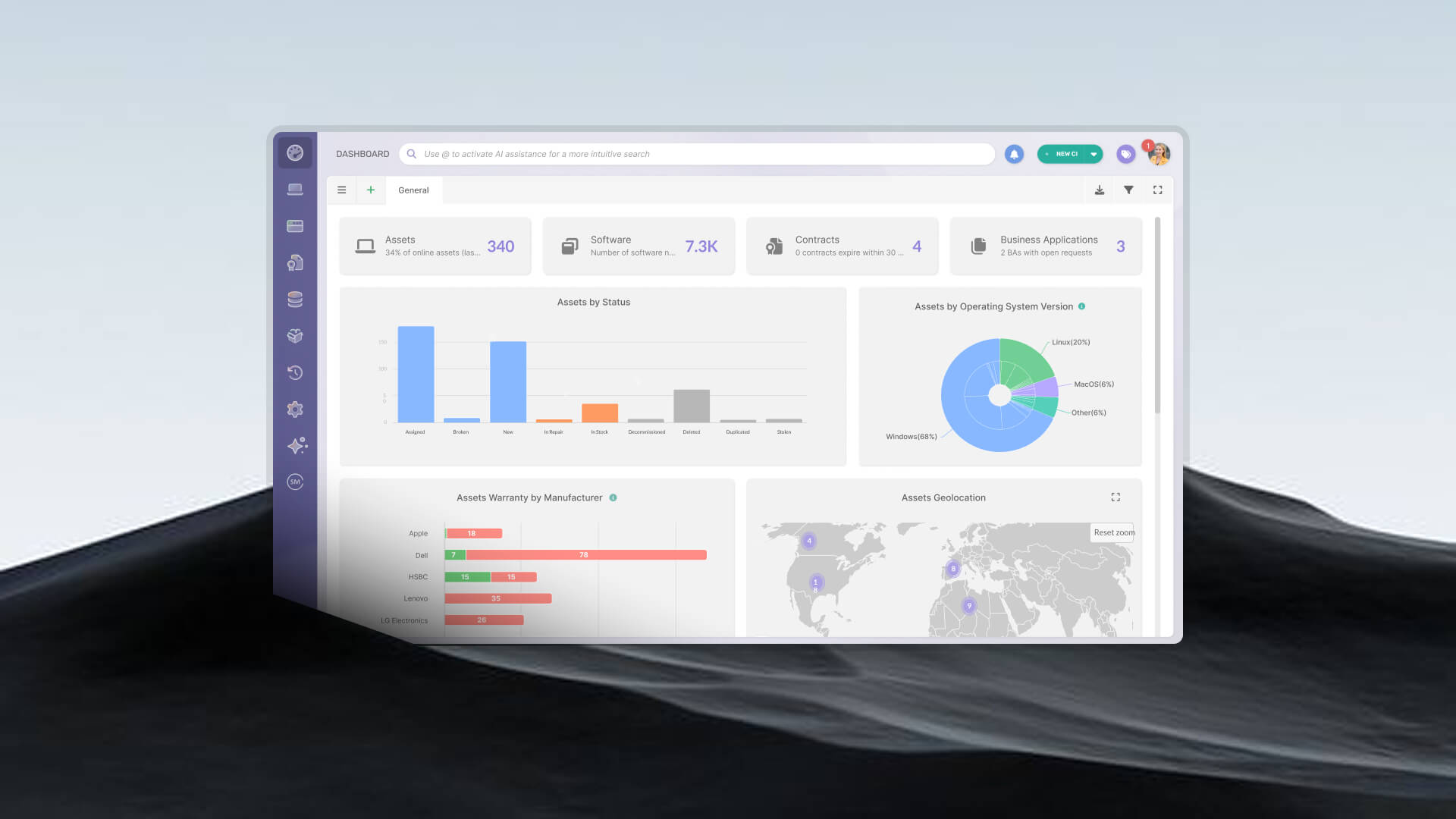
InvGate Asset Management tracks each asset from the moment it enters the system at purchase through assignment, location changes, audits, and retirement. Every stage is part of a single asset record: purchase date, cost, contract reference, warranty, ownership history, lifecycle state, and disposal method are all stored in one place. The platform combines agent-based, agentless, and cloud discovery with support for non-IP devices, configurable lifecycle states, physical audit workflows, and the Atlas module for end-of-life and end-of-support tracking.

