














The Tier 2 help desk bridges the gap between frontline service desk agents and highly specialized technical teams. Analysts at this level handle more complex incidents, perform root cause analysis, work with backend systems, and assist the Tier 1 help desk with issues that require additional expertise.
The exact responsibilities of Tier 2 IT support vary between organizations, but the goal remains the same: resolve problems that exceed Tier 1 capabilities while minimizing unnecessary escalations to Tier 3 teams. Done well, it improves resolution times, strengthens Knowledge Management, and helps organizations make better use of their technical specialists.
In this guide, we'll examine the role of a Tier 2 help desk, its responsibilities, benefits, escalation procedures, and the metrics commonly used to measure performance.
Key takeaways

Tier 2 help desk support is the second level of technical support in an IT organization, designed to handle incidents and service requests that exceed the scope or access rights of first-line agents.
Tier 2 analysts typically have more specialized technical skills than first-line support, and since they’re not constantly firefighting large volumes of incidents, requests, and questions, they’ll have enough time to spend on the incident diagnosis and resolution of complex issues.
It sits in the middle of the 5 support levels model, above the self-service or tier 0 and first-line support, and below the specialist and vendor escalation tiers. It's the primary technical resolution layer for most organizations.
The following categories cover most of what arrives at second-line support.
1. Incidents that exceed Tier 1 troubleshooting scope. These include configuration errors that require direct system access, application bugs that can't be resolved by reinstalling or resetting, and permission issues that require backend changes. A typical example: a user reports that an application crashes on login, Tier 1 has already tried a clean reinstall, and the issue persists. That ticket belongs at Tier 2.
2. Sysadmin tasks Tier 2 handles operational tasks that sit outside the scope of frontline support: scheduling overnight backups, maintaining and installing the standard image for corporate devices, managing endpoint configurations, and handling account provisioning that requires elevated privileges.
3. Issues that require on-site visits Some hardware failures, peripheral issues, or physical environment problems can't be resolved remotely. When an on-site visit is necessary, Tier 1 doesn't have the time or authorization to carry it out — Tier 2 does.
4. Recurring incidents feeding into Problem Management When the same type of incident appears repeatedly, it's a signal that something deeper is happening. Tier 2 is the right level to flag these patterns and raise a problem record for root cause investigation.
In InvGate Service Management, the service catalog determines which ticket types route directly to Level 2 help desk without requiring a manual escalation from Tier 1. Under Settings → Catalog, each category can be assigned to a specific help desk and support level.
Categories related to servers, backend integrations, or infrastructure incidents can be configured to go directly to Tier 2, while standard requests like password resets or software installs stay at Tier 1. This makes routing a structural decision, not a judgment call made at the time of triage.
Help desk tier 2 responsibilities include:
Now that we know their duties, level 2 IT support analysts should have the following skills:
Relevant certifications: Practical certifications for Tier 2 include the ITIL Foundation, the Service Desk Institute (SDI) service desk analyst certification, and Microsoft fundamentals or technology associate qualifications, depending on the organization's environment. Other operating system and platform certifications apply depending on the specific technical scope of the role.
Measuring the right things at this level requires metrics that reflect the complexity of the work. Three starting points:
These metrics should always be evaluated alongside the organization's help desk priority model. A Tier 2 team handling mostly low-priority requests will naturally show different resolution times and escalation rates than a team responsible for critical business outages.
For example, resolving 95% of Priority 4 tickets within SLA may be less challenging than achieving 80% compliance on Priority 1 incidents that require complex troubleshooting and cross-team coordination. Looking at SLA performance by priority level provides a more accurate picture of Tier 2 effectiveness than a single aggregate number.
Priority distribution also affects knowledge creation and customer satisfaction metrics. During periods dominated by high-priority incidents, analysts often spend more time restoring service and less time documenting solutions. Similarly, users affected by severe outages may report lower satisfaction scores despite successful technical resolutions because the business impact was significant. Reviewing Tier 2 metrics within the context of ticket priority helps support leaders distinguish between process issues and the natural demands of handling more complex work.
Ticket escalation from Tier 1 to Tier 2 should follow defined criteria, not be left to individual agent discretion. When escalation is informal or inconsistent, two problems emerge: Tier 2 receives tickets it shouldn't have to handle, and genuinely complex issues arrive late — already outside SLA.
The following criteria provide a reliable baseline:
Every Tier 2 ticket contains information that can improve future support operations. Without proper documentation, the same issue may return weeks later and require the same investigation all over again.
Good resolution notes help future analysts understand what happened, how the issue was diagnosed, and which actions resolved it. They also create the foundation for knowledge base articles, troubleshooting guides, and Tier 1 training materials.
What a Tier 2 closure should include
Every ticket closed at Tier 2 should contain, at minimum:
When to convert a resolution into a knowledge base article
Not every resolved ticket needs a new article. The conversion threshold is roughly this: if another analyst is likely to encounter the same issue, the resolution belongs in the knowledge base. Practical triggers include:
InvGate Service Management includes a Knowledge Article Generation feature that allows an analyst to convert a resolved ticket into a draft knowledge base article directly from the ticket interface, using the "Generate" button in the ticket dialog box. The draft is populated from the ticket content — description, resolution notes, and closure details — and can be reviewed and published without leaving the platform.
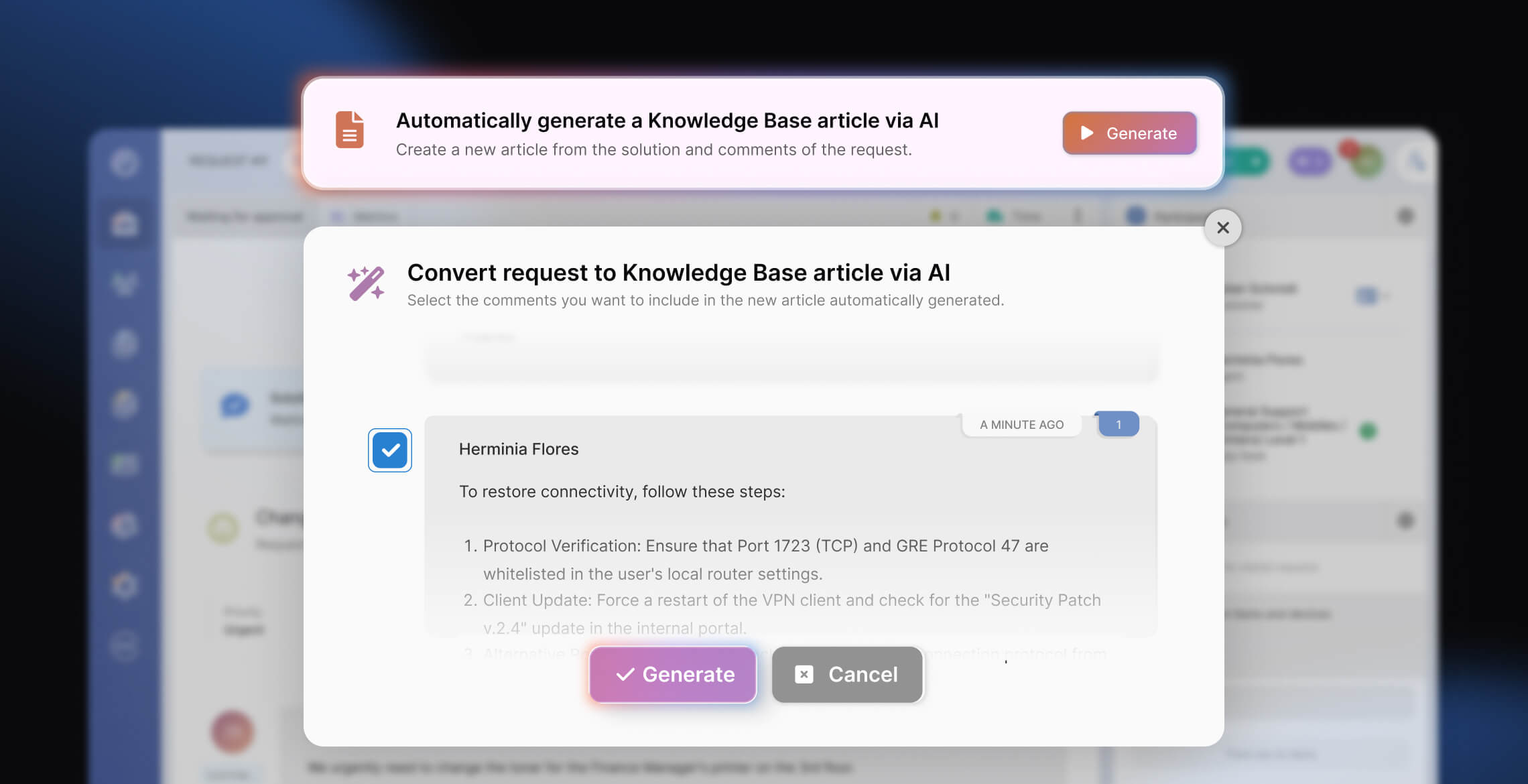
The operational impact compounds over time: more documented resolutions means more actionable knowledge available, fewer repeated escalations for the same issue, and a knowledge base that stays current because it's updated as part of normal ticket closure rather than as a separate task.
Escalation to Tier 3 becomes necessary when resolving the issue requires involvement from product specialists, engineers, developers, infrastructure architects, or external vendors.
Common reasons to escalate from Tier 2 to Tier 3 include:
A good Tier 2 escalation should transfer knowledge, not just ownership. Before escalating, analysts should document the investigation performed, evidence collected, logs reviewed, and troubleshooting steps already attempted. Doing so prevents Tier 3 from repeating work and allows them to focus immediately on deeper analysis.
Poor escalations often sound like "unable to resolve" or "needs engineering review." Effective escalations explain what was tested, what was ruled out, and why Tier 3 involvement is required. The more context provided, the faster the issue can move toward resolution.
Tier 1 is the first point of live support contact, handling high-volume, well-documented issues using scripts and knowledge base articles. Tier 2 takes over when Tier 1 can't resolve an issue — typically because it requires backend system access, advanced troubleshooting, elevated permissions, or an on-site visit. Tier 2 analysts have more specialized technical skills and spend more time per ticket than their first-line counterparts.
A ticket should escalate when: Tier 1 has made two or more failed resolution attempts, the fix requires backend access or permissions the Tier 1 agent doesn't have, the ticket is approaching its SLA deadline unresolved, or the incident has recurred enough times to suggest a deeper underlying problem.
Tier 2 analysts need advanced troubleshooting ability, system administration skills (endpoint configuration, backup management, image maintenance), backend access and configuration management, networking fundamentals, and strong written communication for resolution documentation.
Tier 2 handles complex incidents that Tier 1 cannot resolve — but within the scope of standard sysadmin and configuration work. Tier 3 handles issues that require subject matter expert knowledge, root cause analysis at the infrastructure or code level, or vendor engagement. A Tier 2 analyst configures and troubleshoots. A Tier 3 engineer redesigns or fixes the underlying system.

