















An employee equipment agreement is the document an employee signs when they receive company equipment, such as a laptop, a phone or a monitor. It puts in writing that the company owns that equipment and that the employee is responsible for it while they have it. Depending on the company, it also goes by equipment use agreement, company property agreement, laptop agreement form or equipment assignment form.
Below you'll find an employee equipment agreement template ready to copy, a short explanation of each clause and the moments when a new agreement is needed. The last part covers what makes the signed copy useful over time: tying it to the record of each device, so the team in charge of IT Asset Management (ITAM) can tell who holds what at any moment.
The template covers one employee and every device they receive in the same handover. Fields in brackets are the ones to fill in, and the equipment table should identify each item by its serial number and asset tag, so nobody has to guess which unit the agreement refers to.
It's deliberately complete, and not every company needs all eleven clauses. A small team that hands out one laptop per person can merge or drop sections, while a company with remote staff and strict security rules may keep every one. Either way, treat it as a starting point and have Legal or Human Resources (HR) review the wording before it goes into use, since rules on cost recovery and paycheck deductions change by state and by country.
Employee Equipment Agreement
1. Parties and effective date. This Agreement is made on [date] between [Company legal name] ("Company") and [Employee full name], [job title], [department], employee ID [number] ("Employee"). It takes effect when the Employee receives the equipment listed in section 2 and remains in effect until all of it has been returned.
2. Equipment issued. The Company provides the Employee with the following equipment for business use:
Item type Brand Model Serial number Asset tag Condition at handover [Laptop] [Brand] [Model] [Serial number] [Asset tag] [New / Good / Fair] [Monitor] [Brand] [Model] [Serial number] [Asset tag] [New / Good / Fair] [Phone] [Brand] [Model] [Serial number] [Asset tag] [New / Good / Fair] Accessories included: [charger, docking station, headset, keyboard, mouse, carrying case, other].
3. Condition at handover. The Employee confirms receiving the equipment in the condition recorded in section 2. Existing marks, damage or missing parts at the time of handover: [describe, or write "None"]. [Optional: photos of the equipment are attached to this Agreement.]
4. Ownership. All equipment listed in this Agreement remains the property of the Company at all times. The Employee may not sell, lend, rent, give away or pledge it, and the Company may recall or replace any item at any time.
5. Permitted use. The equipment is provided for Company business. [Limited personal use is / is not] allowed, in line with the [Acceptable Use Policy]. Only the Employee may use the equipment, and it may be used at [Company offices, the home address on file, other approved locations]. The Employee will inform [IT contact] before taking the equipment outside [country].
6. Security and data. The Employee will keep the security settings the Company applies, including encryption, antivirus and automatic updates, and will not install software that [IT department] has not approved. The Employee will lock the screen when away, protect passwords and multi-factor authentication (MFA) codes, and store Company data only in approved locations. The Company may install management and security software on the equipment and access it for support, security or audit purposes, as described in the [IT Security Policy].
7. Care and reporting. The Employee will take reasonable care of the equipment and keep it away from conditions that can damage it, such as liquids, extreme heat or unattended vehicles. Repairs are handled only by [IT department or authorized provider]. Malfunctions must be reported to [IT contact, email or portal] within [number] business days.
8. Loss, theft and damage. The Employee will report any loss or theft to [IT contact] within [24 hours] and provide any report the Company requests. Normal wear and tear is not the Employee's responsibility. Cost recovery for loss or damage caused by negligence or misuse will follow [policy name] and only to the extent permitted by applicable law.
9. Return of equipment. The Employee will return all equipment and accessories listed in this Agreement by [the last working day / a set number of days after the Company's request], in the condition received except for normal wear and tear. Returns are made [in person at (location) / using the prepaid shipping the Company provides]. The Employee will not reset or wipe the equipment unless [IT department] asks for it, and each return is recorded in a signed return form.
10. Replacements and related policies. Any replacement, upgrade or additional item is recorded in a new agreement or a signed addendum that lists what was returned and what was issued. This Agreement works together with the [Acceptable Use Policy], the [IT Security Policy] and the [Hardware Asset Management policy], which the Employee confirms having received.
11. Acknowledgment and signatures. By signing, the Employee confirms having received the equipment listed above, in the condition described, and agrees to the terms of this Agreement. Each party keeps a signed copy.
Employee name: [ ] Signature: [ ] Date: [ ]
Company representative: [name and title] Signature: [ ] Date: [ ]
Each clause in the template answers a question that comes up sooner or later, usually when a device goes missing or someone leaves the company. Here's what each one covers, in the same order as the template.
The parties clause names who signs and when the agreement starts, which matters when the same person signs several agreements over the years. The equipment table is the core of the document: type, brand, model, serial number and asset tag identify one specific unit. Accessories go on the list too, since a missing charger or dock is easier to settle when it was recorded at the handover.
The condition at handover protects both sides. If a laptop arrives with a scratched lid or a weak battery, writing it down (or attaching photos) keeps that damage from being attributed to the employee when the device comes back.
The ownership clause states that the equipment belongs to the company and can't be sold, lent or pledged. It's short, and it's the clause every return request relies on, including requests to remote employees who keep the device at home.
Permitted use sets the boundaries of everyday use: whether personal use is allowed, who else can touch the device, where it can be used and what to do before a trip abroad. This clause can point to the acceptable use policy the company already has, so the agreement doesn't need to repeat every rule.
The security clause turns IT policy into commitments the employee signs: keep encryption and antivirus on, skip unapproved software, lock the screen and protect passwords. It also tells the employee that the company may install management software and access the device for support or audits, which avoids surprises later.
Care and reporting cover the rest of the device's daily life. A deadline to report malfunctions helps IT act while a problem is still small, and routing every repair through IT keeps each intervention on the device's record.
The loss and damage clause sets a reporting deadline, separates normal wear and tear from negligence and explains how cost recovery works. That last part is where the rules differ the most between states and countries, so the template ties it to company policy and to the law that applies (more on this in the FAQs).
The return clause gives a deadline, a method and a record. Tying the deadline to the last working day, offering prepaid shipping to remote staff and asking employees not to wipe the device on their own leave little room for a laptop to stay out or come back without its data.
No agreement can list every rule, so the related policies clause points to the documents that do, such as an acceptable use policy, a security policy and a Hardware Asset Management policy. It also explains how replacements are handled, so a new laptop doesn't leave the old agreement describing a device the employee no longer has.
The signatures close the document. The employee confirms receipt and condition, an IT representative confirms the handover, and both keep a copy, with IT storing its copy next to the record of each device.
An agreement describes the equipment a person holds at one moment. When that changes, the paperwork has to change with it, and four moments account for most of those changes.
The first agreement is signed at the handover itself, with the devices on the desk and the serial numbers checked against the table. Signing it days later, once the laptop is already in use, makes the condition clause harder to trust.
Most new hires receive several items at once, so one agreement can cover the full kit. If some items arrive later, such as a monitor shipped separately, they're added through an addendum on the day they're delivered.
Replacements are the moment when records drift the most, because the old device comes back and a new one goes out on the same day. A new agreement or an addendum should list both: what was returned, in what condition, and what was issued in its place.
The same applies to loaners. A temporary laptop handed over during a repair is still company equipment, so it gets a short addendum with its own serial number and a return date.
For remote employees, the handover happens through a courier. The agreement can travel with the device or go out by email, and the employee signs once the equipment arrives and they've checked it against the list.
Remote agreements usually add a few details: the address where the equipment is kept, a deadline to confirm receipt and how returns are shipped. Beyond the signature, tracking assets for remote employees depends on keeping each device's record current, wherever the device ends up.
At offboarding, the agreement is closed with a return record that lists each item received, its condition, the date and who received it. Missing items are noted on the same document, which gives HR and IT a single reference for the follow-up.
The return record is the counterpart of the onboarding agreement, so it should be checked against the same list. That check is one step in a wider process to manage employees returning equipment, which also covers the offboarding checklist, the communication with the employee and what happens to each device afterward.
A signed agreement only helps if IT can find it and trust that it matches the device in the employee's hands. That means the agreement belongs in the asset record, next to the owner, the status, the serial number and the history of each device.
InvGate Asset Management keeps that record for every asset and generates the agreement from it. The document comes out of the same data IT already maintains, and the signed copy goes back to the devices it covers.
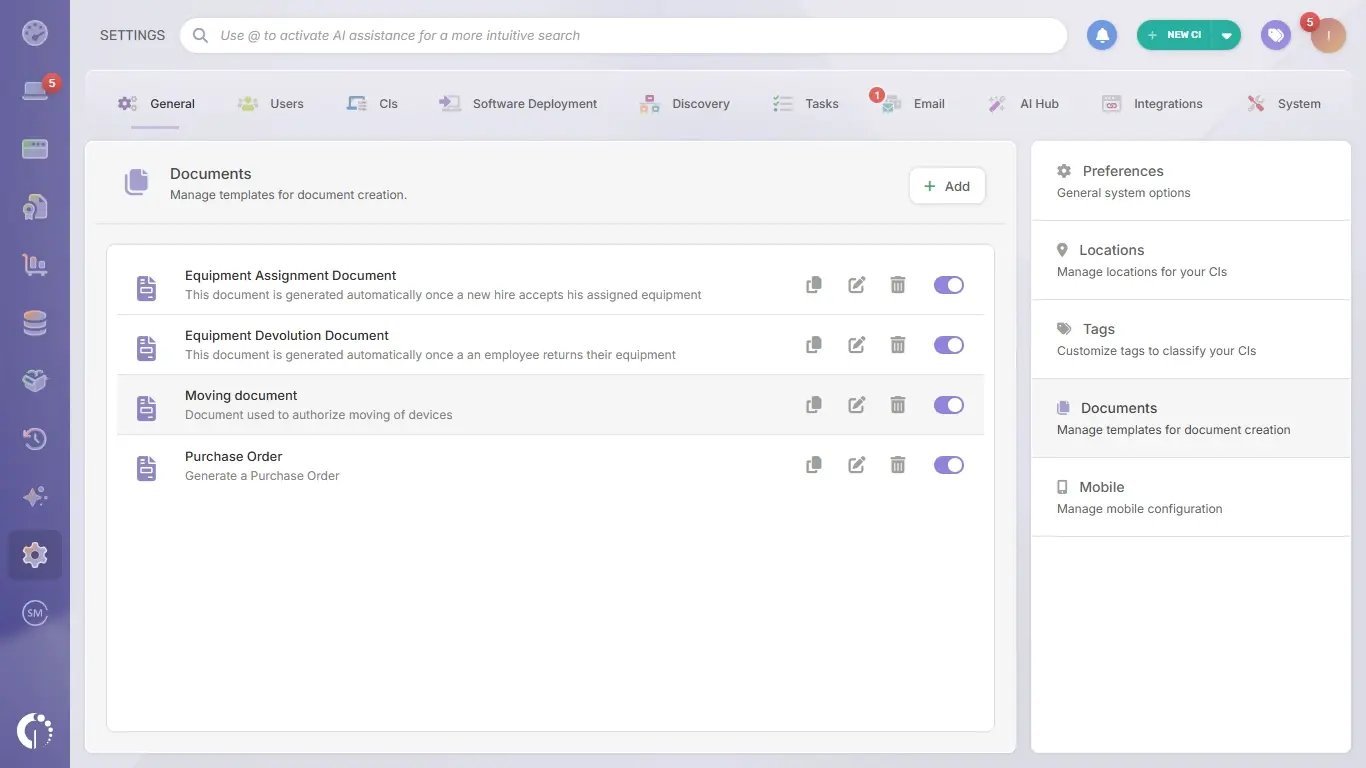 Templates are built by each team from Settings > General > Documents, so the agreement can follow the company's own wording, logo and clauses. IT can create one template for onboarding, one for replacements, one for offboarding returns and others for transfers between locations, each with fixed text and fields that get completed when the document is created, such as the recipient or the person who authorized the delivery. Permissions decide which roles can create documents, so only the right people produce agreements on behalf of the company.
A recent update lets the asset list and the terms share a single document: when the header and footer are set to appear once, the asset table adjusts to the number of devices included and leaves room for the clauses below it. Each text area in a template has a set length, so the version built in InvGate Asset Management works best as a condensed take on the template above, with the clauses that matter most at the handover (ownership, use, security, loss, return and signatures) and a reference to the full policies.
Creating the agreement takes a few steps: choose the template, select the assets (filters make it easy to pick every device assigned to one person), check the preview and download the PDF. The document is attached to every asset it includes, and each of those assets logs an activity with who created it and when.
Once the employee signs, the signed copy is uploaded to the attachments of the asset, next to the original. Teams that want to track new employee equipment from preparation to signature can repeat this same flow at every handover.
For teams that use InvGate Service Management alongside InvGate Asset Management, the agreement can start with the employee's own request. With the Product Catalog, the employee picks an option such as "Standard laptop" in the self-service portal, and once the order is approved, the agent assigns an available unit from the stock tracked in InvGate Asset Management within the same request.
The asset record shows the assignment from that moment, so IT can generate the agreement from the exact unit that was delivered. Each product also shows how many units are in stock, available and assigned, which helps IT confirm there's a device ready before the employee's start date.
Grupo Gigante, a Mexican retailer with about 2,500 employees, moved new-hire setup with InvGate to a single ticket covering licenses, virtual private network (VPN) access, equipment and a phone extension, with everything ready on the employee's first day. From onboarding, each device was linked to the employee it was assigned to.
That link between person and device let the team build a preventive maintenance program, which reduced reported failures by 36% and ended emergency purchases at inflated prices, according to the Grupo Gigante case study. Knowing who held each device gave the team the data it needed to plan maintenance before failures reached the help desk.
An employee equipment agreement works when it names each device precisely, sets clear rules for use, loss and return, and gets signed at every handover. The template above covers those clauses, and signing a new version at each of the four moments keeps it current as equipment changes hands.
The other half is the record. When each signed agreement lives next to the device it covers, IT can check who has what at any time and close every return against the same list. To see how InvGate Asset Management generates and stores those agreements, start a 30-day free trial or talk to Sales.
These are the questions that come up most often once an equipment agreement is in place. The answers on pay and signatures are general information and not legal advice, so check them against the rules that apply to your company.
It depends on where the employee works. Under the federal Fair Labor Standards Act (FLSA), deductions for lost or damaged equipment can't reduce pay below the minimum wage or cut into overtime, even when the loss comes from the employee's negligence, according to the U.S. Department of Labor. State and country rules can add their own limits, so review the clause with Legal or HR before charging an employee for equipment.
Start with the asset record to confirm every item assigned to the person, then send a written request that cites the return clause, the deadline and a prepaid shipping option. If the equipment still doesn't come back, HR and Legal decide the next steps, while IT removes the person's access, protects the data on the device with the tools the company uses and updates the asset status. A clear process for laptop returns and offboarding helps prevent these cases in the first place.
No. An equipment agreement covers devices the company owns and lends to the employee. Personal devices used for work fall under a bring your own device policy, which sets the security and data rules for equipment the employee owns.
In the United States, in most cases it can: the Electronic Signatures in Global and National Commerce (ESIGN) Act establishes that a signature or contract can't be denied legal effect only because it's electronic. Requirements vary in other countries, so confirm them with Legal. With InvGate Asset Management, the generated PDF can be signed on paper or with the company's e-signature tool, and the signed copy is uploaded to the asset record.
They work together, with different scopes. An acceptable use policy sets the rules for everyone who uses company technology, while the equipment agreement records which specific devices one person received and their commitment to those rules.
At least for as long as the employee holds the equipment and until the return is closed, and then for the period the company's record retention policy sets. In InvGate Asset Management, each agreement stays in the activity history of the assets it covers, even if someone removes it from the asset profile.

