Physical Inventory For IT Assets: QR Codes, Barcodes, RFID, or Manual Tracking?

hero image
Join IT Pulse

Receive the latest news of the IT world once per week.

Your system says 240 laptops are deployed across three offices. The physical audit finds 198. That 42-device gap is the predictable result of running without a consistent process for physical inventory of IT assets. Equipment gets reassigned informally, retired without being removed from records, or deployed without ever being registered, and the system slowly drifts away from what actually sits on the floor.

This article covers what a physical IT asset inventory involves, why it matters in Hardware Asset Management (HAM), how the main identification methods compare, how to run a physical audit step by step, and how InvGate Asset Management supports the entire process.

The problem has become harder to manage over the last few years. Hardware is distributed across home offices, branch locations, and shared workspaces. Offboarding cycles are faster and less controlled. Compliance audits are more frequent. In that environment, the gap between records and physical reality grows quietly until an audit makes it visible.

Key takeaways 

  • A physical inventory of IT assets verifies that every asset recorded in the system exists, sits in the right location, and is assigned to the right person.
  • Network discovery covers active networked devices. Physical identification methods cover non-IP assets, peripherals, and hardware in storage.
  • The right identification method -QR codes, barcodes, RFID, or manual tracking- depends on asset type, audit frequency, and available hardware.
  • A physical IT asset audit is the reconciliation step that closes the gap between the IT Asset Management (ITAM) system and physical reality.
  • InvGate Asset Management supports QR code generation, mobile scanning, and audit dashboards from a single platform.

What is a physical IT asset inventory? 

A physical IT asset inventory is the process of verifying that the hardware assets recorded in your system actually exist, are located where the records say they are, and remain in the condition and state the system reports.

Three adjacent concepts often get confused with it.

  • An IT asset inventory in the broad sense includes software, cloud services, and contracts.
  • Network discovery detects devices that are active on the network with an IP address, which leaves out hardware in storage, peripherals without connectivity, and devices in transit.
  • A Configuration Management Database (CMDB) documents relationships and dependencies between configuration items, without physically verifying that those items exist at a given location. 

Physical inventory covers the ground all three leave open: confirming which hardware is actually present, tagged, and accounted for. That verified baseline is the foundation of Hardware Asset Management. Without it, every downstream decision (refresh planning, procurement, lifecycle tracking, compliance reporting) runs on data that may no longer reflect physical reality.

Why physical inventory matters in Hardware Asset Management

Most IT teams know their records are imperfect. What they often underestimate is how quickly imperfect records compound into operational and financial problems. When physical inventory runs without a consistent process, four patterns emerge reliably.

  • Ghost assets are devices that appear in the system but no longer physically exist: retired equipment that was never removed from records, hardware lost during a move, or assets reallocated without an update. They inflate the asset count, distort financial reporting, and create confusion during audits.

  • Unregistered assets are the mirror problem: hardware that is physically present but absent from the system, typically deployed informally or received outside the standard intake process.

  • Inaccurate records also lead to bad refresh decisions, since teams purchase new hardware while usable equipment sits unseen in storage, and to compliance risk, because retiring an untracked asset leaves no documented chain of custody.

InvGate Asset Management surfaces these gaps through audit dashboards and Smart Tags that flag assets outside their expected assignment patterns. The underlying data those tools rely on comes from a physical inventory process. Knowing how to perform an IT asset audit is the first step to making those tools useful.

Physical inventory vs. network discovery: Why you need both

Network discovery is one of the most valuable tools in IT Asset Management. It scans the network, identifies active devices, pulls hardware and software data automatically, and keeps records updated without manual effort. For networked endpoints, servers, and managed devices, it provides visibility that no manual process can match.

The limit is everything outside that scope. Workstations in storage have no active IP. Peripherals such as monitors, keyboards, docking stations, and headsets typically have no network presence at all. Hardware in transit between locations is invisible to discovery, and devices that connect intermittently or through VPN may appear and disappear from scans without any change in their physical status. The server room, the storage closet, and the laptop assigned to a user who left three months ago all sit outside its reach.

Physical inventory covers that remaining ground. InvGate Asset Management combines agent-based, and agentless with support for non-IP assets, QR code scanning for peripherals and equipment that cannot run an agent, and a unified dashboard where discrepancies between scanned and expected inventory surface for reconciliation. The two approaches complement each other: together, they show what exists, where it is, and what state it is in.

Main methods for tracking physical IT assets 

There is no single method that works for every environment. The right approach depends on the type of assets being tracked, the volume, the frequency of audits, and the infrastructure already in place. The four methods below cover the full range from lowest to highest implementation cost, and most mature IT environments end up using more than one.

QR codes 

A Quick Response (QR) code stores a unique identifier that links to the full asset record in InvGate Asset Management. Compared to barcodes, QR codes hold richer data and can be scanned with any smartphone camera, with no dedicated reader required. That makes them the most practical entry point for most IT environments, particularly those managing a mix of asset types across multiple locations.

The workflow in InvGate Asset Management is straightforward: select one asset or a batch from the asset explorer, generate QR codes individually or in bulk, configure the print layout and label format, export, and print. From the mobile app, technicians scan each tag in the field and update status, location, and owner on the spot, without returning to a workstation.

For everything from laptops and monitors to keyboards and docking stations, QR codes give each physical device a direct, scannable connection to its complete record. The full process on how to track IT assets with QR codes in InvGate Asset Management runs from tag generation to field scanning.

Barcodes 

Barcodes are one-dimensional codes with a lower data capacity than QR codes. They store a basic identifier (typically an asset ID or serial number) rather than rich contextual data, and reading them requires a dedicated barcode scanner, since smartphone cameras struggle with standard one-dimensional codes.

Their main advantages are simplicity, low cost per label, and universal support. In environments that already have barcode scanning infrastructure, such as data centers with rack-mounted servers or organizations that have used barcodes for non-IT assets for years, barcodes extend existing workflows naturally. 

The limitation is operational flexibility: a dedicated reader adds hardware for audit teams to carry, and the lower data density means the tag alone reveals little without a system lookup.

RFID

Radio Frequency Identification (RFID) uses radio waves to read tags passively, without requiring line of sight between the reader and the tag. A single reader pass can capture dozens of assets simultaneously, a capability that sets RFID apart from barcode and QR code scanning.

In large data centers, high-density storage environments, or organizations managing thousands of assets across many locations, RFID can reduce audit time dramatically. A walk through a server room with an RFID reader can verify hundreds of assets in minutes rather than hours. 

The tradeoff is infrastructure cost. RFID requires specialized readers and tags that are significantly more expensive than QR labels, plus the operational overhead of managing that hardware. For most mid-sized IT environments, the investment makes sense when audit frequency is high, asset velocity is significant, and the team has dedicated resources for Asset Management operations.

Manual tracking 

Manual tracking records assets by serial number, asset tag, or visual inspection, without any scannable identifier. It is the baseline most teams start with and the first method that breaks down as environments grow.

It works in small, stable environments: a ten-person company with a fixed set of devices in a single location can maintain accurate records with a spreadsheet and a careful process. Once asset counts exceed a few dozen, locations multiply, or turnover introduces regular onboarding and offboarding cycles, manual tracking produces errors at a rate that compounds faster than it can be corrected. Duplicate entries, missed updates, and location drift accumulate silently until an audit reveals the gap.

Manual tracking sits at stage 0 of ITAM maturity. It serves as a valid starting point, and the moment physical inventory accuracy becomes operationally important, a scannable identifier connected to a platform becomes necessary.

How to choose between QR codes, barcodes, RFID, and manual tracking

No method wins in every environment. The decision comes down to asset type, fleet size, audit frequency, and the infrastructure already in place. The table below summarizes the practical tradeoffs.

Method Implementation cost Extra hardware needed Works for non-IP assets Scalability
QR codes Low No (smartphone) Yes High
Barcodes Low Yes (dedicated reader) Yes Medium
RFID High Yes (readers and tags) Yes Very high
Manual None No Yes Very low


A few practical rules apply to most IT environments. QR codes are the default entry point for teams starting from scratch or managing a mixed fleet of endpoints, peripherals, and mobile devices. Barcodes fit naturally where scanning infrastructure already exists. RFID earns its cost when asset volume is large and audits are frequent. Manual tracking works only as a temporary baseline.

Many teams combine methods by asset type: QR codes for endpoints and peripherals, barcodes for rack-mounted servers, RFID for high-density environments where bulk scanning justifies the cost.

Whatever the mix, each physical asset needs a consistent identifier that connects it to a system record. The QR code Inventory Management workflow shows how that connection operates day to day, and the IT asset tagging process defines the standards that keep identifiers consistent across the fleet.

How to run a physical IT asset audit 

Most teams do not fail physical audits because they are careless. They fail because the data is distributed across systems, the process is undocumented, and each step lacks a clear owner. A structured process fixes all three.

  1. Define scope and frequency. Before the audit starts, determine which assets are in scope, which locations are covered, and how often the process will run. A reasonable baseline for most environments is a full physical audit quarterly, with monthly exception checks for high-value or frequently moved assets. Scope decisions should be documented and consistent across cycles so results can be compared over time.

  2. Export the expected inventory. Pull the current list of active assets by location from InvGate Asset Management. This is the source of truth the physical audit reconciles against. The export should include asset ID, serial number, assigned user, location, and current lifecycle status. Anything on this list that is missing physically is a discrepancy, and so is anything found physically that is missing from the list.

  3. Tag and identify assets. Before scanning begins, confirm that every asset in scope has a readable, attached identifier: QR code, barcode, or RFID tag. A missing or damaged tag should be replaced before the scan moves on, since auditing untagged assets manually recreates the data quality problems tagging exists to solve.

  4. Physically scan or verify. Work through each location systematically. Scan each tag and mark the asset as verified in InvGate Asset Management. The mobile app allows technicians to do this directly from the floor, without access to a workstation. Document the scan date and the technician for each location.

  5. Flag discrepancies. At the end of the scan, three categories of discrepancy need attention: ghost assets (present in the system, missing physically), unregistered assets (found physically, missing from the system), and mislocated assets (in the system but at a different location than recorded). Each category requires a different response, so they should be tracked separately.

  6. Reconcile and update records. Ghost assets should be flagged for investigation before any removal from the system, because the asset may be in transit, checked out to a user, or temporarily stored off-site. Unregistered assets need a new record created with all available data: serial number, model, condition, location, and current holder. Mislocated assets need a location update with a note on when and why the discrepancy occurred.

  7. Document and report. Record the audit results: total assets scanned, discrepancies found by category, resolution status, and any open items requiring follow-up. This report becomes the baseline for the next cycle and the evidence trail for compliance purposes. The documentation standards in HAM audit preparation extend this step for environments with formal compliance requirements.

InvGate Asset Management supports each step of this process: QR codes link physical assets to their records, the mobile app enables field scanning, the inventory dashboard shows verification status per asset and per location, and Smart Tags combined with automation rules surface assets that fall outside expected patterns before the next cycle. To see how this runs end to end, start a 30-day free trial or schedule a call with Sales.

Physical inventory and the hardware lifecycle

Physical inventory precision sustains every other stage of the hardware lifecycle. Accurate physical records keep the five stages of Hardware Asset Management running on reliable data, and inaccurate records degrade each one in a specific way.

  1. During planning, a system that shows 80 laptops available for redeployment when only 60 are physically present produces wrong demand forecasts.

  2. During procurement, assets that arrive without being registered or tagged create gaps the next audit will surface.

  3. During deployment, assignments made without physical verification start the lifecycle with a location record that may already be wrong.

  4. During operation, warranty tracking, repair history, and support eligibility all depend on connecting each physical device to its system record.

  5. During retirement, assets that cannot be physically verified leave no documented chain of custody and no evidence of proper disposal.

Each of these moments corresponds to one of the hardware lifecycle stages that Hardware Asset Management tracks from acquisition to disposal.

InvGate Asset Management tracks each asset across all five stages in a single record: purchase date, cost, contract reference, warranty, ownership history, lifecycle state, and disposal method. The lifecycle tracking module connects physical audit results to lifecycle transitions, so every scan and every reconciled discrepancy updates the data the rest of the practice depends on.

How InvGate Asset Management helps keep physical inventory accurate

Keeping physical inventory accurate takes three capabilities working together: a way to register every asset regardless of whether it connects to the network, a physical identification method that links each device to its record, and a workflow that surfaces discrepancies before they accumulate. InvGate Asset Management covers all three from a single platform.

One inventory for connected and non-connected assets

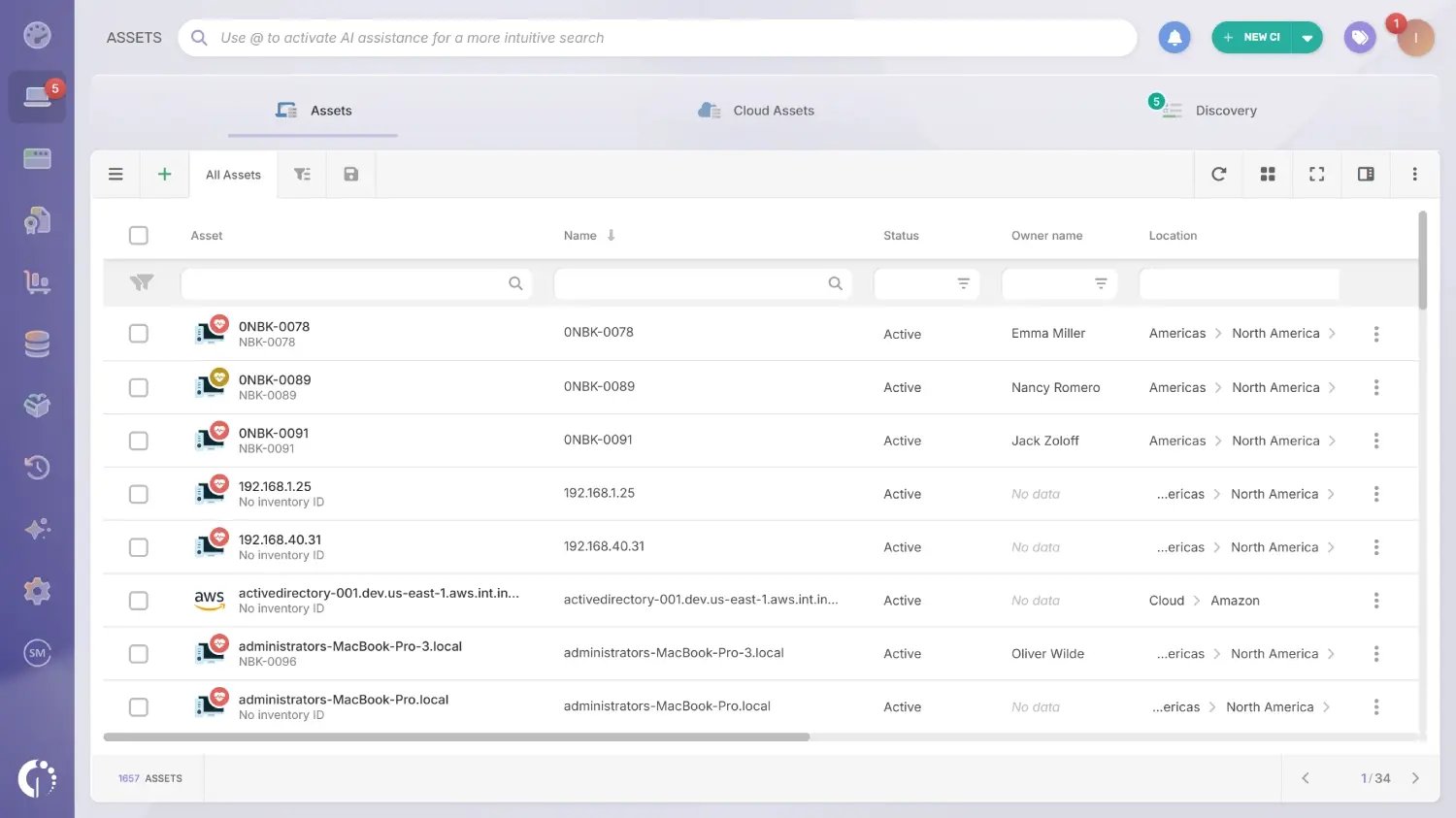
Asset explorer in InvGate Asset Management.

Devices that can run the InvGate Asset Management Agent report their hardware and software data automatically and keep their records updated. Assets visible on the network without an agent are captured through network discovery. Native integrations extend that reach to assets living in other platforms: Microsoft Intune for managed endpoints, and Amazon Web Services (AWS) and Microsoft Azure for cloud instances (to mention a few). For any peripheral without a network address, records are created manually, one by one or in bulk via CSV import.

Every asset ends up in the same centralized inventory, whatever its entry path. That single repository is the expected inventory a physical audit reconciles against, so there is no need to merge spreadsheets or cross-reference separate tools before starting a count.

QR code generation and scanning from the mobile app

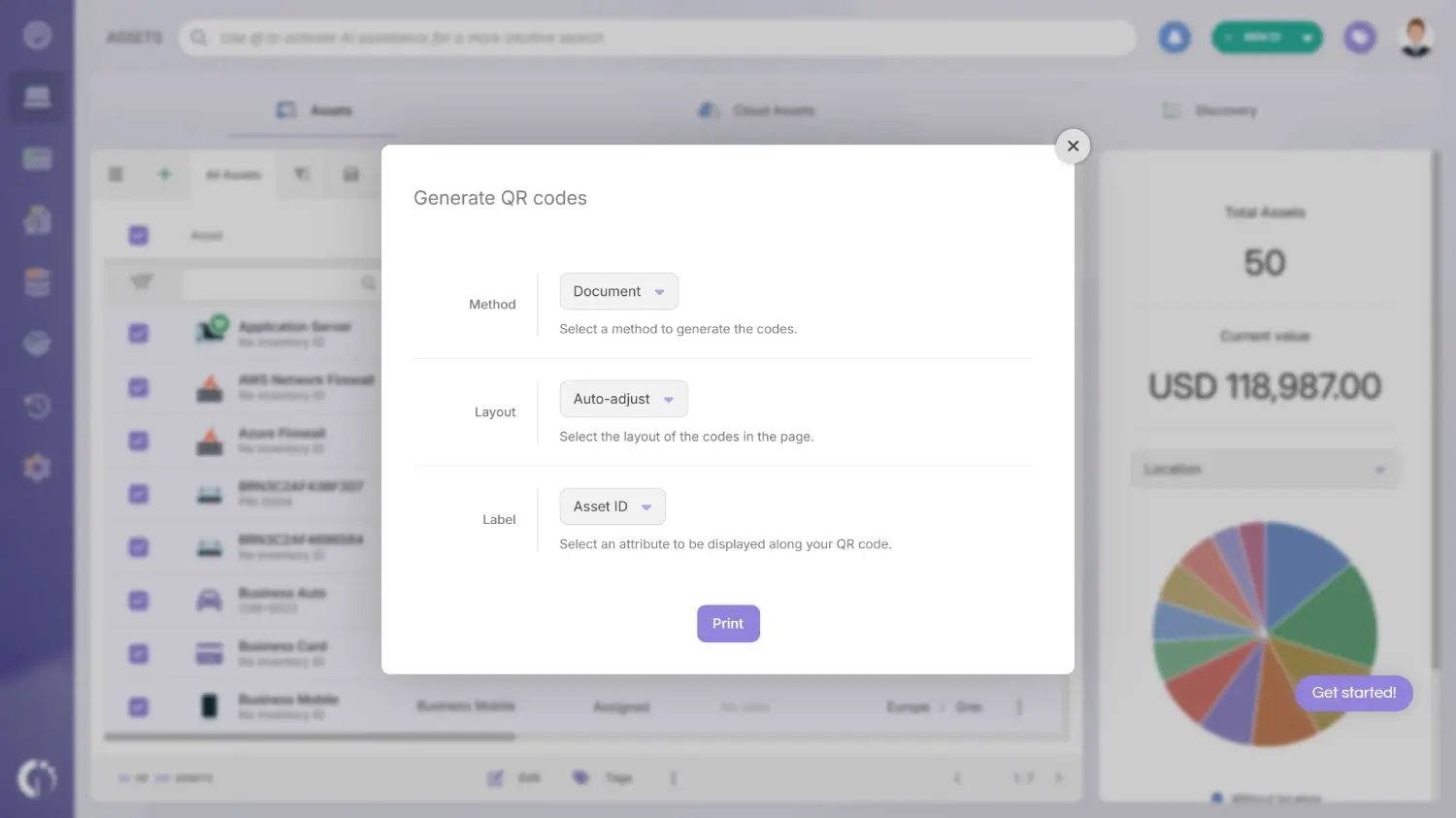
generating-qr-codes-invgate-asset-management

Physical identification starts in the asset explorer: select one asset or a full batch, generate QR codes individually or in bulk, configure the label layout, and print. A QR code can be assigned to any asset regardless of how it was discovered, which means agent-managed laptops and manually registered peripherals carry the same type of tag and follow the same scanning workflow. 

In the field, technicians scan each tag with the mobile app to open the asset record and update status, location, owner, and tags on the spot. Every scan writes directly to the central inventory, so the record reflects reality the moment the technician moves to the next asset.

Audit workflows that catch drift early

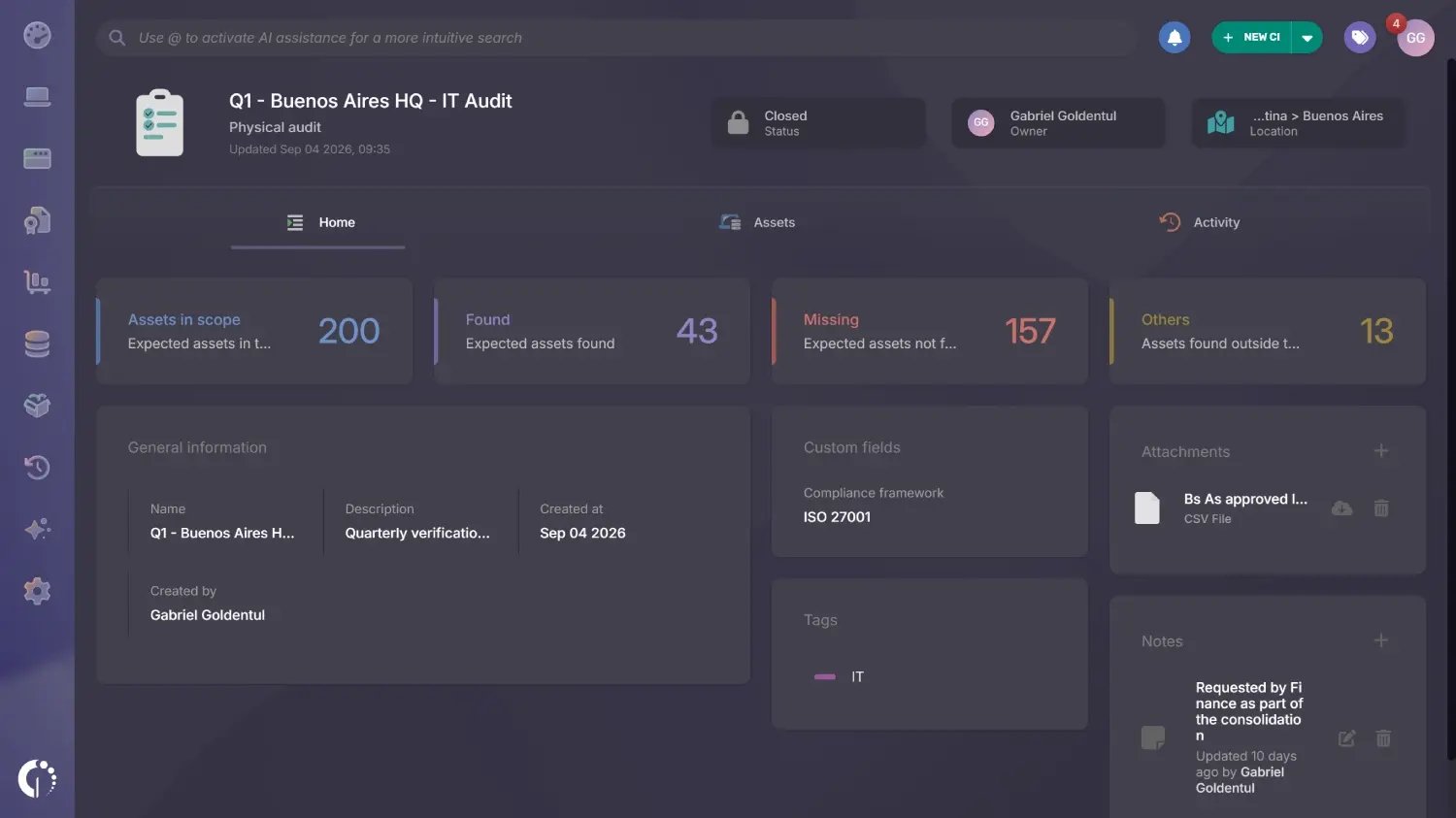
invgate-asset-management-dashboards-locations

An inventory dashboard can show verification status per asset and per location, which turns a physical audit into a visible checklist: what has been scanned, what remains, and where the gaps are. Discrepancies between scanned and expected inventory surface in the same view, ready for reconciliation.

Between audit cycles, Smart Tags group assets by any criteria the team defines, and automation rules trigger alerts when an asset falls outside its expected pattern, such as a device assigned to a user who has left or equipment sitting in a location it should have moved from. Drift gets flagged as it happens, and the next audit starts from a much smaller list of open questions. 

Ready to build a physical inventory process that stays accurate between audits? Start a 30-day free trial of InvGate Asset Management or talk to Sales to see how it fits your environment. 

Simplify your IT ecosystem with InvGate Asset Management

30-day free trial - No credit card needed

Clear pricing

No surprises, no hidden fees — just clear, upfront pricing that fits your needs.

View Pricing

Easy migration

Our team ensures your transition to InvGate is fast, smooth, and hassle-free.

View Customer Experience