













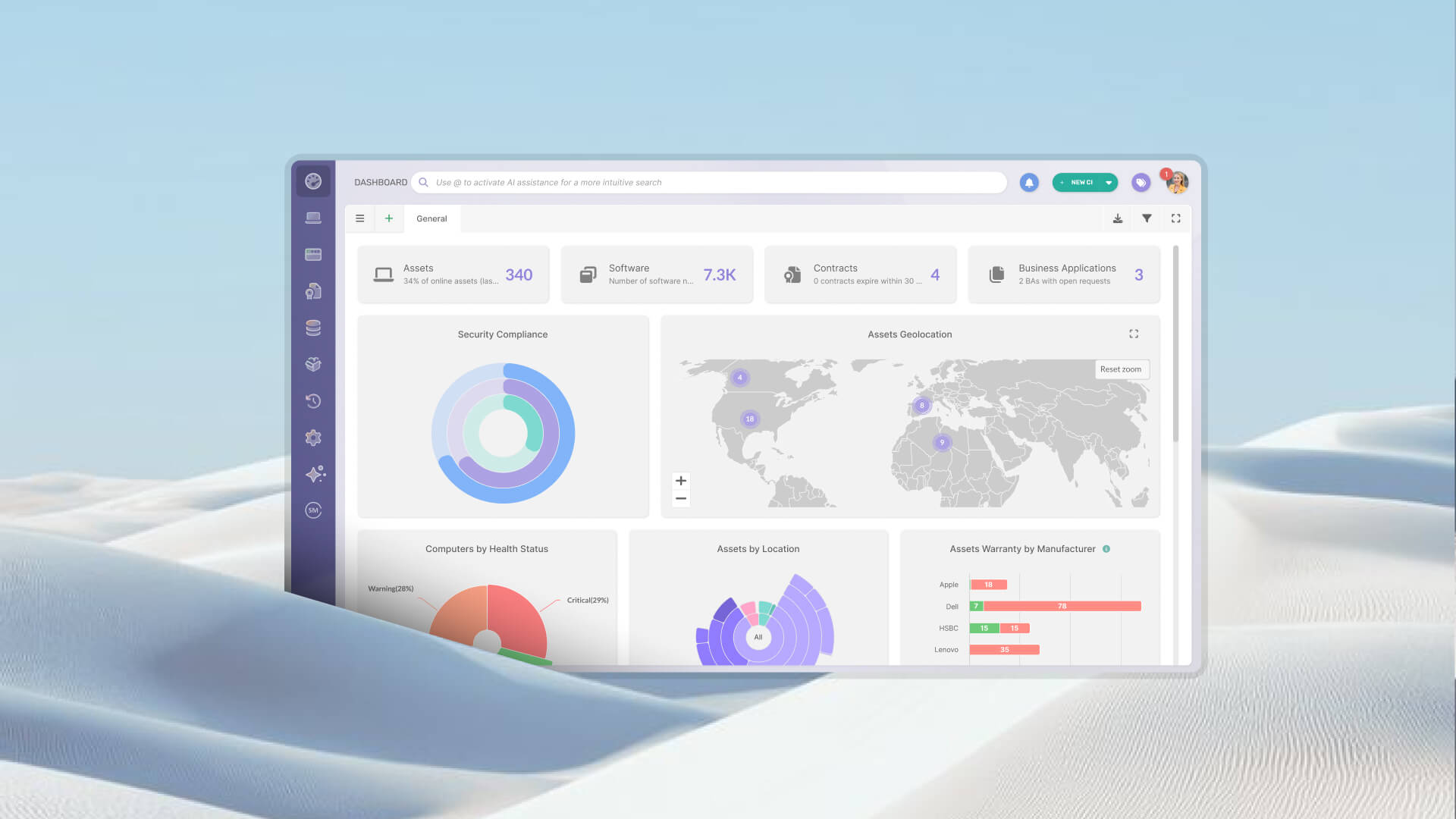

Most IT teams already know they need to plan hardware replacements. The planning part is rarely the blocker. What prevents a hardware refresh planning process from working in practice is the inventory it depends on: incomplete, split across multiple tools that were never designed to talk to each other, and manually maintained by whoever had time to update the spreadsheet last.
The result is a familiar set of problems. Leadership asks how many devices need replacement this year, and IT can't answer with confidence. A network discovery scan shows a clean list of active workstations, but it leaves out the laptop in transit, the hardware sitting in the stockroom, and the device powered down for three weeks. The spreadsheet someone exported last quarter has a different number than the one IT operations uses, and nobody is certain which one is right.
This article covers what data you need before you can build a plan that holds up, and how to structure the process of getting there, even if your inventory isn't clean yet.
Hardware refresh planning is the process of deciding which devices to replace, in what order, when, and how to manage the retirement of outgoing equipment. It requires assigning budget, sequencing work across teams, and aligning timelines with vendor lead times and operational windows. Every one of those steps depends on accurate data about the current state of the hardware estate.
That's what distinguishes planned refreshes from reactive replacements. Reactive replacement happens when something breaks, which means procurement under pressure, unplanned IT work, and user downtime that could have been avoided. A planned refresh, built on real lifecycle data, is the foundation of any effective hardware refresh strategy.
Most IT environments hold plenty of data. The difficulty is that it sits fragmented across sources that were never reconciled, and each source answers the same basic question differently.
That is a data reconciliation problem. Any hardware refresh plan built on top of it starts with compromised inputs.
The goal is the right data, consolidated in one place, with a clear answer to which source is authoritative when sources conflict. Teams often try to solve incomplete inventory by adding more data sources: another discovery scan, another import, another spreadsheet column. That compounds the reconciliation problem.
The starting point is an inventory of workstations and active devices: what exists, by model and serial number, with a current operational status. That alone is insufficient. It also needs to be physically verified, so the record reflects what was confirmed present at each location. This includes hardware that isn't on the network: peripherals, devices in storage, equipment with no IP address that will never appear in a discovery scan. Non-IP devices are consistently the most undercounted part of any enterprise hardware estate.
Assignment and location data complete the picture: who uses each device, at which site, and when that information was last verified. An asset record that hasn't been physically confirmed in 18 months carries uncertainty that compounds directly into the refresh plan. You may be planning to replace a device that was already reassigned or retired informally.
Warranty and lifecycle data are the primary signals for prioritization. Purchase date, warranty expiration, and manufacturer end-of-life (EOL) date need to be recorded per asset, and estimating them from batch purchase records introduces error. A fleet purchased in the same order may have different warranty terms depending on the configuration.
Stock availability is one of the most frequently invisible data points in IT inventories. Hardware that has been received and is sitting unassigned in a stockroom or depot represents deployable capacity that IT doesn't know it has. Without visibility into what's in stock, IT orders new devices while existing hardware sits unused.
Purchase orders close the loop. The gap between what was approved, what was ordered, and what was actually received is one of the most common origins of inventory inaccuracy. A device that arrived but was never formally received into the inventory creates a discrepancy that accumulates over time.
Finally, there needs to be a designated system of record: one authoritative source that wins when two sources disagree. If that question doesn't have a clear answer, every downstream decision, including the refresh plan itself, inherits that ambiguity.
Most IT teams don't get to start from a clean inventory. They have data in multiple places, partial records, and a history of discovery scans that captured some devices and missed others. The goal is to structure the process so that data quality improves with each cycle.
Before trusting the data in any system, verify it against physical reality. A physical audit establishes the verified baseline that the rest of the refresh plan stands on, and it works best as a recurring process rather than a one-time remediation project.
A physical audit confirms that every device in the system actually exists and is where it's supposed to be, identifies assets in storage or in transit that are missing from the system, and flags records that are still active for devices that have already been retired or reassigned. Doing this at scale requires a scanning workflow. Quick Response (QR) codes, barcodes, and Radio Frequency Identification (RFID) each serve different environments: QR codes are low-cost and practical for most IT teams, barcodes suit environments with dedicated scanners, and RFID makes sense where high-volume bulk scanning justifies the infrastructure cost.
Once the physical audit establishes a verified baseline, the next step is reconciling what the system says with what the audit confirmed. The physical record is authoritative, and the system record gets corrected to match it.
The typical discrepancies are ghost assets (devices that appear active in the system but were physically absent or already disposed of), unregistered assets (devices that exist physically but have no record in the system), and stale assignment data (records that show a device assigned to one user or location when it's actually somewhere else). Resolving each category requires a defined rule: which source wins, who is responsible for correcting the record, and how the correction gets logged.
Purchase date is the most commonly used prioritization criterion and one of the least reliable. It works as a proxy for age, and age alone leaves out whether a device needs replacement. Two machines purchased at the same time can be in entirely different operational states three years later.
More precise criteria include: warranty expiration, which indicates that the risk of ownership has shifted from the vendor to the IT team; manufacturer end-of-life status, after which no firmware, driver, or security updates will be issued; ticket volume for the specific device, which surfaces recurrent hardware issues invisible from lifecycle data alone; and physical condition verified in the most recent audit. Devices that meet more than one of these criteria move to the top of the list. These signals map to the hardware lifecycle stages that determine when a device is a candidate for refresh and what the next action should be.
Before submitting any procurement request, the first question should be: what do we already have available? Hardware that has been received but not yet assigned represents real deployable capacity that stays out of a discovery scan. If it isn't registered and tracked, the team doesn't know it exists, and the result is a duplicate order for equipment already sitting in a depot.
A complete stock check should precede every refresh-related procurement action. With a clear picture of what's needed versus what's already available, the IT hardware procurement process reflects actual gaps rather than assumed ones.

Every step described in this article depends on having reliable, current data about the hardware estate.
InvGate Asset Management is an IT Asset Management platform built around that requirement. It covers the full path: populating the inventory, verifying it against physical reality, keeping warranty and end-of-life data current, flagging refresh candidates automatically, and closing the loop on procurement and disposal.
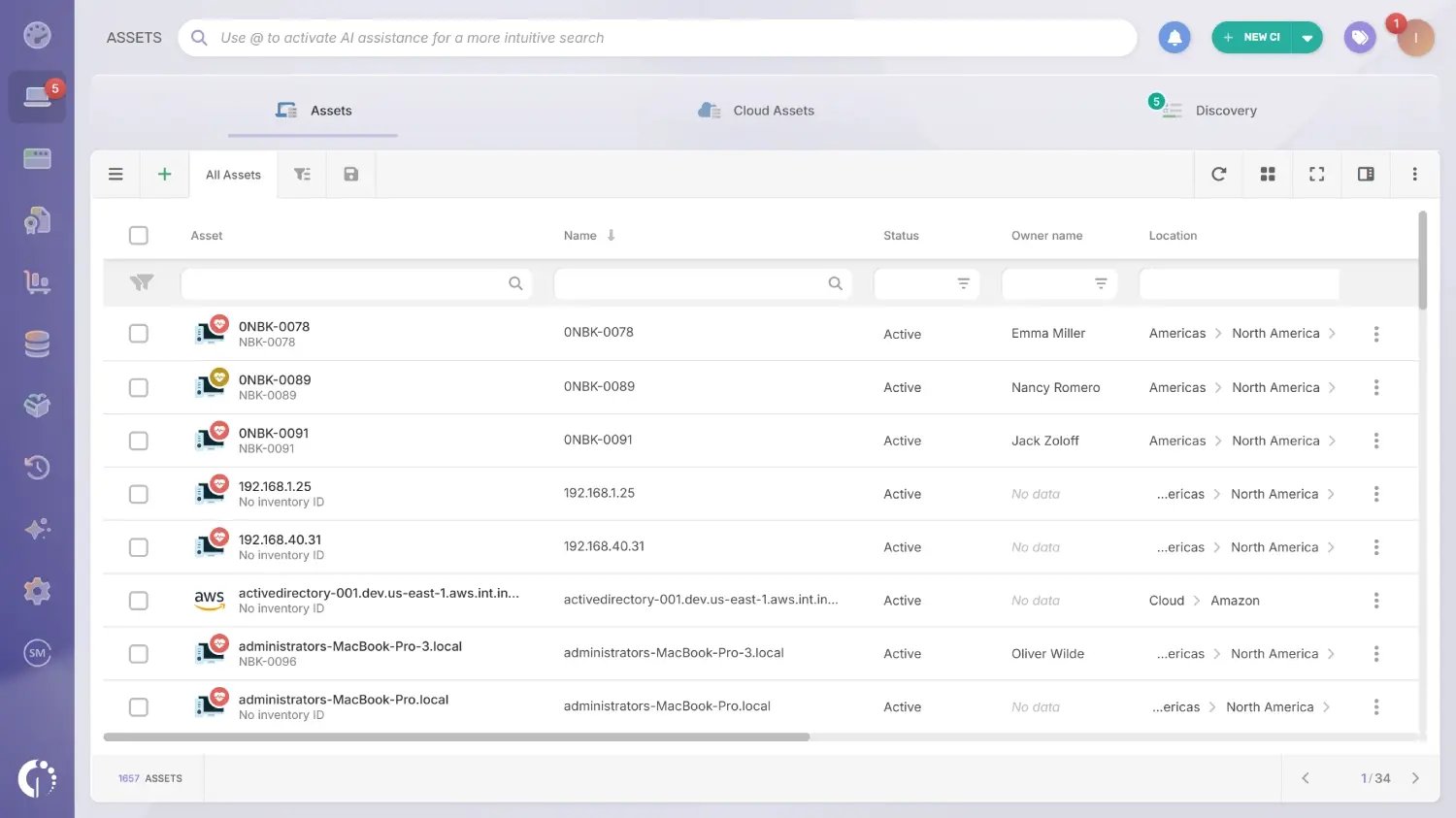
The inventory can be populated through multiple sources simultaneously: agent-based discovery, agentless network scanning, CSV imports, and integrations with tools such as Intune, Jamf, AWS, and Azure. Each source feeds into a single normalized record per asset, so conflicting data from different tools gets resolved rather than accumulated.
The platform tracks both IP and non-IP devices in the same inventory. This includes hardware, software, cloud assets, SaaS (Software as a Service) subscriptions, and any other asset valuable for the organization.
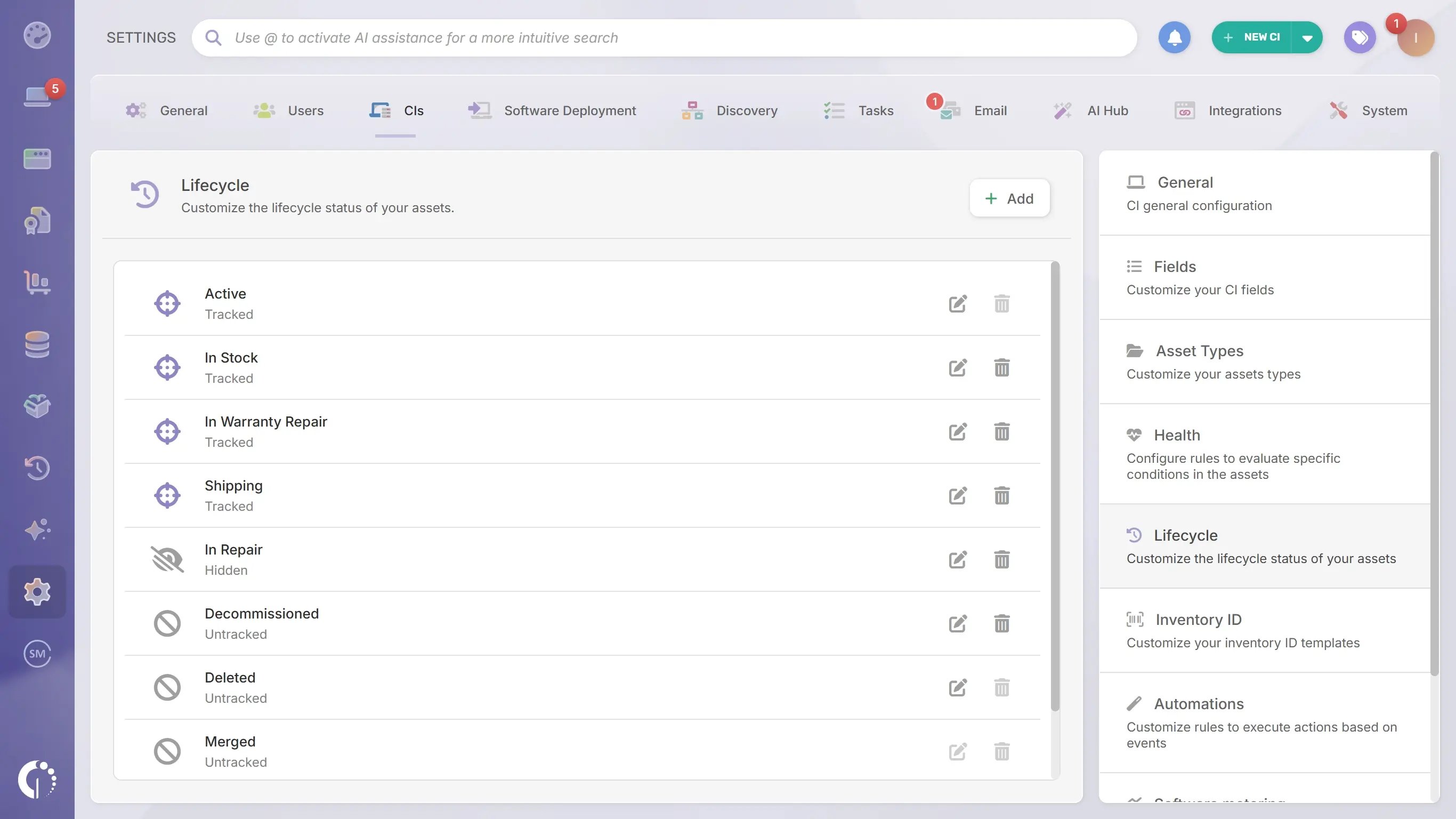
Asset states are configurable to match how each organization operates. "In stock," "deployed," "in repair," "pending retirement," and "disposed" are the default states, and teams can define their own to reflect processes specific to their industry or infrastructure. Custom attributes work the same way: if a field matters to the organization and isn't already in the record, it can be added.
Every state change is logged with a timestamp and linked to the user who made it, and location, assigned user, and configuration changes follow the same pattern. That chain of custody covers the full path from deployment to retirement, which makes audit preparation a lookup rather than a reconstruction.
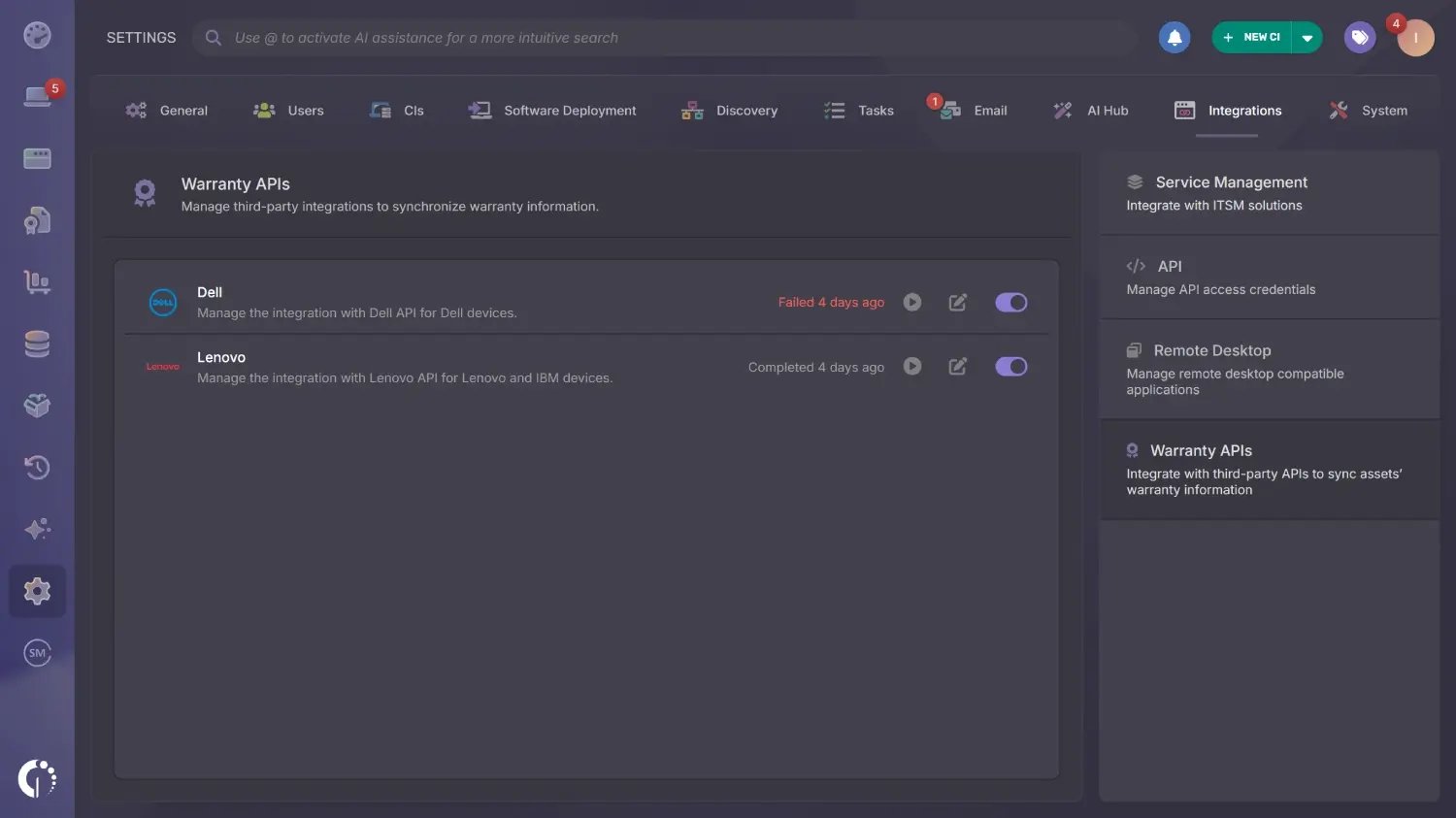 Warranty data usually lives in a vendor portal, which is why it ages badly inside the inventory. Warranty APIs remove that step: for Dell, Lenovo, and IBM devices with a serial number, the platform fills in the acquisition date and the warranty expiration date directly from the manufacturer. IBM devices are covered through the Lenovo API, and the configuration allows excluding specific assets by tag.
The Atlas module covers the other half of the lifecycle signal. It enriches asset records with end-of-life and end-of-support dates taken from official external references, so the team can see whether a device has already passed its EOL date and when vendor support ends without researching it manually. Atlas currently enriches computers, switches, routers, printers, and databases, and is available for cloud instances.

Health rules assign every device a status of Safe, Warning, or Critical based on conditions the team defines. The condition library covers six areas:
Conditions combine inside a single rule, which is where refresh prioritization gets precise. A device whose warranty has expired, whose open request count is above the threshold, and whose battery health has dropped below the defined level is costing the team money and time, and the rule marks it Critical with the evidence attached.
Smart Tags classify assets dynamically alongside Health rules. A tag such as "refresh candidate" or "warranty expiring in 90 days" applies automatically to any device that matches the criteria and drops off when the device no longer qualifies. The windows are fully configurable, so 90 days is one example among many.
Automations act on those signals. The native Upcoming warranty expiration automation sends reminders for devices approaching the end of their warranty period so replacements or contract extensions can be planned ahead of time. Custom automations combine an event, a set of conditions, and an action such as sending a notification, sending a report, or updating a field. Minimum-stock thresholds by category and location trigger alerts before a gap becomes urgent.
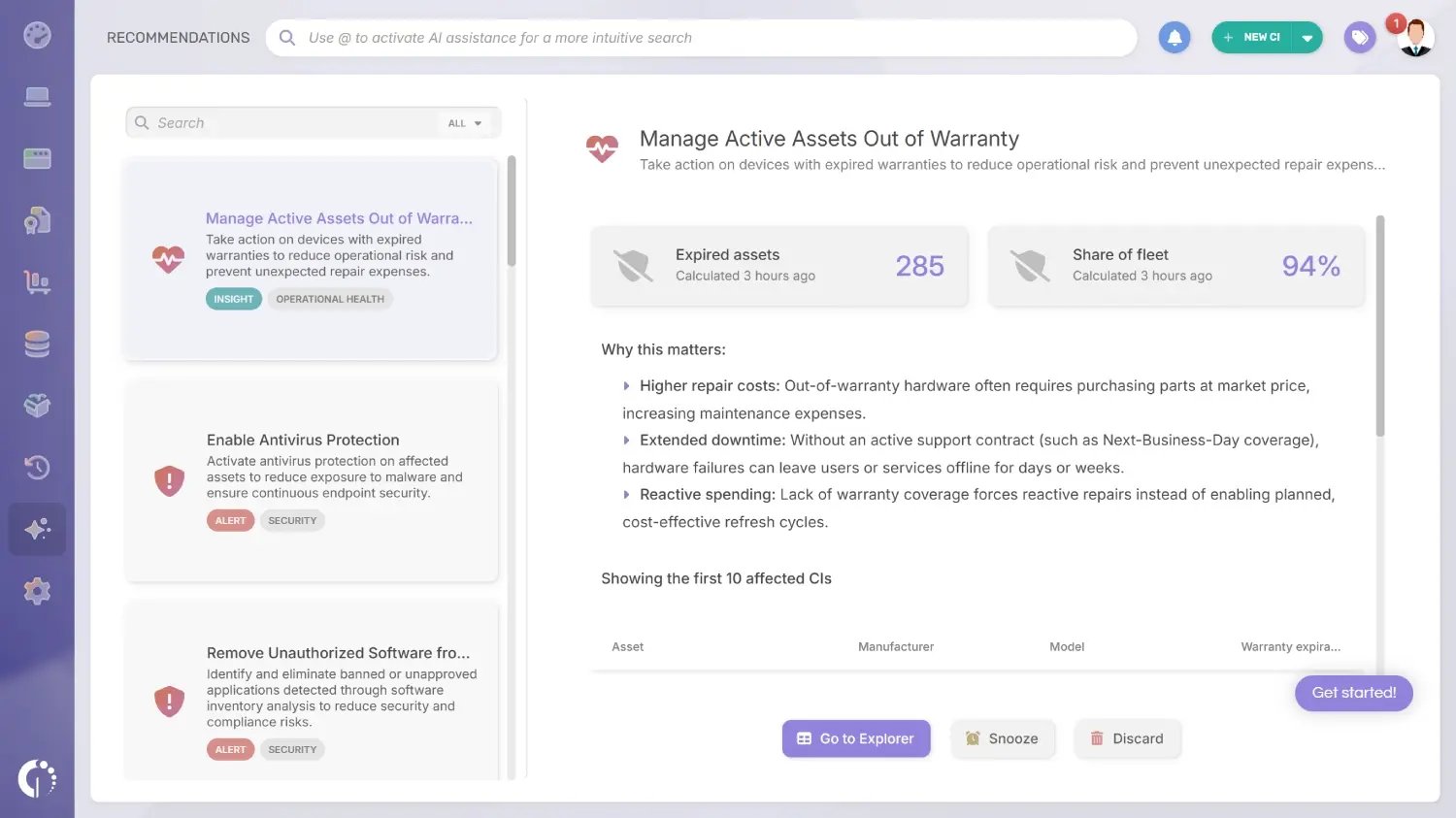
Smart Recommendations lives in the Intelligence Center, a dedicated module in the left-hand menu. It reads the asset data already in the platform and surfaces where the hardware estate needs attention. The module adapts to each environment: recommendations appear according to the asset families present in the inventory and the permissions of the user viewing them.
Suggestions are grouped into categories, so the type of opportunity or risk is clear before opening the card:
Three of those categories carry most of the weight in a refresh cycle. Cost Optimization surfaces the reassign-or-retire decision that a refresh plan exists to make, Operational Health points at the devices whose configuration is degrading day-to-day performance, and Data Quality catches the incomplete records that would distort the plan before it gets built.
What matters is what happens once a suggestion appears. Each one offers three ways forward:
That turns the module into a working queue for the refresh cycle. The team resolves what applies, defers what can wait, and removes what doesn't fit, so what stays on screen is the set of decisions the plan has to act on.
Unassigned hardware is tracked as inventory with its own state, so a stock check before a purchase request is a lookup in the platform. Minimum-stock thresholds by category and location generate alerts when available units drop below what the team defined, which gives procurement lead time instead of an emergency.
Purchase orders are managed in the same platform, which keeps the approved, ordered, and received stages attached to the assets they produce. When a device arrives and is received into the inventory, it enters as a tracked asset with its acquisition data already in place, and the discrepancy between procurement records and physical reality stops accumulating. Retirement closes the same loop: devices move to the disposal states the organization defined, with the full history of the asset preserved.
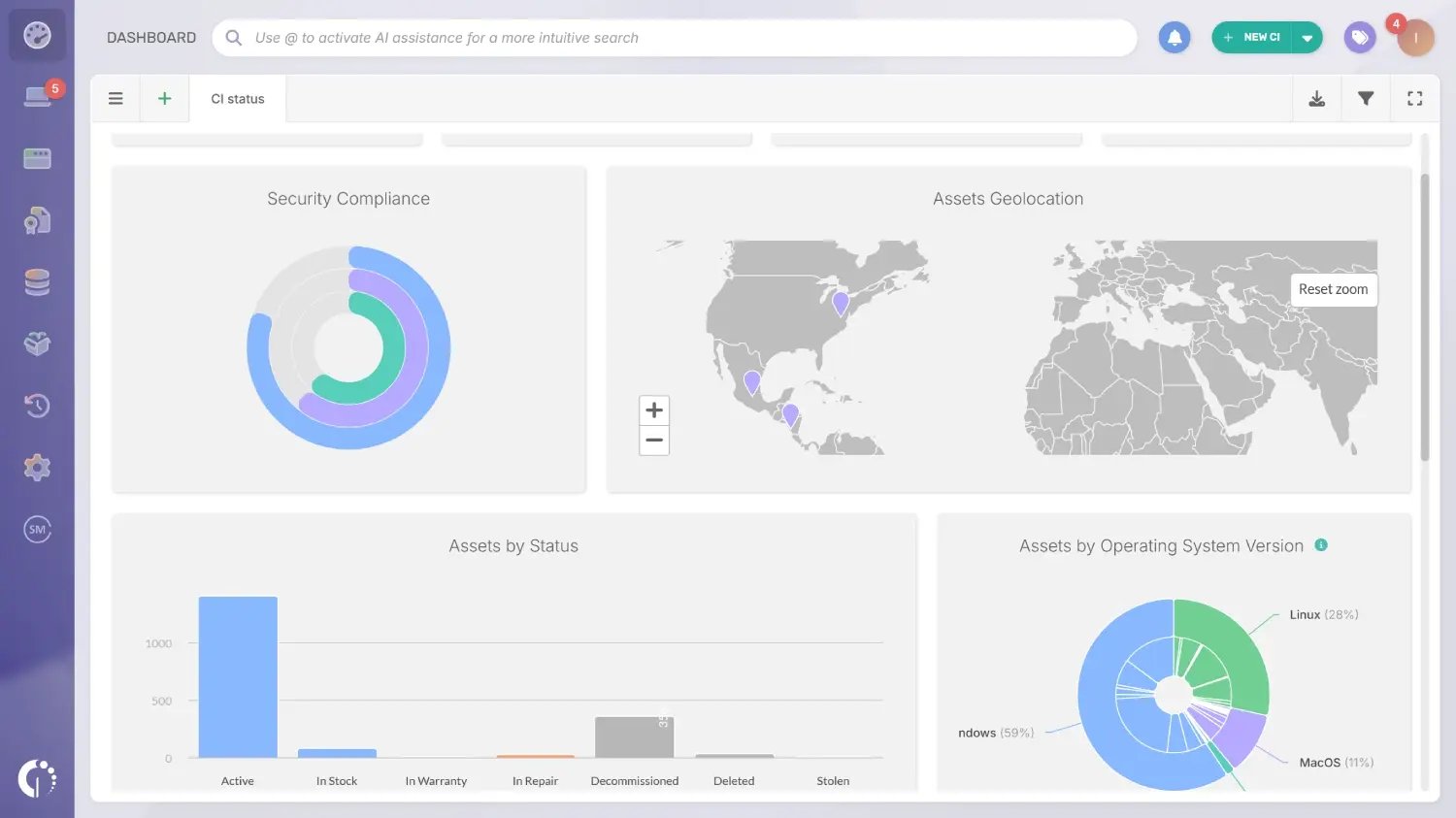
Dashboards give IT a current view of the hardware estate: devices by lifecycle state, warranty expiration distribution, refresh candidates by location or department, and stock availability. The data reflects the state of every record in the system at the time of the last scan.
Scheduled reports can be configured to run automatically and delivered to stakeholders on a defined cadence. When leadership asks how many devices need replacement this year, or what percentage of the fleet has expired warranties, the answer comes from a report.
Hardware refresh planning is only as reliable as the inventory that feeds it. Teams evaluating a Hardware Asset Management tool should look for a platform that covers this full lifecycle: from initial procurement to verified audits, stock tracking, and structured disposal. The complete IT Asset Disposition (ITAD) process covers what closing out retired hardware involves.
If your current inventory has gaps, or you're not confident it reflects physical reality, a free trial is a practical starting point. You can also talk to Sales to walk through your environment before committing to anything.
A hardware refresh plan defines which devices to replace, in what order, when, and how to manage the retirement of outgoing equipment. It is usually owned by IT Asset Management or IT operations, reviewed on a quarterly or annual cadence, and built from real lifecycle data: warranty expiration, manufacturer end-of-life dates, physical condition, and support ticket history. Without that data, what gets called a "plan" is a set of estimates.
The minimum set includes an inventory of active devices with model and serial number, physical verification of what exists at each location including non-networked assets, assignment and location records per device, warranty expiration and manufacturer EOL dates, unassigned stock available to deploy, and open or recently received purchase orders. Having those data points in a single authoritative source is what makes the plan reliable.
The industry standard places hardware refresh between three and five years, and purchase date alone remains an unreliable signal. More accurate prioritization combines warranty status, manufacturer end-of-life date, ticket volume for the specific asset, and physical condition from the most recent audit.
A hardware replacement is reactive: a device failed, and it gets swapped. A hardware refresh is a planned process that updates part or all of the hardware estate based on defined lifecycle criteria. Reactive replacements carry emergency procurement costs and unplanned IT time that are harder to budget for when the inventory is incomplete.
Yes, as long as the process is structured so that data quality improves with each cycle. Start with a physical audit to establish a verified baseline, reconcile existing sources, and prioritize assets where lifecycle data is most complete. Each cycle should leave the inventory in better shape than it started.

