










SQL Server 2016 End of Support took effect on July 14, 2026, when Microsoft closed the extended support phase of the database engine after ten years. IT teams, Database Administrators (DBAs) and IT asset managers look it up to confirm the dates, understand what stopped and decide what happens next with every instance still in production.
This article covers the official dates, what End of Support changes for your servers, how to find every SQL Server 2016 instance and check what each one needs, and the three paths Microsoft offers: upgrade, migrate or buy Extended Security Updates (ESU). It closes with the End-of-Support dates of every SQL Server version still in use and how InvGate Asset Management helps you plan the move.
SQL Server 2016 follows Microsoft's Fixed Lifecycle Policy, with five years of mainstream support and five years of extended support. According to the SQL Server 2016 lifecycle page, mainstream support ended on July 13, 2021, and extended support ended on July 14, 2026, together with Service Pack 3 (SP3), the last service pack Microsoft released for this version.
After that date, the only security coverage left is the paid ESU program, which runs in three yearly terms. These are the dates that matter:
SQL Server 2016 keeps running after July 14, 2026, and so do the applications that use it. What stops is Microsoft's side of the work: as Microsoft explains in its End-of-Support announcement, there are no more regular security updates or technical support for the product. According to the ESU FAQ, Microsoft won't open a support ticket for SQL Server 2016 without ESU, even when the organization has a support plan.
The risk grows with every vulnerability published after that date, because an unpatched database often holds the data an attacker is after. It also shows up in audits: in reviews such as SOC 2 or ISO 27001, auditors typically ask whether every database runs a version within its vendor's support window, a question that database governance practices are built to answer.
Every option Microsoft offers starts with the same list: where SQL Server 2016 runs, which edition and service pack each instance has, and what depends on it. The three subsections below cover each part of that list.
SQL Server 2016 can sit on physical servers, on virtual machines (VMs) in your own hypervisors and on VMs in a public cloud. Some instances arrive bundled with a vendor application, so the team that manages the server may not know a database engine is there.
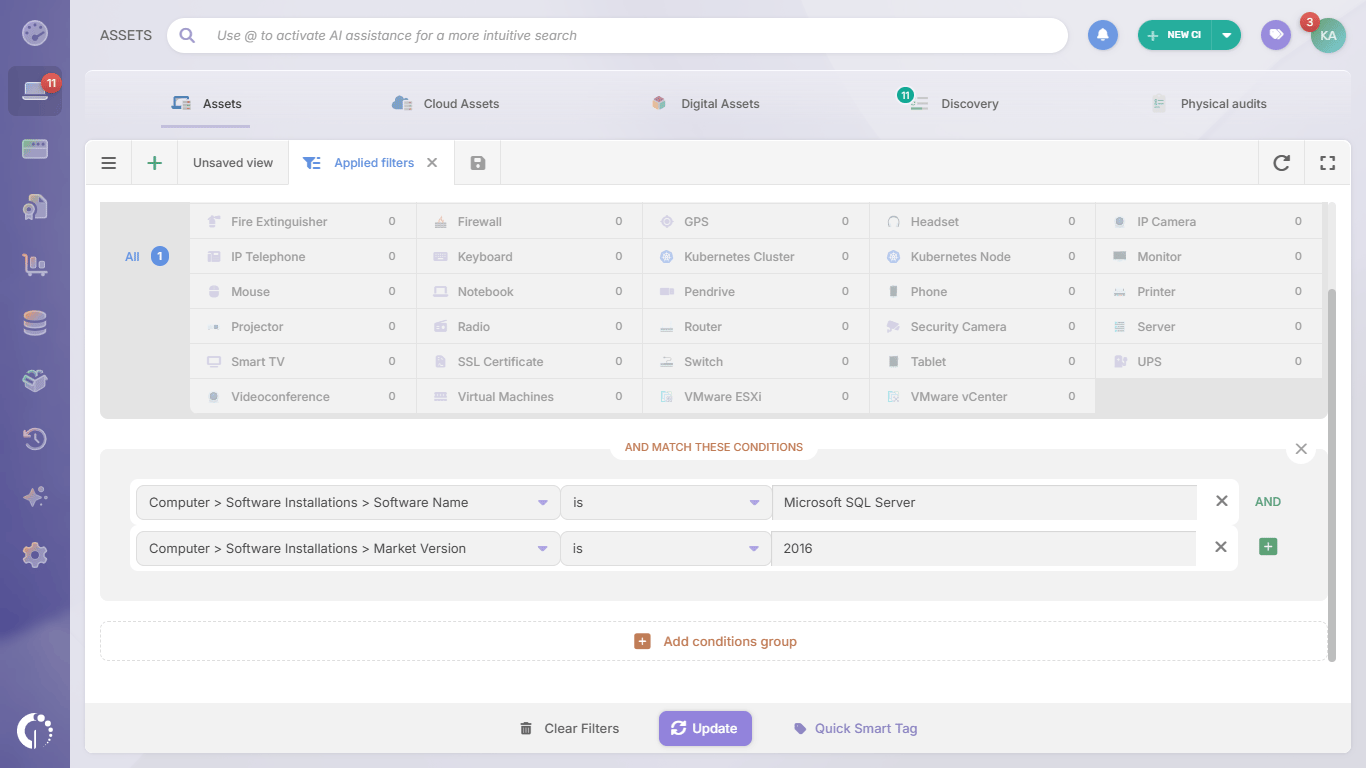
A cloud console or a hypervisor answers how many VMs exist. Which of them run SQL Server 2016 comes from the software installed on each machine, collected from every server and workstation into one inventory, so physical, virtual and cloud instances end up in the same list.
Edition and service pack decide which options an instance has. ESU is only available for Enterprise and Standard editions running the latest service pack, according to Microsoft's ESU FAQ, and an in-place upgrade to SQL Server 2025 requires SQL Server 2016 SP3 or later, according to the supported upgrade paths for SQL Server 2025. Express, Web and Developer editions can't subscribe to ESU.
To check all three values on any instance where you have query access, Microsoft's guide to finding the version and edition of the Database Engine documents this query, which returns the build number, the product level (the original release or the installed service pack) and the edition:
SELECT SERVERPROPERTY('productversion'), SERVERPROPERTY('productlevel'), SERVERPROPERTY('edition')
An instance is only as easy to move as the applications connected to it. For each one, record the applications and services that read from or write to its databases, whether each application vendor supports a newer SQL Server version, and the person who approves the change.
Check the operating system underneath as well. Many SQL Server 2016 instances run on Windows Server 2016, which reaches End of Support on January 12, 2027, so the Windows Server 2016 End-of-Life plan and the database plan usually belong in the same project.
Microsoft lists three paths for SQL Server 2016, and most organizations combine them instance by instance. The table compares them before the details of each one:
Microsoft recommends SQL Server 2025 for databases that stay on premises or in a hybrid environment. Its mainstream support runs until January 6, 2031, and extended support until January 6, 2036, and an instance running SQL Server 2016 SP3 or later can be upgraded in place.
Before you upgrade, check two details from Microsoft's documentation: Web edition doesn't exist in SQL Server 2025, so Web instances move to Standard or Enterprise, and keeping each database's compatibility level unchanged lowers the risk for applications, according to Microsoft's SQL Server End-of-Support options. SQL Server 2022 is also an option, with extended support until January 11, 2033.
Azure offers three destinations. Azure SQL Managed Instance is the closest managed service to SQL Server and usually needs minimal application changes, Azure SQL Database suits applications that don't need instance-level features, and SQL Server on Azure VMs keeps full control of the version and the operating system.
One detail changed from previous End-of-Support cycles. Moving SQL Server 2016 to an Azure VM no longer includes free ESU, according to Microsoft's ESU documentation: free ESU in Azure applied to SQL Server 2014, and SQL Server 2016 instances on Azure VMs pay for ESU like any other.
ESU delivers critical security updates for SQL Server 2016 until July 17, 2029, released only when Microsoft rates a vulnerability as Critical. It doesn't include new features, bug fixes or general technical support, and it requires Software Assurance or a subscription license, or pay-as-you-go billing through Azure Arc.
On the Azure Arc pricing page, Microsoft lists SQL Server 2016 ESU at $278 per month for Standard edition and $1,081 per month for Enterprise edition, per two-core pack, with the same list price wherever the instance runs (checked in November 2026). Licensing has a four-core minimum per VM, and billing starts on July 15, 2026, so a later subscription includes a one-time charge back to that date.
SQL Server 2016 is the most recent version to lose support, and the next deadline is close. The table lists the versions still in use, with the dates published on each version's Microsoft lifecycle page:
SQL Server 2014 and 2016 are the two versions with ESU: the last ESU term for SQL Server 2014 ends on July 12, 2027, and the one for SQL Server 2016 on July 17, 2029. SQL Server 2017 reaches End of Support on October 12, 2027, so an upgrade that lands on 2017 buys less than a year.
InvGate Asset Management is IT Asset Management software that offers an enterprise experience without the complexity or the price of one, with an intuitive interface, a no-code approach and fast deployment. For SQL Server 2016, it answers the question every option starts from: where each instance runs, what version it has and what depends on it.
The inventory is built with the Agent, network discovery, integrations and manual or CSV import, so physical servers, VMs and cloud instances sit in the same list. These capabilities cover the steps above:
 InvGate Asset Management runs in the cloud or on premises, including air-gapped environments, so the inventory can live wherever your database servers do. The platform holds SOC 2 Type II and ISO 27001:2022 certifications, listed in the InvGate Trust Center.
Element U.S. Space & Defense, a U.S. government contractor in engineering and testing for space and defense, had its asset data split across spreadsheets, Microsoft Intune and Microsoft Entra, with outdated software and no lifecycle tracking. With InvGate Asset Management, the team consolidated 1,700 assets across six sites into one inventory and started tracking software and patches on every device.
That inventory carried its own operating system migration. According to its case study, Element completed its Windows 11 migration in 45 days and raised update coverage from 55% to 95% across 1,700 devices.
SQL Server 2016 End of Support leaves every instance with three paths, and the right one depends on its edition, its service pack, the applications connected to it and the Windows Server version underneath. Teams that start from a complete inventory make those calls instance by instance and avoid finding forgotten databases during the next audit.
To see every SQL Server 2016 instance in your environment, start a free trial of InvGate Asset Management or talk to Sales about your migration plan. Either way, the first list of instances is where the decision for each one begins.
These are the questions IT teams ask most often about SQL Server 2016 End of Support. Each answer is based on Microsoft's lifecycle, ESU and upgrade documentation.
Yes. SQL Server 2016 and its databases keep running after July 14, 2026, but Microsoft no longer releases regular security updates or provides technical support, so every new vulnerability stays unpatched unless the instance is covered by ESU.
Until July 17, 2029, through the paid ESU program. ESU covers only critical security updates, it's available for Enterprise and Standard editions running the latest service pack, and Microsoft lists it at $278 per month for Standard and $1,081 per month for Enterprise per two-core pack.
Microsoft recommends SQL Server 2025, supported until January 6, 2036, for databases that stay on premises or in a hybrid environment. Instances running SQL Server 2016 SP3 or later can be upgraded in place; for workloads that can leave the data center, Azure SQL Managed Instance and Azure SQL Database avoid future upgrade cycles.
No. Free ESU in Azure applied to SQL Server 2014, and SQL Server 2016 instances on Azure VMs or Azure VMware Solution subscribe to ESU and pay for it, at the same list price as instances on premises.
Each product has its own date: SQL Server 2016 lost support on July 14, 2026, and Windows Server 2016 loses it on January 12, 2027. Many SQL Server 2016 instances run on Windows Server 2016, so planning both moves together avoids touching the same server twice.

