














Most IT teams learn their inventory is wrong the same way: someone opens a storage room the week before an audit and counts fewer laptops than the spreadsheet promised. Radio Frequency Identification (RFID) is the technology that closes the distance between those two numbers. RFID asset tracking reads hundreds of tagged assets in a single pass, without line of sight and without anyone finding each label by hand.
This guide covers how RFID asset tracking works in an IT environment, which tags belong on which hardware, where it beats Quick Response (QR) codes and barcodes, and what a rollout costs. It also covers the cases where RFID never earns back the reader, and what happens after the read, which is where most RFID content stops and where IT Asset Management (ITAM) actually starts.
An RFID system has three parts, and only one of them is attached to your hardware. The reader emits a radio signal, every tag in range draws power from that signal and answers with the code stored on its chip, and software matches each code against an asset record to decide what was found. Nothing is transmitted between reads, so an asset is visible to the system only during the seconds a reader is pointed at the room.
Most IT inventories that adopt this run on passive Ultra High Frequency (UHF) RFID, which means the tag carries no battery and draws its power from the reader. That single choice decides almost everything else about a rollout:
RFID needs no line of sight, which is its whole advantage over QR, but radio does not pass through everything. Open shelves, storage rooms, desks, racks with some clearance and assets still inside cardboard boxes read well, since cardboard is transparent to radio waves.
Reads degrade inside closed metal cabinets, on assets stacked flat and tight against each other, on tags facing into a metal chassis and near liquids, and they fail completely inside fully shielded enclosures. The reader only ever finds tags, so hardware that was never tagged, or that lost its label, shows up as missing even when it sits on the shelf.
RFID tags for IT assets come in two families, and hardware inventories almost always want the cheaper one. Passive RFID asset tags carry no power source and answer only when a reader energizes them. Active tags carry a battery, broadcast on their own, and reach much farther.
Active tags earn their cost on vehicles, shipping containers and heavy equipment moving across a yard. For laptops, monitors, servers and network gear sitting in buildings you control, passive tags are the default, and the decision that actually matters is which passive tag goes on which surface.
A standard RFID tag stops working the moment you stick it on metal. The metal reflects and absorbs the signal and detunes the antenna, so the tag reads at a few centimeters or does not read at all.
On-metal tags solve this with an engineered spacer that lifts the antenna off the surface, and they cost several times more than standard tags. They are required for notebooks, servers, switches, metal racks and metal enclosures. Standard tags are fine on plastic housings: monitors, docking stations, printers, peripherals and phones.
Read yield depends on physical decisions more than on which tag you bought. Keep tags at 2 x 1 inches (51 x 25 mm) or larger, and use the same position and the same orientation on every unit of a given model, because reader antennas are polarized and consistency is what lets one pass capture everything the first time.
On laptops, the bottom chassis near the rear hinge or an outer corner works well, clear of vents, manufacturer service labels and rubber feet. The chip itself outlasts the hardware by a wide margin, since NXP rates its UCODE 9 tag chip for 20 years of data retention at up to 55 °C and 100,000 write cycles, against a laptop refresh cycle of three to five years. What fails in practice is the label, through scratching, peeling or removal, so budget a small share of replacement tags each year.
QR codes, barcodes and passive RFID each buy something different, and most IT inventories end up running at least two of them. The comparison that matters for IT hardware is what a label costs against how long it takes to read a room.
Barcodes and QR codes cost nothing to produce and need no hardware budget, which makes them the right first step for most teams. RFID buys back time in one specific place: locations where someone would otherwise find and scan a few hundred labels one at a time, several times a year. Inside InvGate's audits, QR and RFID are available today, and barcode scanning is coming soon.
An RFID rollout has three line items: the readers, the tags, and the work of getting a tag onto every asset. Only the first one looks like a purchase order.
Tag and reader prices move with volume, region and reseller, so treat the figures below as sizing guidance for an investment. They come from publicly listed prices and ranges, and the two readers named here are the only models the InvGate mobile app supports today, because it is built on the Zebra RFID SDK. Naming them reflects that technical requirement and does not endorse any brand.
RFID readers for this job are integrated handhelds, with the radio built into the device. Zebra's TC22R is the default choice: a 6 inch touch device rated at a nominal 12.2 m read range and up to 1,300 tags per second, sealed to IP65, with an SE4710 imager that also handles QR scans. The MC3330xR is the alternative when a team needs a pistol grip, a physical keypad or cold storage operation, since it keeps working down to -20 °C, with a nominal range of about 6 m and up to 900 tags per second.
Both sets of figures are laboratory ceilings. In InvGate's own testing, a small label on a laptop inside a stack reads at roughly 1 to 3 m, which still captures a room without aiming at anything. As of September 2026, AtlasRFIDstore lists the TC22R at about 1,500 dollars and the MC3330xR at about 3,400 dollars. Four things decide what the reader line item actually looks like:
Passive tag prices are published as ranges, without fixed list prices. AtlasRFIDstore puts entry-level labels at roughly 5 to 50 cents each in bulk, standard tags at 50 cents to 2.50 dollars, and specialty formats, including on-metal, at up to about 4 dollars.
Unit price is rarely what sets the first invoice, because tags are sold by the roll and roll minimums run into the thousands for standard labels. Tagging 200 monitors can still mean buying a roll sized for the next several years of purchases, so build the order around roll sizes and around the hardware still to arrive. Adding tagging to the receiving process is what keeps coverage from decaying after the first pass.
InvGate also supplies tags in its own format, encoded before the roll ships, so the QR code and the RFID identity are already paired when they arrive and there is nothing to encode on site. Start a free trial to run a first audit with QR codes, or schedule a call with our Sales team to plan tags and readers for your sites.
The reader is a one-time cost reused in every audit, and tags are consumed one per asset. The payback therefore comes from audit work saved every year, which makes the real questions how often you count and how densely the inventory sits.
Published guidance on this tends to stay vague about the threshold. Three conditions have to hold together, and the organizations that meet all three are usually regulated, audited several times a year, and running a small infrastructure team.
RFID earns the hardware back when the same locations get counted repeatedly. A storage room with 200 tagged assets is a few minutes of walking, against hours of finding and scanning 200 individual labels, and that difference repeats at every single audit.
Three conditions show up together in the deployments that work:
RFID is not always worth the hardware, and specifying it properly means saying so out loud. QR codes cost nothing to print, work from any phone camera, and cover the same counting workflow one asset at a time.
Skip the reader when any of these describe the situation:
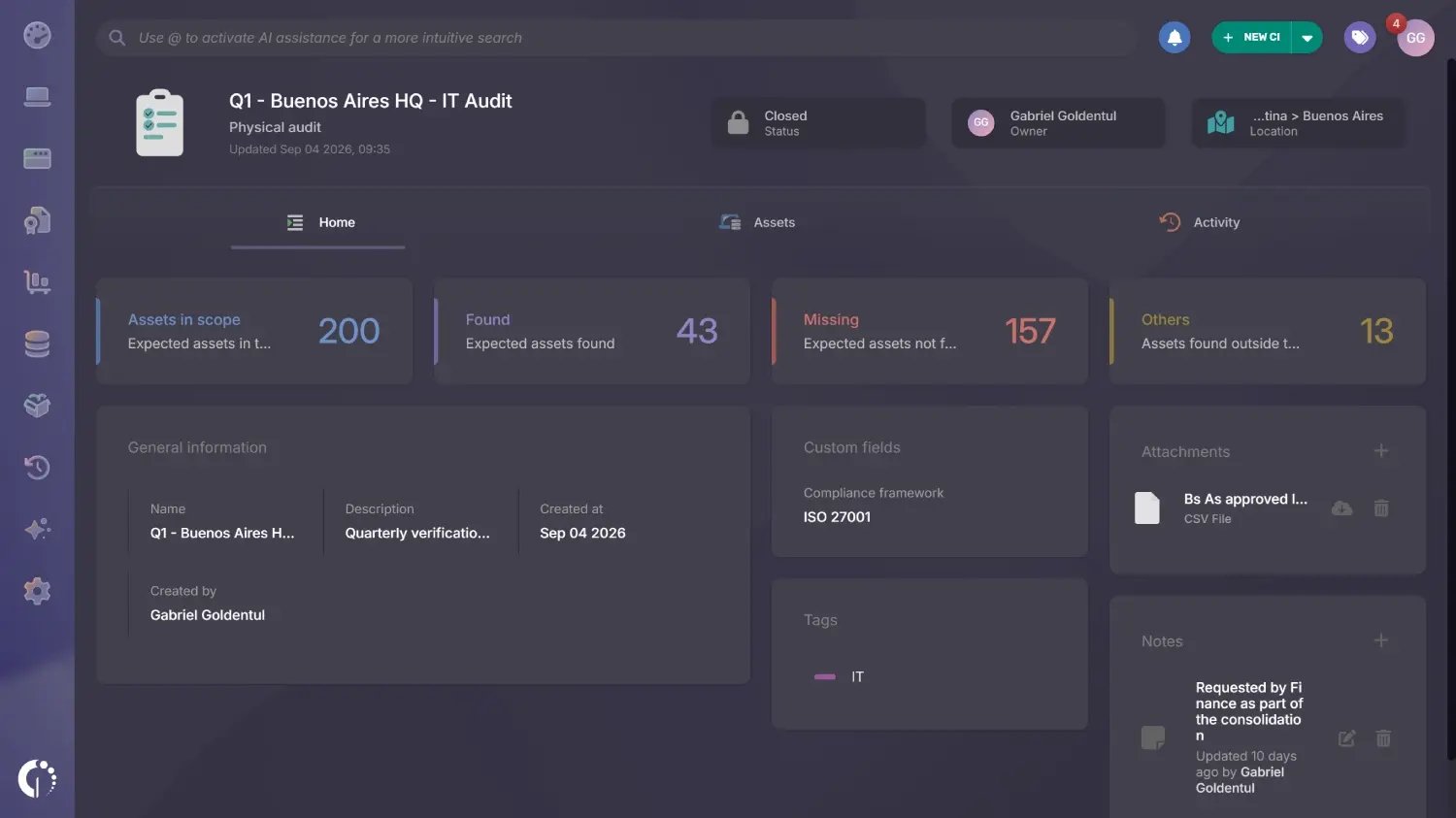
InvGate Asset Management runs RFID as part of physical audits, the counting exercise the rest of this guide has been describing. Discovery covers everything that talks to the network, and physical audits cover what does not: the monitor, the switch in a closet, the fifteen laptops in a storage room. You create an audit for a location, walk it with a supported reader, and the platform compares what was read against what it expected to find there.
Three capture methods feed the same audit: an RFID reader for bulk reads, QR codes scanned one asset at a time, and manual entry of identifiers from a desktop for teams that run their physical inventory count another way. A full pass runs in five steps:
An asset only shows up in an RFID audit when two things are true: the tag is physically attached to the hardware, and the asset record carries the code that tag holds. For RFID that code lives in the Physical asset tag (RFID) field on the Hardware card of the asset profile, and an asset with an empty field stays invisible to the reader no matter how many times someone walks past it.
Getting the code onto the record is the part that usually stalls a rollout, so there are four routes into that field:
Audits live in the Assets module, in the Audits explorer, and the plus button opens a New audit form with three tabs. The General tab carries the name, an optional description, the owner responsible for the audit, and tags, which also govern who else can act on it, while the Additional tab holds any custom fields configured for physical audits, which is where a regulated team records whatever its own audit procedure requires.
The Scope tab is where the expected set gets built, because it decides which assets the platform will expect to find:
Results reach the audit three ways, and they mix freely inside the same one. An auditor with a supported Zebra reader holds the trigger and walks, the app reads continuously and matches every code against the Physical asset tag (RFID) field, and progress shows on screen as a percentage and a running count of found assets against expected ones.
The other two routes cover what RFID cannot, and a few behaviours matter once people are in the field:
Results sit at two levels, and the audit summary shows both: Assets in scope, Found and Pending describe the expected set, while Others counts everything read that falls outside it. The detail view splits the same information into In scope, Extra and Unknown, and the split matters because a count of what is absent and a count of what sits in the wrong place are two different problems with two different fixes.
Within those levels each asset lands in one of the states below. The one to watch is Missing, which does not exist while an audit is open, because expected assets stay Pending until the audit is closed:
Closing locks the audit and records the result on the assets, which is the step that turns a walk into evidence. Pending assets become Missing, and each expected asset's Last physical audit card is updated with the audit name, date, location and result, while the asset's activity log records every close, which gives the chain of custody one dated entry per count. Closing cannot be undone, so it is worth reviewing the Others group before committing.
From there the findings become ordinary inventory work:
RFID asset tracking is worth the hardware when dense locations get counted several times a year by a team too small to do it one label at a time. Below that threshold, QR codes on a phone cover the same workflow for the price of printing labels, and they leave every asset ready for RFID later. You can try InvGate Asset Management free for 30 days and run a first audit with QR, or talk to Sales about what an RFID rollout would look like across your sites.
The technology decision is the smaller half of the problem, because what turns a read into an accurate inventory is the record waiting on the other end. Teams weighing this usually need to settle two things first: which asset tracking method and tool fits the estate, and what actually goes on the label when they tag IT assets.
These are the questions that come up most often when teams first scope RFID inventory tracking, before any hardware has been bought. Each answer follows from the sections above.
Not the tags used for asset inventory. Phones read NFC tags at a few centimeters, but none carry the ultra high frequency radio that passive asset tags need, so RFID inventory tracking runs on a dedicated handheld reader. Phones can read QR codes, which is why QR is the usual starting point for teams that want to tag their inventory before committing to reader hardware.
Passive tags have no battery and answer only when a reader energizes them, which makes them cheap, small and maintenance-free. Active tags carry a battery and broadcast on their own, reaching much farther at a much higher cost per tag. IT hardware inventories almost always use passive tags.
The cost breaks into three parts: readers, tags and the labour of tagging. Passive tags run from a few cents to a few dollars each depending on type, with on-metal formats at the top of that range, and they are sold in rolls with minimum order quantities that often set the first invoice. Handheld readers are a one-time purchase, publicly listed at roughly 1,500 to 3,400 dollars for the two models covered here, reused in every audit, and you need one per person auditing at the same time.
Only on-metal tags do. Metal chassis reflect and absorb radio signals and detune a standard tag's antenna, so a normal label stuck to a laptop reads poorly or not at all. On-metal tags include a spacer that lifts the antenna off the surface, and they are required for notebooks, servers, switches and metal enclosures.
No. RFID reports which tagged assets were present at a location at the moment someone scanned it. It gives no continuous position and no location for an asset nobody has scanned recently, which is a different capability from GPS or any location system that reports position on its own.
Yes, and mixed inventories are common. Assets that cannot take an RFID tag, or that have not been tagged yet, can be scanned individually by QR code inside the same audit. That also makes it practical to start with QR at no hardware cost and add RFID later where asset density justifies it.


