














Plenty of small IT teams start on Google Workspace and soon ask the same question: is Google Endpoint Management enough to run the device inventory, or does the company need a dedicated IT Asset Management (ITAM) tool as well? The question gets sharper when someone above IT points out that endpoint management already comes with the subscription. It sounds like a free inventory, and nobody wants to pay twice for the same thing.
This guide answers that question with Google's own documentation as the reference. It covers what Google Endpoint Management manages on each platform, where its records stop, and when an ITAM tool earns its place next to it. It closes with how to feed Google's device data into an inventory that also tracks lifecycle, contracts, licenses, and costs.
Google Endpoint Management is the device management built into the Google Admin console, the same place where admins manage Google Workspace users, security, and services. Google says it covers mobile devices, desktops, laptops, ChromeOS devices, Windows 10 or 11 devices, and other endpoints, and how deep Google Workspace device management goes depends on the platform and on the Workspace edition.
Google offers two levels of Mobile Management. Basic management is agentless, so nothing gets installed on the phone. According to Google's comparison of Mobile Management features, it includes:
Advanced management adds strong passcode enforcement, device approvals, full remote device wipe, iOS app management, Android work profiles, security policies, and company-owned device enrollment. Google lists agentless management under the basic level only, so advanced management needs more setup on each device. It requires Business Plus, Enterprise, or an equivalent Frontline, Education, or Cloud Identity Premium edition.
On Windows 10 and 11, Windows Device Management lets admins set users' permission levels, turn on BitLocker encryption, manage automatic Windows updates, block apps or USB drives, and wipe a device. It is available from Business Plus upward. Mac and Linux computers get lighter coverage through endpoint verification, which lets admins see device details and control access to company data.
ChromeOS devices come closest to asset tracking. The Admin console lists each device's serial number, enrollment time, last policy sync, and user, plus editable fields for asset ID, location, and notes. Admins fill those fields in by hand, which makes Chromebook fleets the easiest to track inside the Admin console.
For company-owned devices, admins can import a list of serial numbers and asset tags from a CSV file. Listed devices are approved automatically when a user adds a work account, and the company-owned inventory shows serial number, import date, type, asset tag, and whether each device is assigned. Which devices can be imported depends on the edition: most computers can be listed on almost any edition, while Android and iOS devices need advanced management and higher tiers.
On the reporting side, higher editions add a monthly report of inactive company devices, which flags company-owned Android devices that haven't synced work data in 30 days. Together, these tools give IT a list of enrolled devices and their security state. It's also the list many teams take for an asset inventory.
Google groups endpoint features into three tiers, and the Workspace pricing page maps them to plans:
The names cause part of the confusion. G Suite was the previous name of the same subscription, and Google Cloud announced Google Workspace as its new brand on October 6, 2020, which is why older editions still appear as "G Suite Basic" and "G Suite Business" in Google's documentation. Google Endpoint Management is a set of features inside that subscription, so what an organization gets depends on the Workspace edition it pays for.
Google Endpoint Management keeps track of devices so it can secure them and control their access to company data. Everything a device record holds serves that purpose, and the gaps below come from comparing Google's own feature lists and device fields with what an asset inventory needs to record.
Google's feature set comparison covers security, device management, app management, and reporting, and none of its tiers include lifecycle stages. There is no way to record when a device was requested, purchased, received, deployed, repaired, retired, or disposed of. A device record starts when the device enrolls or its serial number is imported, and it ends when someone removes it.
The one exception is ChromeOS. Google's directory data includes the date after which a Chromebook stops receiving Chrome updates, which works as a replacement signal for that fleet. Google's documentation shows no equivalent field for phones, tablets, or other computers.
The mobile device details Google lists cover security properties, hardware and operating system build information, user information, and installed work apps. They include no purchase date, warranty expiration, vendor, or support contract. Chromebooks bought directly from Google show an order number and support end date, and that is the full extent of it.
Contracts are outside the scope entirely. Leases, support agreements, and software subscriptions have no place to live in the Admin console, so renewal dates stay in whatever spreadsheet or inbox the team uses today.
The Admin console manages licenses for Google's own services: a user needs a license for Google Workspace before using Gmail or Drive. For third-party software, Google Endpoint Management shows the managed work apps on Android devices and the apps from the managed list on iOS.
It doesn't record how many seats of a product the company bought, who holds each one, or whether installations exceed what the contract allows. License Management for tools like Adobe, Autodesk, or Microsoft 365 needs a separate system.
No device field in Google's documentation holds acquisition cost, current value, or depreciation. The only cost-related field is the cost center, which belongs to the user's directory profile.
That leaves finance questions unanswered. How much hardware the company owns, what it's worth today, and what next year's replacements will cost all have to be rebuilt outside the console, which is the core of IT Financial Management.
Google Endpoint Management only sees what enrolls or gets imported. A laptop still in its box can sit in the company-owned inventory as a serial number and asset tag, with nothing else recorded about it.
Everything that can't sign in to a Google account is left out: monitors, docking stations, printers, network switches, headsets, and any non-IT asset the team is responsible for. Those items still get bought, assigned, lost, and audited.
A device record in the Admin console stands alone. It doesn't show which business service a laptop supports, which server an application runs on, or what would be affected if a switch fails.
Mapping those dependencies is the job of a Configuration Management Database (CMDB). Without one, change planning and incident analysis depend on whoever remembers how things connect.
An audit asks for more than a device list. Auditors want proof of who had each asset and when, when it was bought, whether its software was licensed, and how it was disposed of.
Google Endpoint Management can answer the security part: encryption status, passcode compliance, and device audits and alerts. For a regulated company, the rest of the evidence has to come from somewhere else.
For most companies, no. Google Endpoint Management secures and controls the devices that sign in to Google Workspace, while an ITAM tool records every asset the company owns across its whole life, including cost, contracts, and licenses. A company that needs Google Workspace asset management gets the device security half from Google and needs a second system for the rest.
The table sums up what each one covers:
For some teams, Google's tooling covers the need. If the job is to set passcode and encryption policies, push approved apps, control which devices reach company data, and wipe a lost phone, that is Endpoint Management. Google Endpoint Management handles it inside a subscription the company already pays for.
A small, all-Google company with a few dozen Chromebooks, no audit obligations, and no finance team asking about hardware value can live with the Admin console and a spreadsheet. Teams that need deeper device control across mixed fleets tend to move toward Unified Endpoint Management (UEM) platforms, which is still endpoint work.
The need for ITAM shows up in questions the Admin console can't answer. These are the most common signals:
Any one of these signals means the device list needs to become an asset inventory. At that point, Google's data is still useful as a source, and it can feed IT Asset Management software that holds the rest of the record.
InvGate Asset Management is a no-code ITAM platform that keeps hardware, software, cloud, and non-IT assets in a single inventory, with automations, reports, and dashboards built on top. It runs in the cloud or on-premises, and plans start at $1,499 per year for 500 Internet Protocol (IP) devices, with two non-IP devices included for each one.
For Google Workspace customers, it connects to Google as a discovery source and imports Chromebooks and mobile devices on a schedule, which our guide to Android Device Management covers for Android phones and tablets. Google keeps managing security and access, and InvGate Asset Management adds the lifecycle, financial, license, and audit records that Google Endpoint Management doesn't hold.
Here's what that combination gives the IT team:
Want to see your Google devices in one inventory with everything else? Start a free trial of InvGate Asset Management or talk to Sales about your setup.
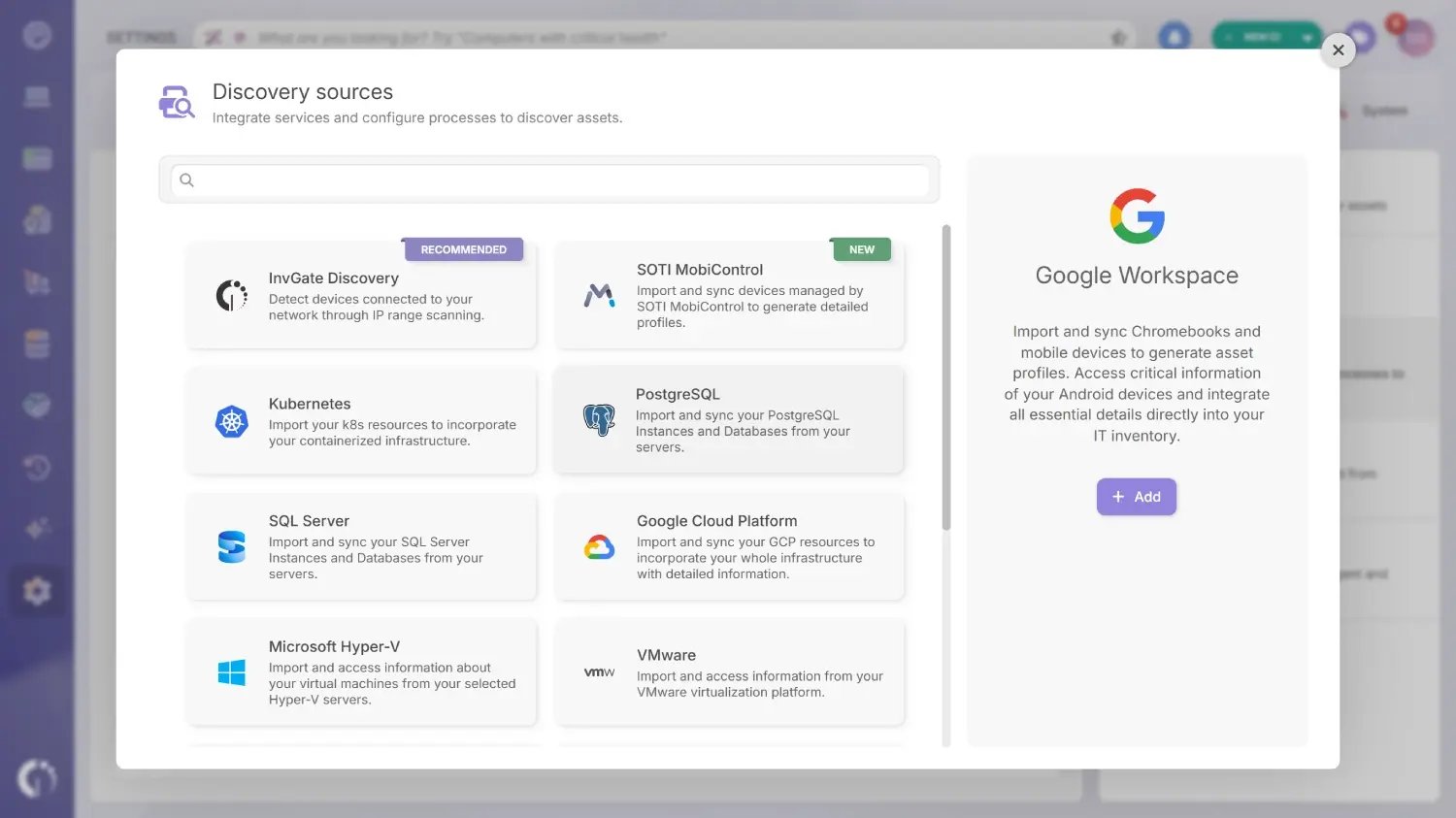 The setup has two parts: creating credentials in Google Cloud and adding the discovery source in InvGate Asset Management. Both parts need a Google account with admin privileges, so it helps to have one ready before starting.
In the Google Cloud console, signed in with a Google admin account:
Then, in InvGate Asset Management:
Each imported Chromebook or mobile device gets its own asset profile in InvGate Asset Management. For Android devices, the record includes device type, manufacturer, model, screen size, serial number, storage, RAM, IPv4 address, CPU, and battery status.
From there, the device behaves like any other asset: it can be assigned, tagged, given a cost and warranty, and included in audits. The discovery source list shows the status and date of the last sync, the number of devices found, and logs for each run, so IT can check the connection without opening Google.
Google Endpoint Management does its job well: it secures the devices that sign in to Google Workspace and controls what they can reach. Its records stop at what that job needs, so lifecycle, warranties, contracts, licenses, costs, and every asset that never enrolls stay outside it.
Teams that only need device security can stay with Google. Once audits, finance, or a mixed fleet come into the picture, Google Endpoint Management works best as one data source for an ITAM tool that keeps the full record.
Google Endpoint Management is the device management included in the Google Admin console. Google describes it as a way to manage your organization's devices in the same console used for Google Workspace security, services, and accounts, covering Android, iOS, Windows, and ChromeOS devices.
Google Endpoint Management is included with Google Workspace, so it has no separate price. The feature tier depends on the edition: Business Starter and Standard get Fundamental, Business Plus gets Advanced, and Enterprise plans get Enterprise.
Both are endpoint management tools. Microsoft describes Intune as a cloud service to enroll, configure, secure, and update devices and deploy apps, and says most organizations get it through a Microsoft 365 bundle. Google Endpoint Management fits companies built on Google Workspace, and InvGate Asset Management can import devices from either one.
Google MDM is a common shorthand for the mobile device management (MDM) part of Google Endpoint Management. Google's own documentation calls it Google endpoint management, and it covers computers and ChromeOS devices as well as phones and tablets.
G Suite was the previous name of Google Workspace, which Google announced as its new brand in October 2020. Google Endpoint Management is the device management included in Google Workspace, with features that depend on the Workspace edition.

