








CVE-2026-115560 is a critical vulnerability in PHP's session upload progress feature that can let an attacker run code on a web server. PHP fixed it on November 19, 2026, in a security release that ships PHP 8.5.13, 8.4.28, 8.3.37 and 8.2.36, and the fix is also part of PHP 8.6.0, the new branch released the same day. Exposure depends on two things: the PHP version each server runs and how its sessions are configured.
If you're handling CVE-2026-115560 right now, start with the action plan below. Then check which PHP versions fix it and which setups are exposed, and follow the steps to find every server that still needs the update with InvGate Asset Management, using a Smart Tag to build the work list and a dashboard to track the fix.
These six steps take you from the release announcement to an environment where every PHP install has the fix. The sections below cover the versions, the conditions and how to build the server list.
PHP fixed CVE-2026-115560 in every supported branch as part of its regular four-week release cycle, according to PHP's security announcement. The table shows the version each branch needs, as listed in PHP's ChangeLog, and how long PHP supports it.
According to PHP's supported versions page, 8.2 reaches End of Life on December 31, 2026, so a server on PHP 8.2.36 is protected from CVE-2026-115560 and still needs an upgrade plan. Servers on 8.1 or older run deprecated software that PHP no longer patches, and they stay exposed until they move to a supported branch or get a fixed package from their Linux distribution or long-term support vendor.
The flaw sits in session upload progress, the PHP feature that stores the status of a file upload in the user's session. According to PHP's security advisory on GitHub, an attacker can submit an upload that PHP writes with one session serializer (php_binary or php_serialize) and that is later read with another (php), and an application with a suitable chain of classes can end up running the attacker's code. PHP rates it Critical, with a Common Vulnerability Scoring System (CVSS) v4 score of 9.2.
The mismatch appears when an application switches session.serialize_handler to php at runtime before it calls session_start(), or when separate applications, PHP-FPM pools, virtual hosts or command-line jobs with different settings share the same session storage. Servers where every reader and writer of the session data uses the same serializer don't create it, which is why PHP says its critical issues this month require "non-default configuration or uncommon setups."
PHP's advisory asks teams that can't update yet to set session.upload_progress.enabled=0 in every configuration that can write to the affected session storage. The setting has to apply before PHP reads the request, in php.ini, a PHP-FPM pool or the server configuration, because calling ini_set() from the application is too late, and PHP already recommended this setting in its informational advisory of October 23.
Teams that need the feature have to keep the same session.serialize_handler in every application and process that reads or writes the same session data, and isolate the session storage of applications that use different formats. That rule still applies after the update: the fixed releases disable session upload progress by default and reject runtime changes to session settings while it is enabled, and an explicit setting that turns the feature on overrides that default.
InvGate Asset Management is IT Asset Management software whose software inventory records the PHP version installed on each computer the Agent covers. With a Smart Tag and a dashboard, you get the list of servers that still need the PHP security release and a view of how the update is progressing.
The Agent reports the version of every PHP installation and doesn't read PHP configuration files, so the tutorial builds the list of servers to update, and your team checks the session settings on each one. The inventory comes from four sources: the Agent, network discovery, integrations and manual or CSV import. This tutorial relies on the software installations the Agent reports, so the servers and computers you want to check need the Agent installed.
Start in the Asset Explorer with a filter that keeps every asset with PHP and leaves out the ones already on a fixed release. All the conditions go in the same group, joined by AND, so an asset has to meet every one of them:
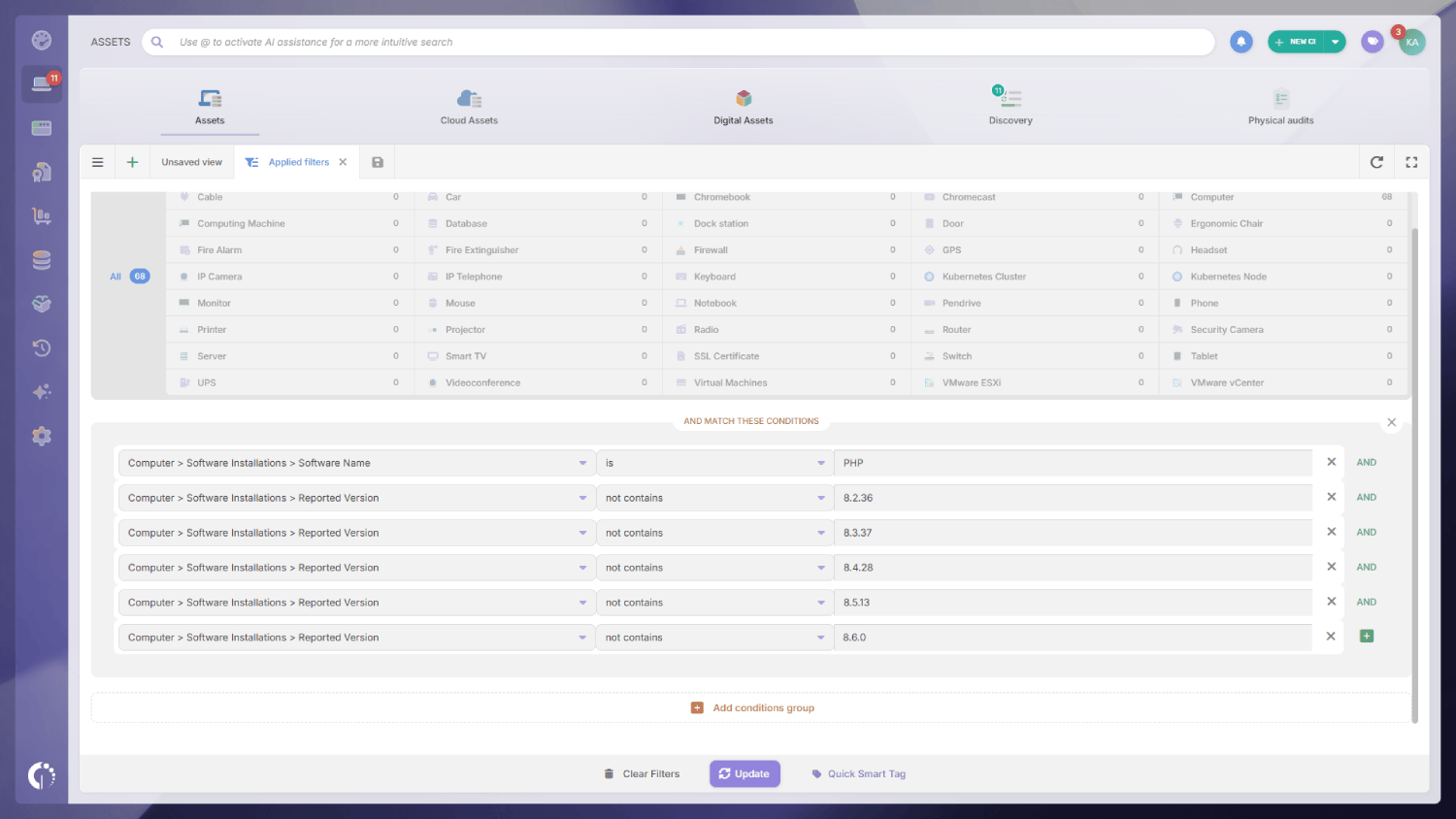
Reported Version holds the full version the system reports, which on Linux can include the package suffix (8.3.37-1, for example), and the "not contains" condition leaves those patched packages out of the list too. Market Version holds the branch (8.3), and the dashboard uses it later to group the results.
A Smart Tag turns the filter into a list that maintains itself. Assets join the tag when they match the conditions and leave it when they stop matching, for example after the Agent reports a fixed version:
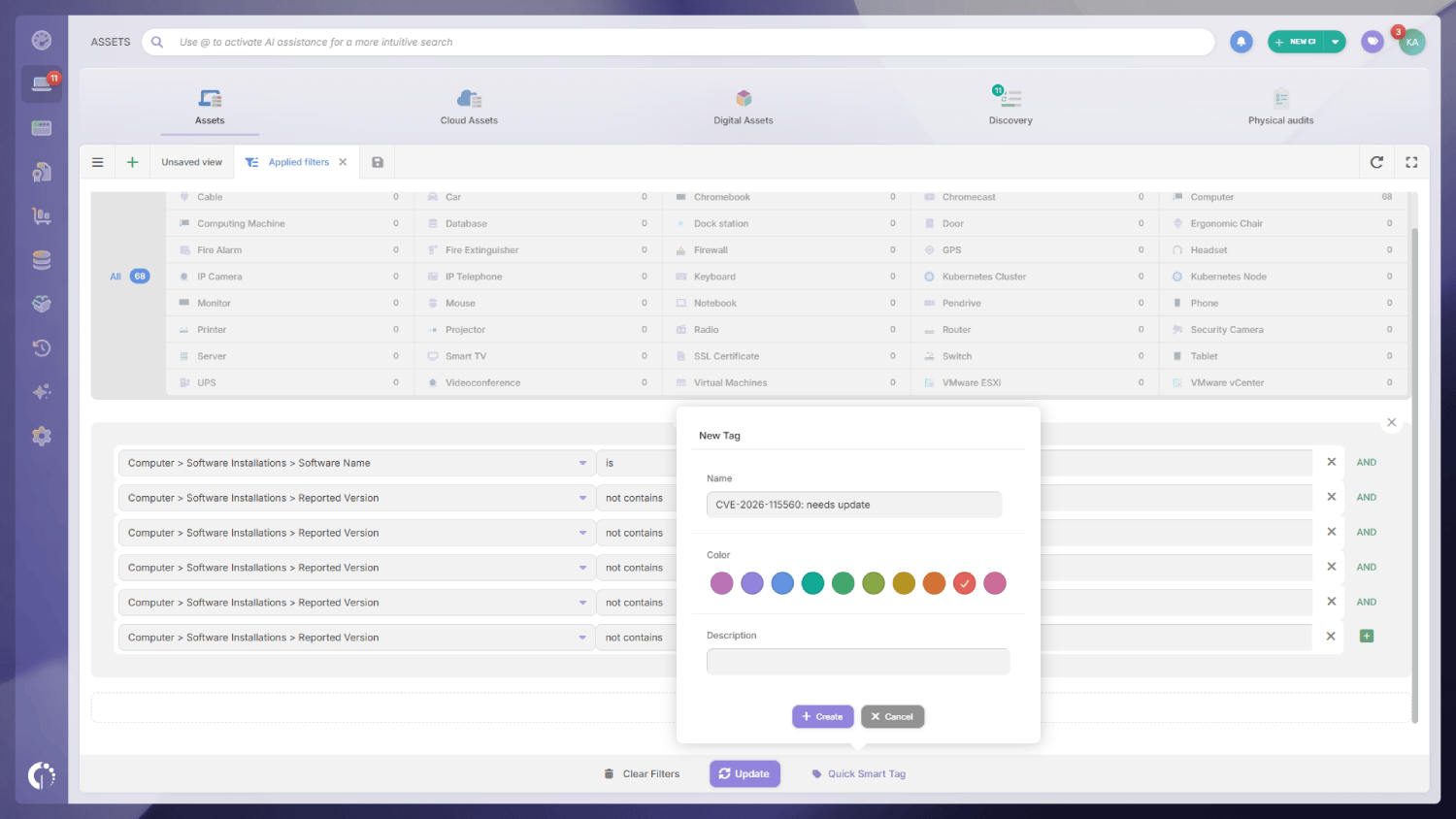
The tag is applied in the background, so the first assignment can take a while on large inventories, while the filtered view shows the results right away. When PHP publishes newer releases, add them as new Reported Version conditions so updated assets leave the tag.
The tag is the list of servers your team needs to work on. Open it from the Asset Explorer to see the owner and location of every asset, and start with the internet-facing servers. On each one, check the session settings in php.ini, the PHP-FPM pools and the virtual hosts: servers with session upload progress enabled go first, and the update then runs through your usual Patch Management process so every server gets an owner and a deadline.
Assets on a branch older than 8.2 need a branch upgrade, which takes longer and needs to start now, and assets on 8.2 or later only need the fixed release of their branch. Check Linux servers against your distribution's security advisory before scheduling an upgrade, since distributions such as Ubuntu ship fixes under the original version number, so a server can appear in the tag and already be protected.
The Smart Tag gives your team the work list, and a dashboard shows the exposure by risk and the progress at a glance. Go to Dashboard, click + to create a custom dashboard and add these five charts. The walkthrough below was recorded for PHP2Shell, so its conditions use the October releases; build yours with the versions that fix CVE-2026-115560 (8.2.36, 8.3.37, 8.4.28, 8.5.13 and 8.6.0).
Grouping unsupported versions by location shows which sites carry the most exposure, and the chart of supported versions shows which branches still need the fix. As your team updates servers and the Agent reports the new versions, the unsupported and supported charts shrink and the fixed-version chart grows, which gives you a progress report to share with security and management.
CVE-2026-115560 affects every PHP release before 8.6.0, 8.5.13, 8.4.28, 8.3.37 and 8.2.36, and the servers at real risk are the ones that also run session upload progress with mismatched session serializers. The fastest way to sort them out is to start from a software inventory: it tells you where PHP runs and which version, so the configuration review only covers the servers that still need the fix.
With InvGate Asset Management, a single Smart Tag gives you that list and a dashboard shows how the update is progressing, and the same approach works for the next critical vulnerability in a widely used component. To try it with your own inventory, start a free trial or talk to Sales.
These answers cover the questions that come up most while teams check their exposure to CVE-2026-115560. Each one points to the official source where it applies.
CVE-2026-115560 is a critical vulnerability in PHP's session upload progress feature, published by PHP in a GitHub security advisory with a CVSS v4 score of 9.2. When session data is written with one serializer and read with another, an attacker can get PHP to unserialize data they control, which can lead to remote code execution in applications with a suitable chain of classes. PHP first described the issue on October 23, 2026, and fixed it on November 19, 2026, in PHP 8.6.0, 8.5.13, 8.4.28, 8.3.37 and 8.2.36.
CVE-2026-115560 is a separate flaw. PHP2Shell is the nickname of CVE-2026-109618 and CVE-2026-109619, two vulnerabilities in the PHP core that PHP fixed on October 21, 2026, in 8.5.12, 8.4.27, 8.3.36 and 8.2.35, and that put every PHP installation serving web requests at risk. CVE-2026-115560 was disclosed two days later, only affects uncommon session setups, and needs the November releases, which also include the PHP2Shell fixes.
Updating removes the default exposure: according to PHP's advisory, the fixed releases disable session upload progress by default and reject runtime changes to session settings while the feature is enabled. A configuration that explicitly turns session upload progress on overrides the new default, so after the update, check php.ini, PHP-FPM pools and virtual hosts, and keep the same session serializer in every application that shares session storage.

