















If you work in IT, you’ve probably heard (and dreaded) the term “tech debt.” While it’s usually tied to software development, it means something slightly different in IT Asset Management (ITAM). In ITAM, tech debt is the accumulated cost of rushed asset decisions, or missing decisions, that solve short-term needs but create long-term waste, friction, and risk.
Tech debt can show up across many areas of ITAM, but hardware is often where it gets the most expensive: end-of-life devices, missing warranty data, inconsistent maintenance, and assets that quietly fall out of control. In this article, we’ll focus on hardware tech debt and show how InvGate Asset Management helps reduce tech debt with proactive lifecycle tracking, maintenance visibility, and automated alerts.
ITAM tech debt rarely looks urgent at first. It builds quietly in the background as assets age, records get outdated, and lifecycle decisions are postponed. But over time, it becomes a real operational problem, and the impact usually shows up in very concrete ways:
Tech debt in ITAM doesn’t come from code, it comes from postponing decisions across the asset lifecycle. Hardware is one of the most visible and expensive forms of this debt, but it’s far from the only one. Depending on the organization, ITAM tech debt can build up across several areas:
In practice, these types of tech debt rarely exist in isolation. Reducing one often helps reduce others too, because they tend to be connected: for example, improving inventory accuracy can also reduce compliance debt, and better lifecycle planning can lower both security risk and support workload.
Note: The term “tech debt” is most commonly used in software development to describe shortcuts in code that create future rework. In this article, we’re applying the same logic to ITAM, focusing specifically on the cost of postponed decisions in hardware management.
Reducing tech debt in IT Asset Management starts with turning Hardware Lifecycle Management into a proactive system. That means moving away from scattered spreadsheets, manual checkups, and last-minute refresh decisions, and replacing them with complete visibility, automated controls, and reliable data you can act on.
InvGate Asset Management helps you reduce hardware tech debt in three key ways:
You can’t fix lifecycle debt if you don’t fully know what you own, where it is, and what condition it’s in. InvGate Asset Management helps you build and maintain a complete IT inventory, enriched with the information that actually matters for refresh planning, including ownership, location, lifecycle stage, warranty details, depreciation status, and maintenance history.

Hardware tech debt grows when critical moments go unnoticed: warranties expire, assets reach EOL, refresh windows pass, and maintenance schedules get skipped.
With InvGate Asset Management, you can define lifecycle thresholds and automatically trigger alerts when an asset reaches key milestones.
Once your inventory is complete and controlled, the next step is moving from monitoring to decision-making.
InvGate Asset Management already enables proactive work through lifecycle policies and automation, and it will go one step further with Smart Recommendations, a feature expected in early 2026, designed to surface actionable insights based on signals like lifecycle status, compliance, cost, and risk.
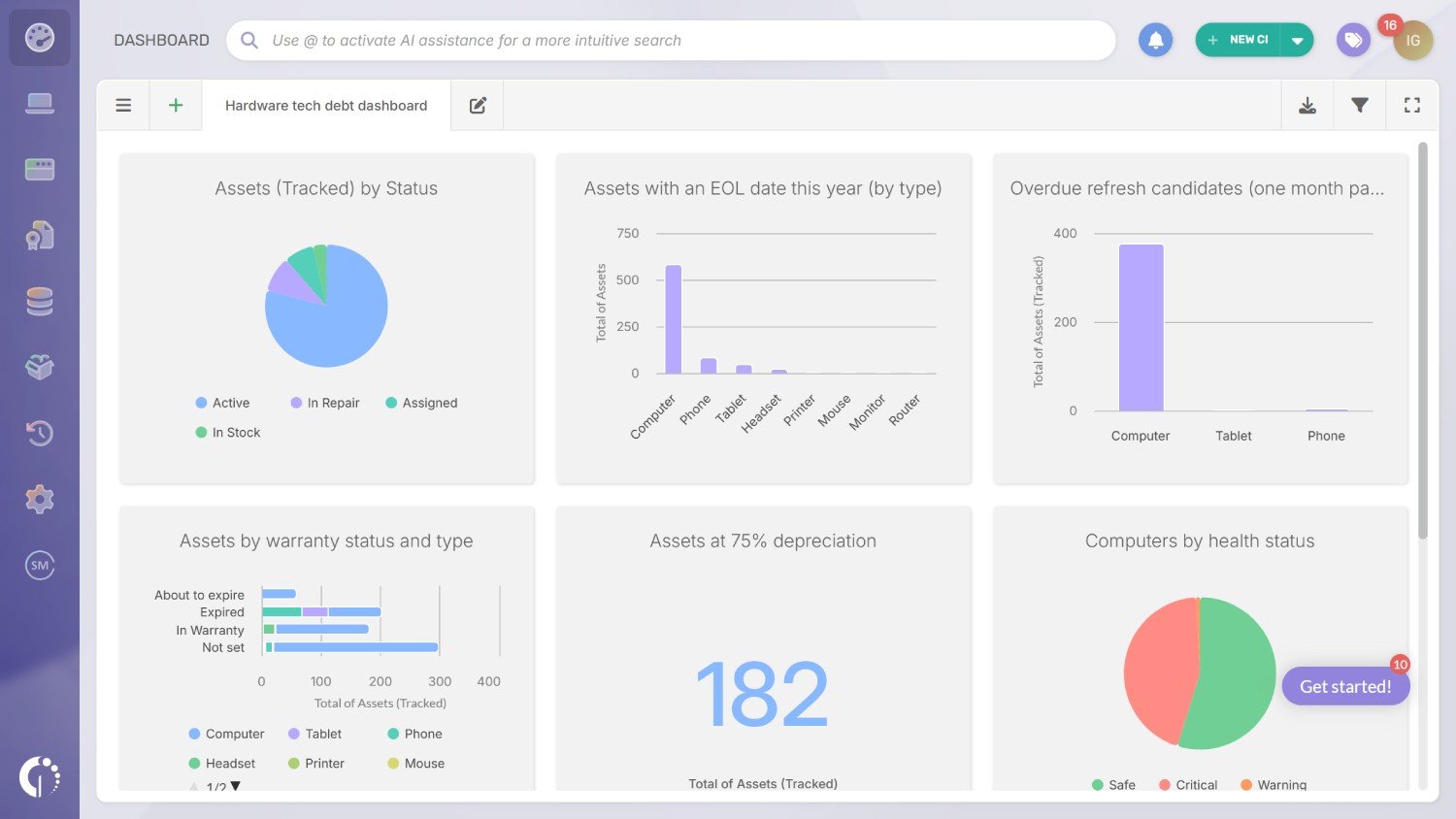
If you want to reduce hardware tech debt, the fastest path is to make it visible. A dedicated dashboard gives you a view of lifecycle gaps, refresh pressure, and data quality issues, so you can prioritize actions instead of reacting to surprises.
These are the core charts we recommend including as a starting point:
The goal of a hardware tech debt dashboard is to make lifecycle debt visible before it becomes expensive. With the right charts in place, you can spot refresh pressure, warranty blind spots, data quality gaps, and device condition risks early enough to act proactively.
To build this dashboard in InvGate Asset Management, follow these steps:
Note: Global filters apply to every chart in the dashboard, creating a default view that works alongside each chart’s own filters. This makes it easier to refine visualizations without editing charts one by one.
Once the dashboard setup is complete, you can start adding the charts recommended above. Here’s how to do it.
Click “Add chart” to create your first chart:
Click “Add chart” to create your next chart:
Note: To build EOL-based charts, you’ll need to add an EOL date custom field to your asset records. This can be done in just a few simple steps, and once it’s in place, you can use it across dashboards, alerts, and refresh workflows.
Click “Add chart” to create your next chart:
Click “Add chart” to create your next chart:
Note: Warranty status is calculated automatically based on the warranty end date stored in each asset record. You can fill this information manually, or if your devices are Dell or Lenovo, pull it automatically through a native integration.
Click “Add chart” to create your next chart:
Note: This chart works best if depreciation is configured so the Current value updates automatically. Once it is, you can create multiple indicators using different thresholds (e.g., 50%, 25%) to support refresh planning.
Click “Add chart” to create your next chart:
We used computers as a starting point. You can replicate this for laptops/printers/POS terminals.
Note: Health status is calculated automatically based on the health rules you define (for example, low storage, degraded battery, or other conditions). Once those rules are set, InvGate Asset Management can alert you when assets fall outside your predefined thresholds, helping you act proactively.
This chart helps you quickly identify which hardware assets need attention. Incomplete asset records are one of the fastest ways tech debt grows in ITAM. That’s why we recommend creating a dedicated chart to track this debt signal and keep it under control. For this dashboard, we’ll prioritize assets missing the most critical fields: Location, Owner, and Acquisition cost.
Click “Add chart” to create your next chart:
Note: This chart relies on Smart Tags that automatically flag assets with missing critical fields (such as owner, location, model, serial number, or purchase date). Once the Smart Tag is configured, the chart stays updated automatically as data changes. Check out How to tidy up your IT inventory to learn how to do it in simple steps.
Tech debt is the long-term cost of taking shortcuts to solve short-term technical needs. In IT Asset Management (ITAM), it refers to rushed or postponed asset decisions that create ongoing waste, operational friction, and risk, such as unmanaged end-of-life devices, incomplete inventory records, and inconsistent refresh planning.
The biggest challenges include limited visibility into the environment, inconsistent asset data, weak lifecycle governance, and manual processes that don’t scale. Many teams also struggle to prioritize what to fix first, since tech debt often accumulates quietly across hardware, software, and compliance areas.
In 2026, tech leaders are treating tech debt as an operational and financial risk, not just a technical issue. The focus is shifting toward proactive lifecycle management, stronger governance, automation, and data-driven prioritization using dashboards, alerts, and predictive insights to prevent debt from growing faster than teams can fix it.
Start by making tech debt visible through a structured inventory and a dashboard that highlights lifecycle risks, EOL pressure, warranty blind spots, and data quality gaps. Then, reduce debt through automation: lifecycle alerts, refresh thresholds, maintenance tracking, and standardization policies. The goal is to move from reactive fixes to proactive controls that prevent debt from piling up again.

