















Lenovo Premier Support is Lenovo's paid support tier for business PCs: 24/7 access to Lenovo engineers, a single point of contact who owns each case, Technical Account Managers (TAMs) for escalations and next business day onsite repair where Lenovo offers it. Premier Support Plus includes all of that and adds predictive issue detection, a Services Engagement Manager (SEM), Accidental Damage Protection (ADP), Keep Your Drive (KYD), sealed battery coverage for up to four years and International Service Entitlement.
This guide is for IT teams that manage fleets of Lenovo business devices and need to decide which plan each group of machines should carry. It compares Lenovo Premier Support, Premier Support Plus and Lenovo Standard Support side by side, explains the conditions behind each service, covers how to upgrade a warranty, and shows how to keep track of what every device is covered for once the fleet mixes plans.
Lenovo publishes a three-column comparison of its support tiers for devices, and the table below follows it row by row. The data comes from the Lenovo Premier Support for Devices page for the United States, checked in October 2026.
Several rows carry conditions in Lenovo's footnotes. OEM software support is level 1 best effort, onsite repair depends on the market, parts and hardware, proactive detection requires customer authorization and Windows 10 or 11, and the Services Engagement Manager requires a minimum of 500 units. Lenovo also notes that availability and support options can differ by country or region.
Premier Support gives IT teams direct access to Lenovo engineers for business devices, 24 hours a day, every day of the year. Lenovo groups what the plan includes in four areas, according to its page and the Premier Support for Devices Suite brochure published in 2026:
The plan suits teams that already handle most issues themselves and want faster escalation when a device fails. It adds no proactive monitoring and no protection beyond the system warranty: those services start at Premier Support Plus.
Premier Support Plus covers everything in Premier Support and adds services aimed at preventing failures and protecting devices beyond the standard warranty. Each one comes with its own condition, so it helps to read them one by one:
The jump from Premier Support to Plus is the jump from faster reactive support to coverage for the failures a standard warranty excludes. For many fleets, the deciding factors are accidental damage, data retention on failed drives and devices that travel.
In Lenovo's comparison, Lenovo Standard Support covers break/fix only: repair or replacement of faulty devices to restore normal operation. Every other row in the table belongs to Premier Support or Plus, so the difference between them covers who handles the case, when it can be reported and how fast parts and labor arrive.
The related search question about onsite support has a precise answer. Onsite repair can be added to a device without Premier Support as a warranty upgrade, which Lenovo describes on its Warranty Upgrade page as an enhanced service that an upgrade may include. Premier Support bundles next business day onsite repair with prioritized parts, 24/7 access to engineers and a single point of contact, so the onsite visit comes with the support layer around it.
Lenovo sells warranty upgrades for devices already in use through its Warranty Upgrade page, which is also where the "Upgrade Existing Support" button on the Premier Support page leads. The process has three steps: identify the device to see the options available for it, select the services to buy, and check out. Offerings vary by country and by device eligibility, so the options shown depend on the serial number entered.
Accidental Damage Protection, Keep Your Drive and sealed battery coverage are also sold on their own, outside Premier Support Plus. Bought separately, the sealed battery warranty extends the one-year base battery warranty to three years, while Premier Support Plus covers the battery for up to four. For a small group of devices with one specific need, a single add-on can be enough without moving them to Plus.
The right plan depends on how devices are used and on what a failure costs the business. These four scenarios cover the most common cases and can coexist in the same organization.
Laptops that cross borders need coverage that follows them, and accidents are more likely on the road. International Service Entitlement extends Accidental Damage Protection, Keep Your Drive and sealed battery coverage to other countries, and it is only part of Premier Support Plus.
For sales teams, consultants and executives who travel often, Premier Support Plus is the plan that keeps the add-ons valid abroad. Premier Support alone still gives them 24/7 access to engineers, but its onsite repair depends on the market where the device is.
Keep Your Drive lets the organization keep a failed drive after a repair instead of returning it to Lenovo. That matters for legal, finance, healthcare or any team with data handling policies that forbid drives leaving the building.
Keep Your Drive comes with Premier Support Plus and can also be bought separately. If the rest of Plus does not apply to these devices, the standalone add-on covers them without paying for services they will not use.
Desktops that never leave a desk rarely suffer accidental damage, and onsite repair matters more than international coverage. For these machines, Premier Support gives next business day onsite repair, prioritized parts and a single contact for each case.
Teams with strong in-house support can also keep these devices on standard support with an onsite upgrade. Premier Support makes sense when the help desk wants Lenovo engineers to own the case from start to finish.
Fleets of 500 units or more qualify for a Services Engagement Manager, who reports on asset performance and manages the relationship with Lenovo. Combined with predictive issue detection, the team gets alerts and replacement parts before a component fails.
This scenario requires Premier Support Plus, customer authorization for monitoring and devices running Windows 10 or 11. It fits organizations where downtime on any single device has a direct cost.
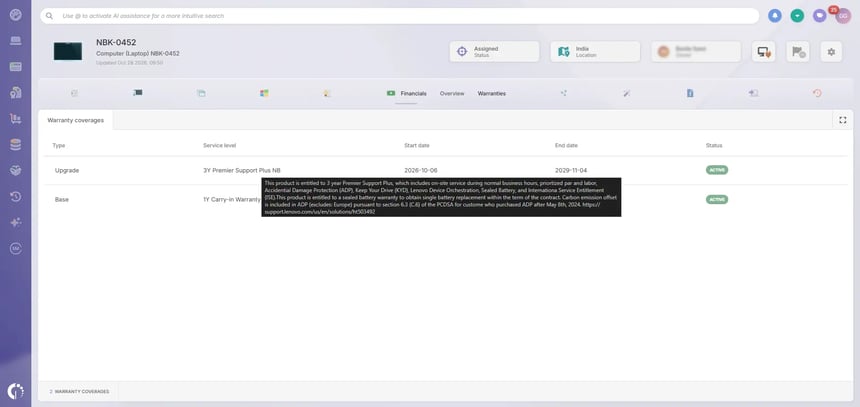 Once a fleet mixes Premier Support, Premier Support Plus, standalone add-ons and base warranties, knowing what each device is covered for becomes daily work. A device can be under warranty and still lack the coverage for the repair it needs, such as a laptop with an active contract whose onsite upgrade already expired. Lenovo's own lookup answers that by serial number or in batches, as explained in our guide to the Lenovo warranty check, and the work multiplies when the fleet includes several manufacturers, a case covered in our warranty check guide.
InvGate Asset Management is IT Asset Management software that offers an enterprise experience without the complexity or the price of one, with an intuitive interface, a no-code approach and fast deployment, in the cloud or on premises. Its warranty features bring Lenovo's own data into the inventory, so the team reads coverage from the same place where it manages each device:
With that view, a renewal stops being a guess. The team sees which coverage is about to end on each device and decides whether to renew it, move the device to Premier Support or Plus, or plan its replacement.
Lenovo Premier Support gives business devices 24/7 access to engineers, one contact per case, escalation through Technical Account Managers and next business day onsite repair where Lenovo offers it. Premier Support Plus adds predictive detection, a Services Engagement Manager from 500 units, and the protections a standard warranty leaves out: accidental damage, drive retention, a four-year sealed battery and international coverage.
Most fleets end up mixing plans by device group, which makes tracking coverage as important as choosing it. To see every Lenovo coverage next to the rest of your inventory, start a free trial of InvGate Asset Management or talk to Sales.
These are the questions IT teams ask most often when they compare Lenovo's support plans. Each answer is based on Lenovo's published plan details as of October 2026.
Yes. Lenovo Premier Support and Premier Support Plus include advanced technical support 24 hours a day, 7 days a week, 365 days a year, with direct phone access to Lenovo engineers.
Premier Support does not include Accidental Damage Protection. It comes with Premier Support Plus, and Lenovo also sells it as a separate warranty upgrade for eligible devices.
Keep Your Drive lets an organization keep a failed drive instead of returning it to Lenovo during a repair, so the data on it never leaves the company. It is part of Premier Support Plus and is also sold on its own.
Yes. Premier Support Plus includes every Premier Support service and adds predictive issue detection, a Services Engagement Manager, sealed battery coverage, Accidental Damage Protection, Keep Your Drive and International Service Entitlement.
The price depends on the device, the length of the coverage, the country and the sales channel. Lenovo shows the options and prices available for a specific device in its warranty upgrade process.
Enter the serial number in Lenovo's warranty lookup, which lists the coverages active on the device. For a whole fleet, InvGate Asset Management lists each device's coverages in the Warranties tab of its asset profile, where a plan like Premier Support Plus appears by name as an upgrade.

