















In ITSM, an AI agent is a system that can interpret requests, make context-aware decisions, and take action — such as updating tickets or triggering workflows — without relying solely on predefined rules.
In practice, their impact concentrates around a few clear use cases:
Adoption is already well underway. PwC research shows that 79% of organizations have already adopted AI agents to some extent, while 15% are exploring implementation. Customer service and support and IT rank among the top functions where they’re being applied.
An AI agent in IT is a system designed to perceive inputs from its environment, make decisions based on that context, and take actions to achieve a defined outcome within IT operations. In an ITSM setting, that environment typically includes tickets, user data, asset information, service relationships, and workflow states.
Under the hood, these agents combine different AI components. Large language models (LLMs) in IT suppport handle unstructured inputs like ticket descriptions or chat requests, turning them into structured intent and relevant entities. Decision layers — often built with orchestration logic, retrieval systems, or even reinforcement learning in more advanced setups — use that context to determine the next action.
Execution happens through integrations with ITSM tools, where the agent can update records, trigger workflows, or complete tasks. The term agentic AI usually refers to these systems acting with a degree of autonomy rather than just waiting for a single input–output exchange.
They differ from traditional automation in how decisions are made. Instead of following predefined rules, the agent evaluates the current context, selects from possible actions, and adapts its behavior based on data, past outcomes, or feedback loops.

When we look across the service desk, some use cases stand out. These cases share a pattern: the tasks are repetitive, rule-based, and data-intensive. AI agents excel in environments where structured data and clear rules are available, and where service desk automation can directly reduce manual workload.
Service desks deal with inconsistent, incomplete, or unclear ticket data, which slows down categorization and prioritization.
An AI service desk can handle incoming requests using language models, identify intent, extract key details (user, service, urgency), and assign categories, priorities, and even initial tags. It can also enrich the ticket with related context from past cases or linked assets.
Teams spend less time cleaning up tickets and more time resolving them. Intake becomes faster and more consistent, which improves downstream processes like routing and reporting.
Users often submit tickets for issues that already have documented solutions, either because they can’t find them or don’t recognize the right terms.
An AI agent interprets the request and retrieves relevant knowledge base content based on meaning, not just keywords. It can guide users step by step or resolve the request directly if the action can be automated. In more advanced setups, this interaction layer can extend beyond chat and portals, for example through an AI phone answering service that handles incoming requests, gathers context, and routes them into the same workflows.
Fewer tickets reach the service desk, and users get answers faster without waiting in a queue.
Tickets frequently bounce between teams due to unclear ownership or missing context, delaying resolution and escalation.
An AI agent uses historical patterns, service relationships, and ticket content to assign issues to the right team from the start. It can also detect signals that require escalation, such as multiple related tickets or SLA risk.
Resolution times improve, and teams avoid unnecessary reassignment loops. Escalations happen earlier and with better context.
Change requests require validation, risk assessment, and coordination, which can slow down approvals and increase back-and-forth.
An AI agent reviews the request, checks for completeness, suggests risk levels based on similar past changes, and can recommend approval paths or required stakeholders. It can also pre-fill change records with relevant data.
Change processes move faster, with fewer manual checks and more consistent evaluations across requests.
Knowledge bases often fall out of date or depend on manual documentation that doesn’t keep up with resolved issues.
An AI agent analyzes resolved tickets, identifies reusable solutions, and drafts knowledge articles or updates existing ones. It can also flag outdated or unused content based on access patterns and resolution success rates.
Documentation stays aligned with real support activity, making knowledge more reliable and easier to maintain over time.
AI agents can also support asset management by keeping data accurate and surfacing events that usually go unnoticed.
Asset data often becomes outdated as devices change, move, or fall out of use. An AI agent monitors signals from network scans, usage patterns, and integrations to detect new or modified assets. It updates records automatically and flags inconsistencies.
Teams keep a more reliable inventory without relying on manual updates.
Key lifecycle moments — like warranty expiration or software nearing end of life — can be missed or tracked in isolation. An AI agent tracks these events across assets and sends alerts or triggers actions when thresholds are reached.
Teams stay ahead of renewals, replacements, and risks tied to outdated assets.
Audits require accurate records, but data gaps and inconsistencies make them time-consuming. An AI agent checks asset data against policies, identifies missing or conflicting information, and highlights compliance risks.
Teams reduce audit preparation time and have clearer visibility into compliance status.
InvGate's AI-powered Service Management approach is centered around the Virtual Service Agent (VSA), supported by additional AI capabilities available in the AI Hub.
The VSA acts as the main interaction layer with end users, focused on self-service across channels like the service portal, Microsoft Teams, and WhatsApp.
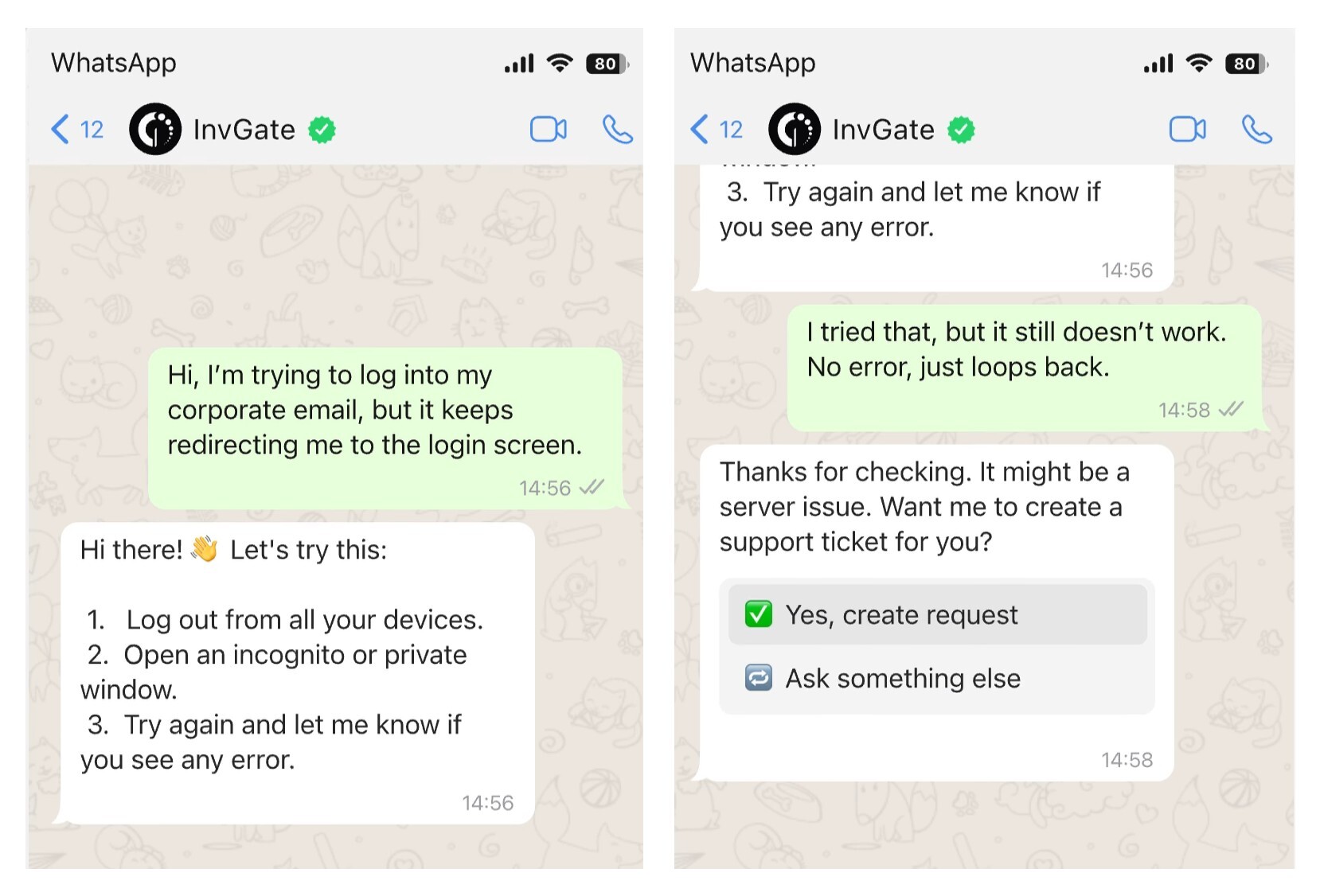
In day-to-day use, the Virtual Service Agent handles incoming requests by understanding what the user needs, asking for missing details when necessary, and triggering the right workflow. For common scenarios — like access requests or standard issues — it can guide the user through resolution or move the request forward already structured for the service desk.
It also plays a role in knowledge retrieval. Based on the user’s input, the VSA can suggest relevant knowledge base articles during the interaction, helping users solve issues without creating a ticket when possible.
When a request requires human intervention, the VSA passes it to the service desk with the context already captured. From there, routing, prioritization, and other decision points can be supported by AI features available in the AI Hub, depending on how the team configures them. Escalation signals — such as urgency or patterns across requests — can also be surfaced to help teams respond earlier.
The structure is consistent: the VSA handles the interaction layer, while the rest of the AI capabilities support decision-making and execution behind the scenes. For teams assessing how this would work in practice, a demo of InvGate Service Management can help map these scenarios to real service desk operations.
AI agents depend on the environment they operate in. If processes are unclear or inconsistent, the agent will struggle to make reliable decisions. Defined workflows, ownership, and escalation paths give it something solid to act on.
Data quality matters just as much. Tickets, asset records, and knowledge base content need to be accurate and structured enough to provide context. Gaps or outdated information limit how far the agent can go.
Governance sets the boundaries. Teams need to decide what the agent is allowed to do, where human validation is required, and how outcomes are monitored. Starting with controlled use cases helps keep expectations aligned with what the setup can support.
AI agents are no longer experimental — they are beginning to deliver measurable value in enterprises. If we put together the numbers mentioned earlier, it means almost every organization is considering them. Only 6% of organizations are not yet considering AI agents — a rare level of consensus in enterprise technology.
For decision-makers, the priority now is to identify which processes in their organization match the patterns that agents handle best: repetitive, rule-based, and data-intensive tasks.
Starting with focused pilots can help validate the benefits and build a foundation for broader adoption.
If you want to see how this works in practice, you can try InvGate Service Management with a 30-day free trial and explore how the Virtual Service Agent fits into your service desk workflows.


