














Software Contract Management is the practice of tracking, reviewing, and acting on every agreement that governs how an organization uses its software. Each contract defines rights, obligations, and financial commitments that follow a piece of software for its entire lifecycle, from the first purchase order to the day it's renewed, renegotiated, or retired.
In most organizations, software procurement happens across finance, legal, and individual department budgets, while IT, the team that actually manages what's installed and licensed, often finds out about a new contract after the fact. That gap between how contracts are signed and how they're actually managed creates real operational risk: missed renewal windows, unused licenses that roll over automatically, and license compliance violations that only surface during audits.
This article covers the key types of software contracts, the clauses that matter most, and how to build a Software Contract Management process that keeps IT in control.
Software Contract Management is the ongoing process of tracking, reviewing, and acting on the legally binding agreements between a software vendor and the purchasing organization. Each agreement defines how many licenses are acquired, what support is included, when and how it renews, and what happens if either party wants to exit.
The term "software contract" is an umbrella that covers traditional end-user license agreements (EULAs), Software as a Service (SaaS) subscription agreements, Enterprise License Agreements (ELAs), and standalone maintenance and support contracts. Each type has its own renewal cycle, license compliance obligations, and risk profile. Managing that variety well requires visibility that most organizations don't have by default. This gap is often closed with dedicated Software Contract Management software or broader IT Asset Management software.
Software contracts vary in structure and length, though most include a core set of clauses that IT and procurement teams need to understand before signing.
Understanding these elements before signing reduces the risk of surprises at renewal time and gives IT teams a clearer picture of what they're actually paying for.
Software contracts aren't a monolithic category. IT and procurement teams regularly deal with several distinct contract types, each with different terms, renewal dynamics, and license compliance implications. Knowing the differences matters at every stage of Software Contract Management, not just at procurement.
A software license agreement, more commonly known by its acronym EULA (end-user license agreement), governs what a user can and cannot do with the software. It typically defines permitted uses, restrictions on copying or redistribution, and the conditions under which the license can be revoked. For IT teams, this is the baseline contract type to track: it has a defined license count, a scope of permitted use, and often a renewal or maintenance component.
A recurring access contract (monthly or annual) for a cloud-based application. Unlike perpetual licenses, SaaS agreements bundle usage rights, hosting, and often support into a single subscription. This is where SaaS Contract Management becomes its own discipline: key elements to monitor include the SLA for service availability, data handling policies, and automatic renewal clauses. IT teams need to track not just the renewal date but also whether usage justifies the tier purchased.
A negotiated agreement for organization-wide access to a software suite, typically with volume-based pricing and multi-year commitments. ELAs can offer cost savings at scale, but they come with complexity: usage rights can be broad or narrowly defined, true-up clauses may require periodic reconciliation, and exiting before term end usually involves significant penalties. Procurement and legal typically co-own these contracts, but IT carries the operational burden of ensuring license compliance.
Covers updates, patches, and technical software maintenance for software already purchased. This type of contract may be included in the base agreement or sold as a separate annual line item. IT teams need to know whether it's active to determine whether the organization is entitled to version upgrades or must pay separately for them. An expired maintenance contract often means running unsupported software.
When software is acquired through a reseller or comes preinstalled on hardware, the terms may differ significantly from a direct vendor contract. Support obligations may be split between the reseller and the original vendor, license portability may be restricted, and renewal pricing may not match the vendor's standard terms. IT teams managing Original Equipment Manufacturer (OEM) software need to know exactly who owns the support relationship and where the contract lives.
Understanding what Software License Management covers and how to implement it is directly tied to Software Contract Management: knowing which license type you hold determines what you need to monitor, when it expires, and who in the organization is responsible for the renewal.
Renewal time is when contract mismanagement becomes expensive. Auto-renewals trigger without review, unused licenses roll over for another year, and price increases go unnoticed because no one compared the new terms to the previous agreement. The fix is having a structured checklist and enough lead time to act on it, which is what effective Contract Renewal Management comes down to in practice.
Before renewing any software contract, IT teams should work through the following:
This is where having a system in place pays off directly. InvGate Asset Management allows you to configure automated expiration alerts, so the team receives email notifications days before any contract expires, without relying on manual calendar reminders. Centralizing vendors, contracts, and assets in one platform makes this kind of proactive Contract Renewal Management operationally viable, even across a large software portfolio.
Most Contract Management problems trace back to a lack of visibility, even when a process technically exists on paper. Contracts live in email threads, shared drives, or a Contract Lifecycle Management tool that procurement owns and IT can't access. The result: IT teams find out a contract renewed or expired after the fact.
InvGate Asset Management works as Software Contract Management software built directly into the asset inventory, rather than a standalone repository IT has to check separately. It treats software contracts as Configuration Items (CIs), linked directly to the software assets, vendors, and purchase orders they cover, so IT has full context on every contract: what it's tied to, who owns it, and when it needs attention.
For teams building out Software Contract Management, five capabilities matter most:
Here's how to set it up.
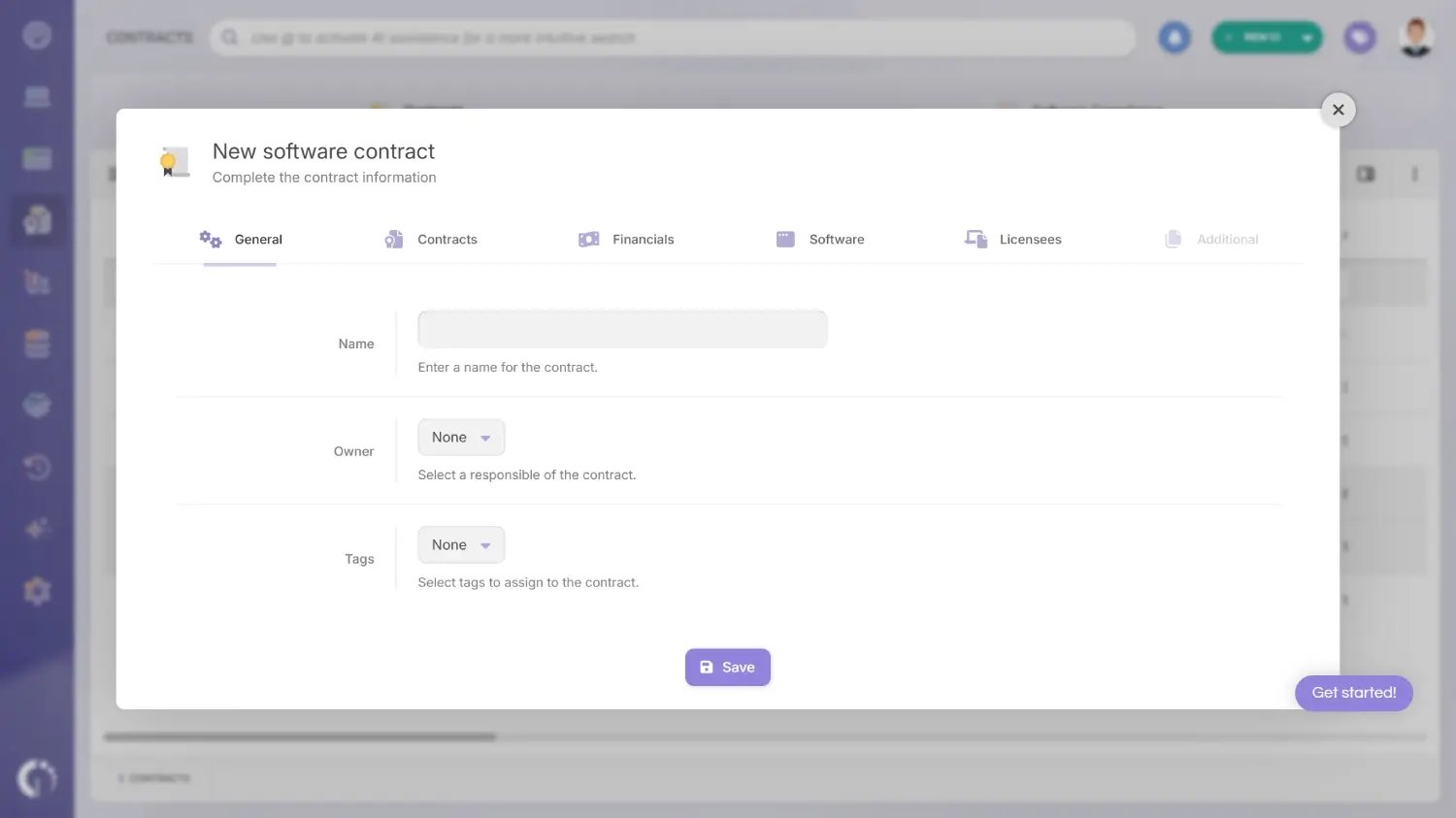
In InvGate Asset Management, contracts are created from the "Create CIs" menu. Two types are available: software contracts and asset contracts (the latter covers hardware, leases, maintenance, and similar agreements). For software contracts, the setup spans several tabs. General captures the contract name, owner, and tags.
Tags are useful for grouping contracts by category or renewal cycle for easier filtering later.
The Contracts tab defines the operational terms: software type (Cloud software, Operating system, Stand-alone, or Suite), total number of licenses, license type (by devices or by users), serial numbers, auto-assign rules, and auto-recycle conditions.
For teams managing a large contract portfolio, InvGate Asset Management also offers a public API to create, update, and delete contracts and to assign or unassign licenses in bulk, instead of setting up each contract manually through the UI.
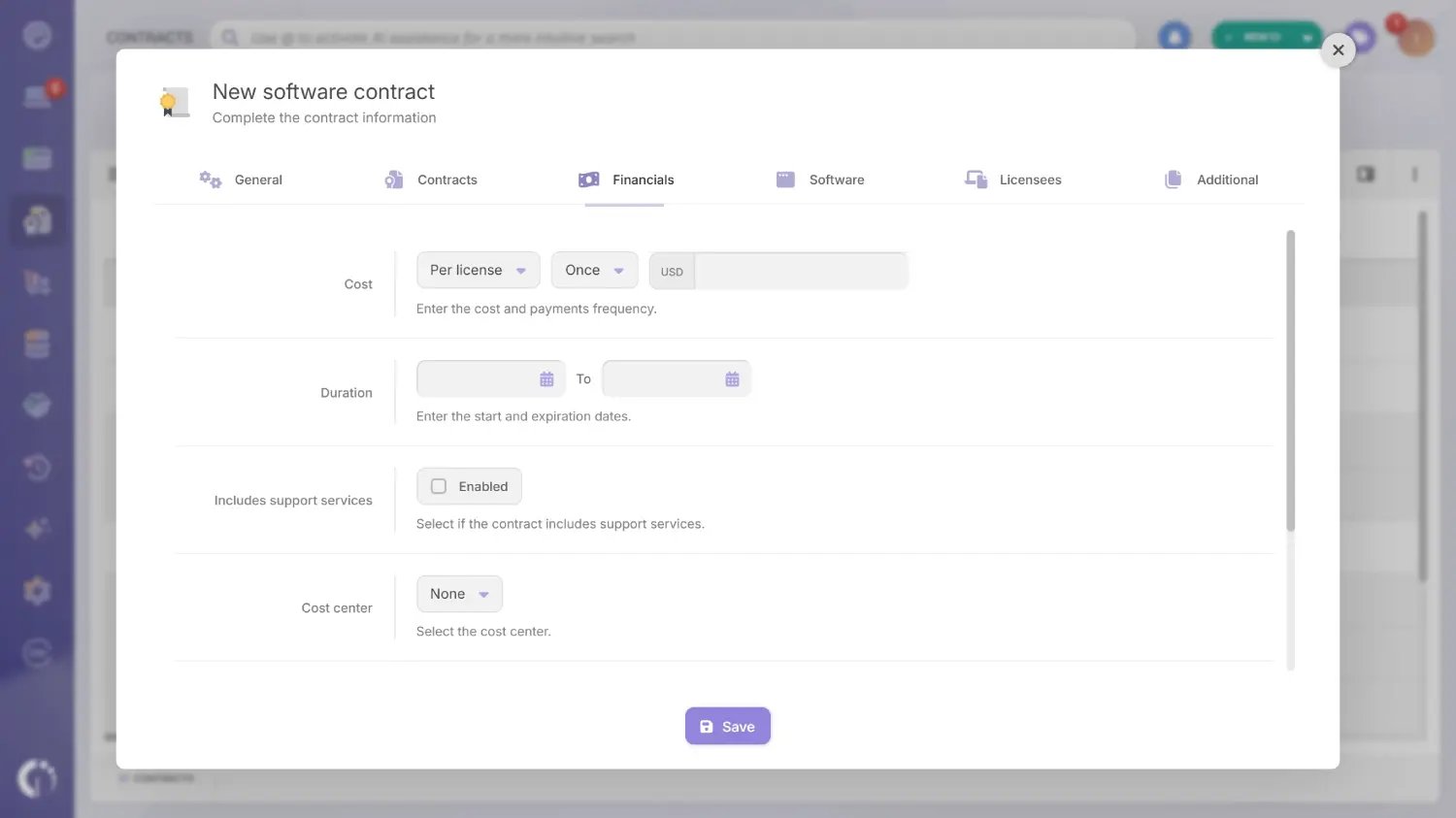
The Financials tab connects the contract to the organization's financial and procurement records. Here you set the cost (total or per license), contract duration, whether support services are included and until when, the cost center, the associated vendor, and any linked purchase order.
Vendors are managed as CIs within the Procurement module, alongside purchase orders. Each vendor profile connects to its active contracts and the assets those contracts cover, making spend analysis by provider a straightforward report rather than a manual exercise.
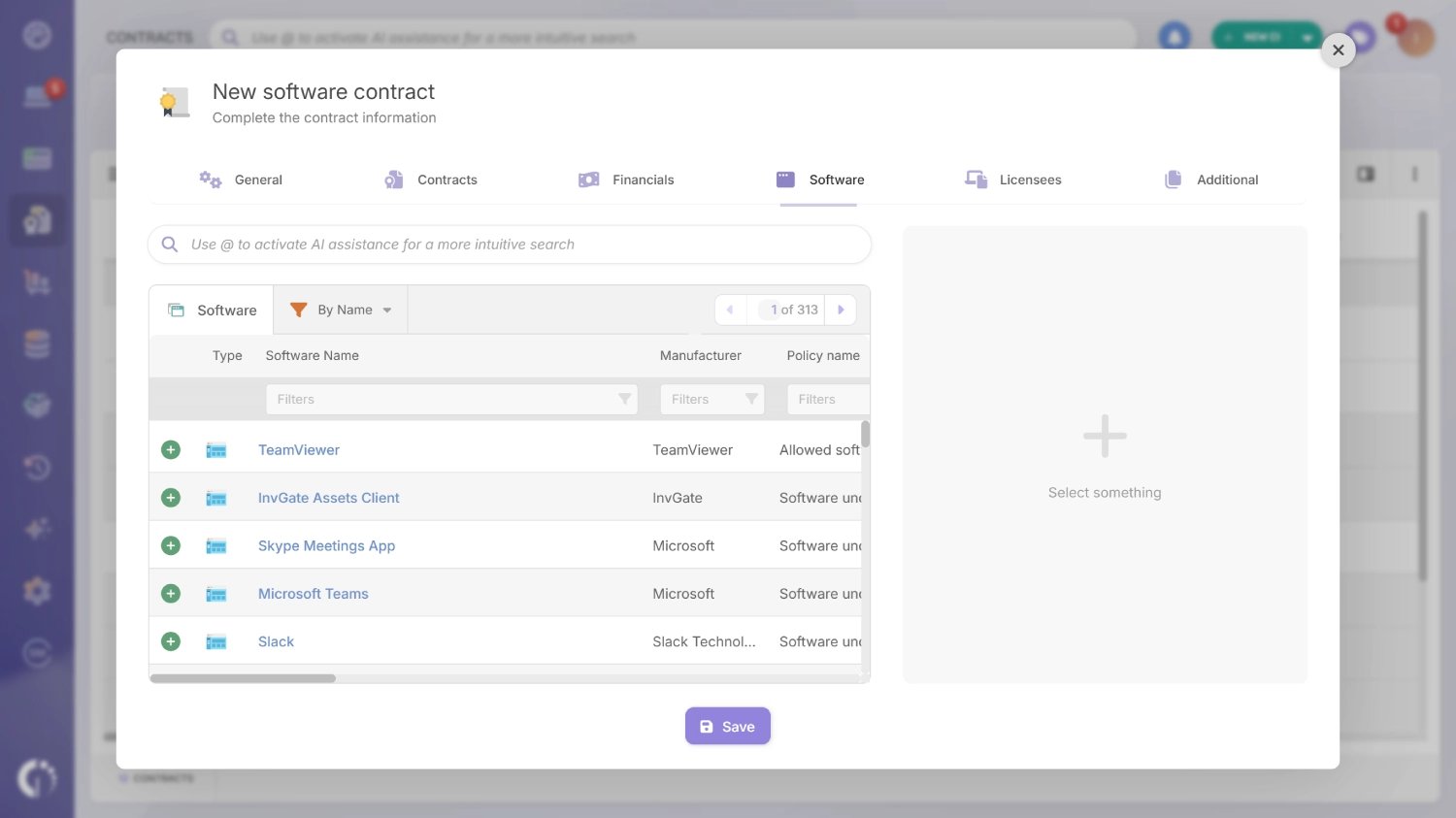
The Software tab lets you link the contract to specific software discovered by the InvGate Asset Management Agent across endpoints. This is how the platform cross-references licenses acquired against actual installations. If there are more installs than licenses, or unused licenses available for reassignment, the platform surfaces that directly.
From the Licenses tab, you can then assign or unassign those licenses to specific users, keeping allocation tightly tied to the contract terms.
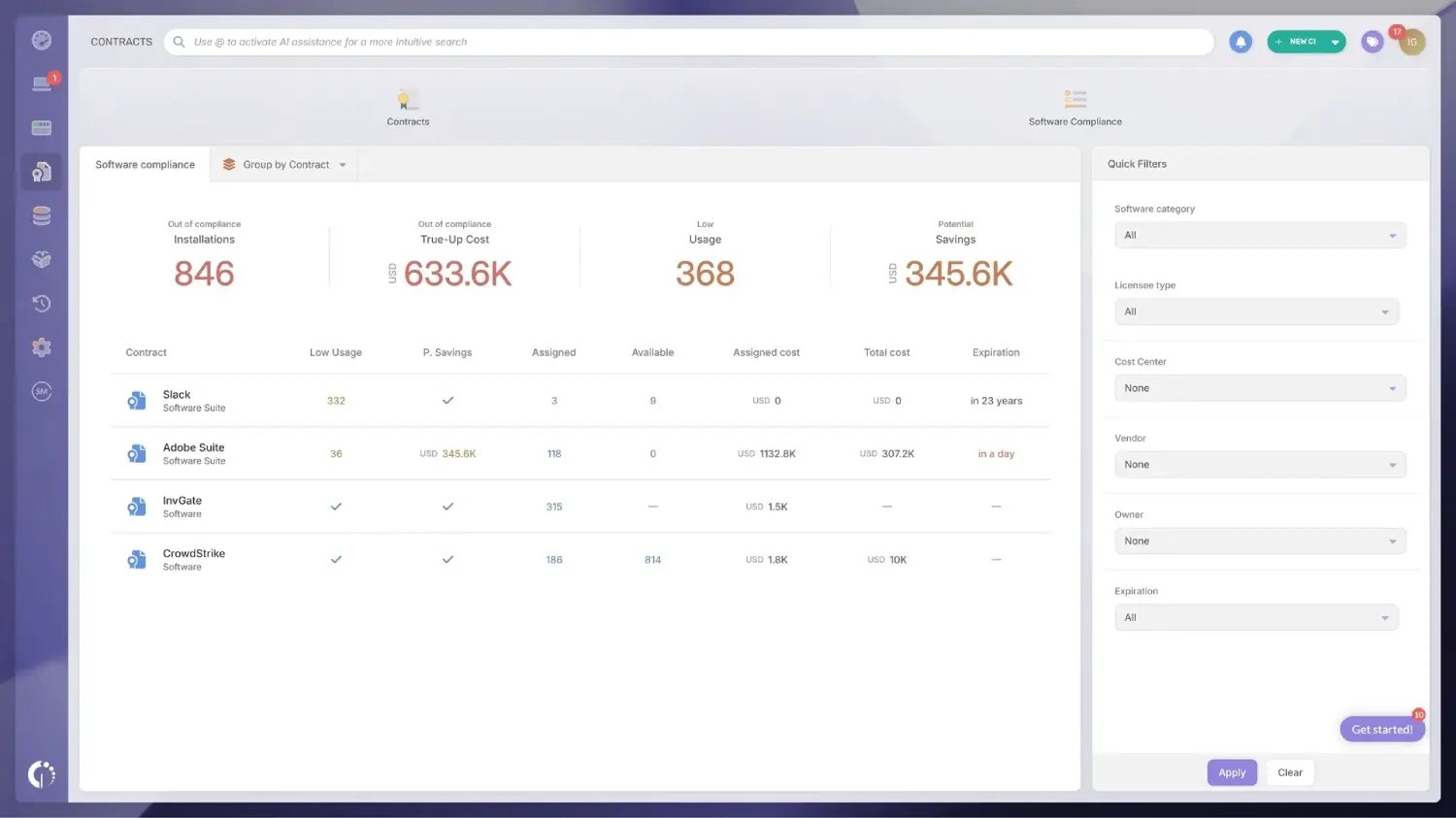
Activate Software Metering from Settings > CIs > Software Metering, then use the Software Compliance module to compare licenses acquired against actual usage.
The Contracts > Software Compliance view displays columns for Low usage, Assigned, and Available per contract. This makes it immediately visible which licenses are underused and which are at risk of overage. Authorization policies can complement this view by classifying detected software as approved, under review, or prohibited, which helps flag unauthorized installs that fall outside any tracked contract.
Usage detection depends on the software being installed on a managed endpoint. For cloud and SaaS applications, native usage data is currently available through the Microsoft 365 integration; other SaaS contracts rely on seat assignment and renewal tracking rather than direct usage metering.
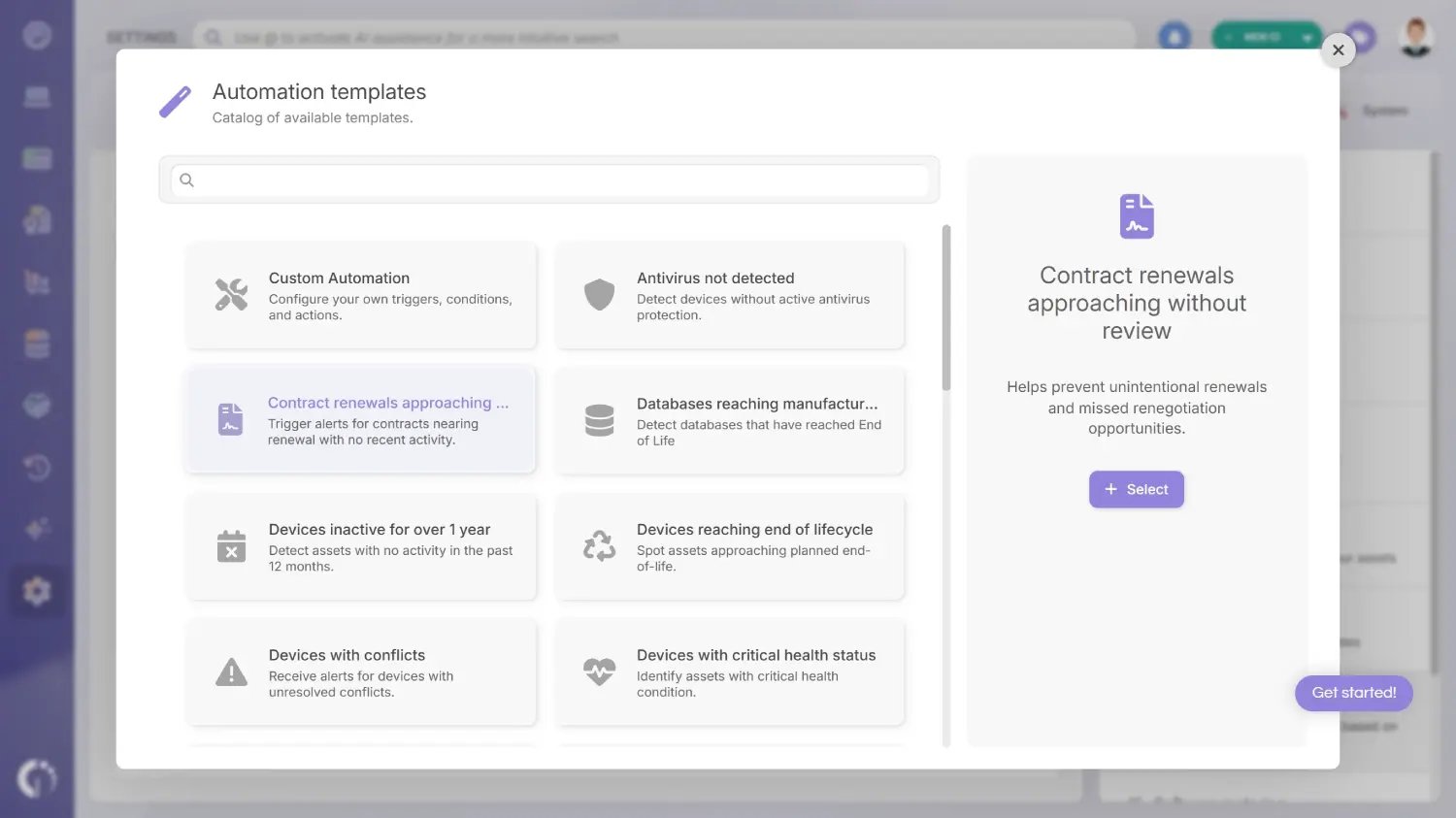
InvGate Asset Management includes native automation rules tied to contract events. From Settings > CIs > Automations, create a "Contract renewals approaching without review" automation. This helps prevent unintentional renewals and missed renegotiation opportunities.
Set the condition to "Contract > Expiration date > is in the next (days) > 30 days" and the action to "Send email" to the responsible team. The number of days is customizable. The platform also supports custom automation rules for more specific workflows, such as triggering on other contract conditions or routing notifications to different recipients.
Create custom views to monitor active contracts, upcoming expirations, and associated costs by vendor. These dashboards give IT, procurement, and finance a shared view of the software contract portfolio without requiring manual reports.
You can explore the full contracts module with a 30-day free trial of InvGate Asset Management before your next renewal cycle, or talk to Sales to see how it fits your environment.
A system is only the starting point for Software Contract Management. The practices around how contracts are managed determine whether that system actually delivers value.
For teams evaluating dedicated tooling, Contract Lifecycle Management (CLM) software tools compared covers the broader landscape of Contract Lifecycle Management platforms, and Software Asset Management tools focuses on the ITAM-side tooling that handles contracts as part of the asset lifecycle.
Software contracts are the primary formal touchpoint between IT and its vendors. Every SaaS tool, every perpetual license, every maintenance agreement represents a financial and operational commitment to a specific provider. The quality of that relationship depends in part on how well both sides understand and honor the terms of those agreements.
Managing contracts well gives IT something most vendor relationships lack: data. When contract records are linked to vendor profiles, it becomes possible to see total spend per vendor, track SLA performance over time, and identify concentration risk, the risk of being overly dependent on a single provider without visibility into what happens if that relationship changes.
InvGate Asset Management treats vendors as CIs within the CMDB tools it ships with, specifically the Configuration Management Database (CMDB). Each vendor profile can be linked to its active contracts, the assets those contracts cover, and associated purchase orders, all from a single record. When it's time to renegotiate, IT works from a complete picture of the relationship instead of memory or scattered spreadsheets.
This connection between Software Contract Management and IT Vendor Management is one of the clearest ways ITAM tooling creates value beyond asset tracking: it turns the vendor relationship into a managed, data-informed process instead of a reactive scramble at each renewal.
Software Contract Management works best when it stops being a once-a-year scramble and becomes a habit built into how IT tracks its software inventory. The organizations that avoid missed renewals, license compliance surprises, and wasted spend are the ones that treat contracts as living records tied to real usage data, not static PDFs filed away after signing.
Getting there doesn't require a separate legal tech stack. Connecting contracts, vendors, and license data inside the same IT asset management software the team already relies on gives every renewal enough lead time to be a decision instead of a default.
Software Contract Management is the ongoing practice of tracking, reviewing, and governing the legally binding agreements between a software vendor and the purchasing organization. It covers the rights and restrictions on how the software can be used, the number of licenses acquired, pricing and payment structure, support entitlements, and the conditions under which the contract renews or terminates.
A software license agreement (or EULA) is a specific type of software contract that governs the end user's rights to use the software. "Software contract" is a broader term that also encompasses SaaS subscription agreements, Enterprise License Agreements, maintenance and support contracts, and OEM agreements. Every software license agreement is a software contract, but not every software contract is a license agreement.
Before renewing, verify actual license usage against what was purchased, review auto-renewal terms and cancellation windows, evaluate any pricing or terms changes from the previous agreement, confirm the software still aligns with the organization's roadmap, assess whether the vendor met its SLA commitments during the contract period, and ensure the contract is linked to the correct assets in your inventory.
The most reliable approach is to centralize all contracts in an ITAM platform with standardized expiration date fields, configure automated alerts to notify the responsible team 30, 60, or 90 days before each contract expires, and assign a named contract owner accountable for the renewal process. Relying on manual calendar reminders or email-based tracking introduces unnecessary risk, especially in organizations managing large software portfolios.
Look for a platform that links contracts directly to the assets, licenses, and vendors they cover, rather than treating the contract as a standalone document. Core features to prioritize include license-to-installation matching, automated expiration alerts, a compliance view comparing acquired versus detected software, and financial reporting by vendor or cost center.

