














A service catalog is one of the core building blocks of an ITSM practice, and government IT teams working toward ITIL-aligned service management eventually run into the same gap: without a structured catalog behind it, ticket intake reduces to whichever channel happens to be in reach, no matter how mature the rest of the practice is.
Getting the catalog right is what turns ad hoc request handling into a formal government ITSM practice: where things can actually be routed, measured, and improved over time, and it's usually the piece that determines whether a self-service portal, a chatbot, or any other front end built on top of it actually works.
A private company building a service catalog is usually organizing one line of business. A government IT department is organizing several at once, each with its own scope, its own funding, and its own definition of a routine request. Lance Spranger, CIO of Waukesha County, Wisconsin, described that difference at an InvGate industry forum on government IT modernization, comparing his move from healthcare IT into county government.
"The challenge was moving from one industry focus to 17 different industries in our particular case. With 17 different strategic plans... they all have a business model behind every one of them, as well as the unique funding sources that they all have." — Lance Spranger, CIO, Waukesha County, WI
A single catalog structure that works cleanly for IT rarely survives contact with facilities, courts, or social services without some rework, since each of those areas has its own vocabulary for what counts as routine and what needs escalation. Ignoring that tends to produce the second common failure mode: a catalog built once, by IT, in IT's own terms, that never gets adopted by the departments it was supposed to also serve.
Complexity is the other way a catalog fails, and it shows up even in departments that already had one. A catalog only specialists can maintain stops getting maintained. New request types don't get added, outdated ones don't get retired, and the structure that was supposed to organize requests quietly falls out of sync with how the organization actually works.
Building a service catalog is a process of defining what IT and other departments offer, organizing those offerings into a structure people can navigate, and deciding how each request gets routed, approved, and supported once it's submitted. Everything downstream, whether that's a portal, a chatbot, or reporting on service delivery, depends on this structure being right first.
InvGate Service Management supports each stage of that process. The following steps show how to configure it.
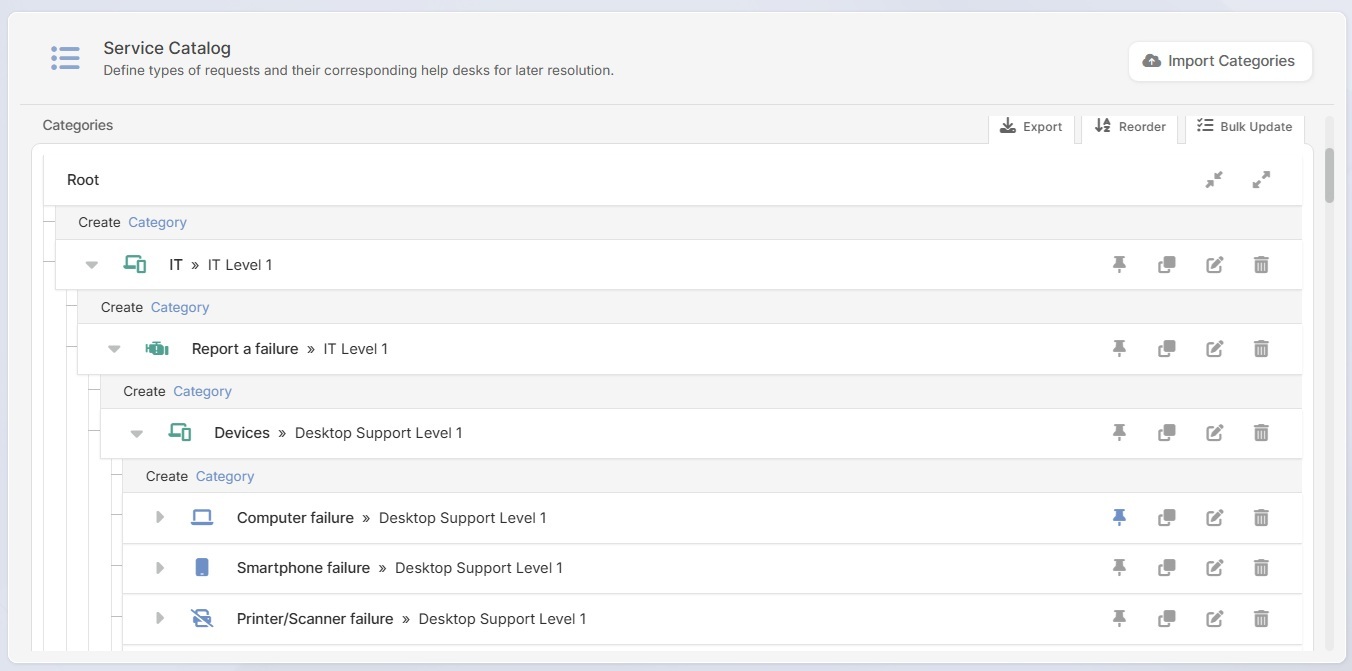
A service catalog is built as a tree that narrows from broad to specific, and getting the number of levels right is what determines whether people find what they need or give up halfway through.
A workable structure usually runs three or four levels deep: a top-level category by department or service area (IT, HR, Facilities), a sub-category for the general type of issue (Hardware, Access, Reports), and a specific request item at the bottom. Going deeper than that adds clicks without adding clarity. Staying flatter forces too many unrelated items into one category, which pushes people back to searching, or worse, back to email.
In InvGate Service Management, this tree lives under Settings > Catalog, and a team can be assigned at every level, not just at the bottom, so a whole branch can route to one queue by default while specific items underneath override it where needed.
Keep these best practices in mind:
Once the tree's shape is set, how each item is named determines whether people actually find it. A request labeled "Facilities service request, category 3" tells nobody what it's for. A request labeled "Report a facilities issue" needs no explanation at all.
In InvGate Service Management, each item's General tab holds its icon, name, description, and keywords. InvGate's AI keyword generation can suggest additional search terms automatically, so a search for "can't log in" still surfaces "reset my password" even if nobody typed that exact request name.
Keep these best practices in mind:
A catalog with no routing logic behind it just becomes a longer list that still needs a human to sort through it manually. Most service desks already work in tiers, Level 1 for common, well-documented issues and Level 2 or specialist teams for anything requiring deeper access or expertise, and the catalog is where that tiering gets encoded so it happens automatically at the moment of submission.
In InvGate Service Management, routing is set directly on the catalog tree built in step one. A whole category, like Devices under IT, can default to a Level 1 queue, while a specific item underneath it, like a server configuration change, overrides that default and routes straight to a specialist team.
Keep these best practices in mind:
Some requests need sign-off before anyone acts on them, and some need to move through several teams in a defined sequence. Leaving either of those undefined means someone has to notice and coordinate it manually every time.
In InvGate Service Management, approval rules for straightforward requests are set under Settings > Requests > Approvals, where Custom Approval Templates require sign-off for specific request types, commonly used by facilities or security teams before granting building or system access.
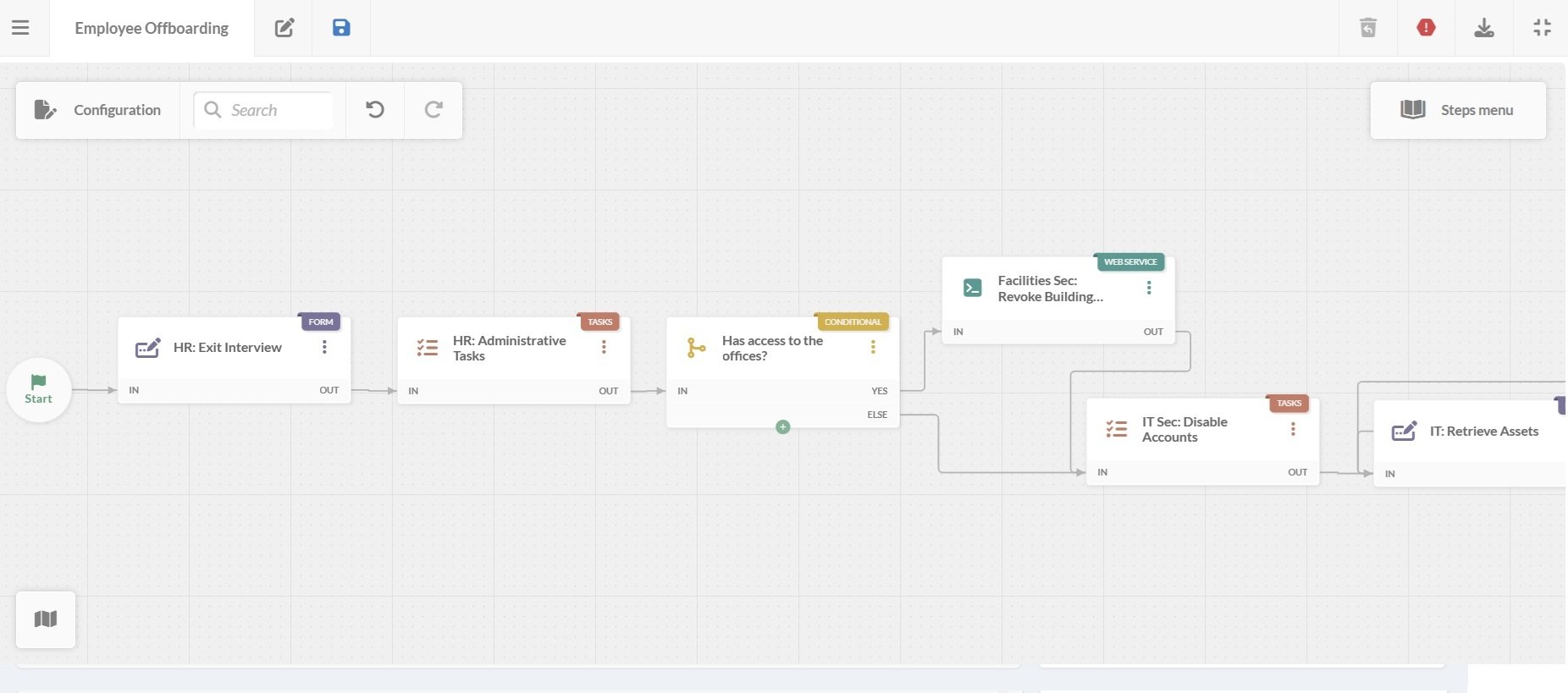
For requests that move through several teams in sequence, such as onboarding a new employee, the no-code Workflow Builder lets an administrator lay out that full sequence, with an approval placed at any point authorization is needed, and automated actions, like account provisioning, triggered once it's granted.
Keep these best practices in mind:
Start by linking existing knowledge base articles to the request types they resolve. Many requests don't need a ticket at all if the answer is already written down somewhere.
In InvGate Service Management, administrators can attach knowledge base articles directly to specific catalog items, so opening a request like "reset my password" surfaces the relevant article before anyone submits anything. Resolved tickets can also be converted into new articles with AI assistance, so the knowledge base grows alongside daily ticket volume without a separate writing project.
Keep these best practices in mind:
A catalog is not a one-time build. Services get added, departments reorganize, and request types that made sense a year ago stop matching how work actually gets done.
Assigning an owner to each category, the same team already receiving its routed requests, makes it clear whose job it is to keep that section current. In InvGate Service Management, this ownership sits alongside the routing configuration on the catalog tree under Settings > Catalog, so the team responsible for fulfilling a request is also the team responsible for keeping its definition accurate.
Keep these best practices in mind:
Ready to see what your own request volume looks like once it's organized into a catalog? Start a 30-day free trial of InvGate Service Management, no credit card required.
A service catalog does more than organize requests. It defines how employees access services, how work reaches the right teams, and how consistent those experiences are across the organization.
Once categories, routing, approvals, and knowledge are connected, the catalog becomes the foundation for your self-service portal, Virtual Service Agent, automation, and reporting. New services can be added without redesigning the whole experience, and existing ones become easier to maintain because every request follows a defined process.
Building the catalog carefully from the start makes every other part of your Service Management practice easier to scale.

