














A Vendor Management System (VMS) is a software solution designed to centralize and automate the entire supplier lifecycle.
Instead of relying on manual processes, a VMS consolidates vendor data into a single platform to handle onboarding, performance tracking, and risk assessment, ensuring procurement is both cost-effective and compliant.
A Vendor Management System, often referred to as Vendor Management software, is a centralized platform that standardizes and automates how organizations work with third-party suppliers. It centralizes vendor information, tracks performance, helps manage potential risks and comply with internal and external regulations, and provides visibility into spending, among other capabilities.
A VMS can manage traditional providers of goods and services as well as IT and SaaS vendors, cloud providers, consultants, and even contingent workforce partners. By bringing all third-party relationships under one framework, organizations gain better visibility, reduce manual errors, and strengthen compliance and decision-making.
In practice, the terms Vendor Management System and Vendor Management software refer to the same thing: a software platform used to centralize vendor data, streamline processes, and support the full lifecycle of supplier relationships.
The difference, to the extent there is one, is mostly linguistic. "Software" highlights the product itself, while "system" speaks to the broader framework that includes the technology, as well as the workflows, processes, and governance models that support Vendor Management.
A Vendor Management System focuses on the entire vendor lifecycle, from onboarding and Contract Management to performance tracking and payment oversight. Its goal is to centralize information, streamline processes, and provide a consistent framework for working with suppliers across the organization.
Vendor Risk Management software, on the other hand, concentrates specifically on identifying, assessing, and monitoring third-party risks related to security, compliance, and regulatory requirements. While they address different needs, many modern platforms combine both capabilities, offering a unified view of vendor performance and vendor risk in a single solution.

A Vendor Management System helps organizations bring consistency, visibility, and control to the way they work with third-party suppliers. By centralizing data and standardizing processes, it strengthens compliance, improves decision-making, and reduces the operational effort associated with managing vendors across multiple teams.
A VMS unifies vendor records, contracts, SLAs, and payment information in one place. This eliminates scattered spreadsheets, reduces manual errors, and makes it easier to understand the status and performance of each supplier.
It supports pre-contract evaluations, due diligence documentation, and ongoing monitoring of vendor certifications and regulatory requirements. Automated reminders and structured assessments help ensure continuous compliance and lower third-party risk.
A centralized view of suppliers makes it easier to spot duplicates, negotiate better terms, and consolidate contracts where possible. These insights help organizations reduce unnecessary spend and improve their purchasing leverage.
Performance scorecards, KPIs, surveys, and SLA tracking enable more structured and transparent vendor relationships. This helps organizations address issues early, reward high performers, and maintain long-term partnerships with critical suppliers.
A shared system creates a consistent way of working across procurement, IT, security, finance, and legal teams. With standardized workflows and clearer approvals, cycle times decrease and coordination becomes significantly smoother.
A Vendor Management System should provide a clear set of capabilities that help organizations centralize information, standardize processes, and maintain control throughout the vendor lifecycle. The following features serve as a practical checklist for evaluating and comparing VMS solutions.
A VMS offers a single record for each vendor that includes general information, contacts, risk categories, and supplier classifications. This unified view ensures consistency across teams and reduces duplicate or outdated data.
Standardized forms, vendor portals, and approval workflows simplify the onboarding process and improve data accuracy. These tools also support ongoing updates and documentation requirements without relying on manual communication.
The system provides a centralized repository for contracts, SLAs, and related documents. Automated reminders for expirations and renewals, along with links to purchase orders and invoices, help organizations stay ahead of deadlines.
Integrated online questionnaires, scoring models, and evidence tracking support structured risk evaluations. When relevant, the system can also align with industry standards or regulatory requirements to strengthen compliance.
Performance metrics such as delivery times, quality, SLA compliance, and incident history can be tracked in one place. Dashboards and reports offer insights by category, region, business unit, or risk level.
A robust VMS integrates with Enterprise Resource Planning (ERP), IT Asset Management (ITAM), IT Service Management (ITSM), security tools, and financial systems to maintain consistency across the ecosystem.
Treating vendors as configuration items within a Configuration Management Database (CMDB) strengthens relationships between vendors, assets, contracts, and services, while a public API enables data synchronization and workflow automation.

A Vendor Management System supports a wide range of operational and compliance needs, especially in environments with complex supplier ecosystems such as IT, SaaS, and managed services. These are some of the most common scenarios where a VMS delivers measurable value.
A VMS helps track software contracts, renewals, service levels, and actual usage to prevent shadow IT and unnecessary licensing costs. IT Vendor Management helps centralize all vendor-related information, making it easier to stay ahead of renewals and optimize spend.
Managed services, consulting firms, and support providers can be monitored through standardized SLAs and performance metrics. This ensures greater accountability and strengthens collaboration across outsourced processes.
Vendor Management Systems provide structure for documenting due diligence, assessments, and compliance checks. This makes it easier to supply evidence during internal and external audits and maintain ongoing alignment with security and regulatory requirements.
Organizations operating across multiple countries can use a VMS to manage different regulatory environments, currencies, and tax requirements. Centralized visibility reduces inconsistencies and improves compliance in distributed procurement models.
You typically need a VMS when the number of suppliers becomes hard to manage, contracts are scattered, compliance tasks are difficult to track, or vendor-related costs lack transparency.
A dedicated system helps centralize information, standardize processes, and provide the visibility needed to scale vendor operations.
Selecting the right Vendor Management System requires aligning the tool with your organization’s scope, risk profile, and operational maturity. A structured evaluation helps ensure the solution supports your current needs while providing room for future growth.
Start by defining whether you need to manage suppliers of goods and services, SaaS vendors, contingent workforce partners, or a combination of all three. Then identify the internal sponsors involved, such as IT, procurement, finance, security, and legal.
Your VMS should integrate with ERP, procurement platforms, ITAM, ITSM, security tools, and Contract Management systems. Treating vendors as part of your asset inventory and connecting them through a CMDB strengthens visibility and operational consistency.
Look for configurable forms, approval flows, business rules, and contract templates that match your internal processes. The system should also offer an intuitive experience for both internal teams and external vendors.
Ensure the platform includes access controls, encryption, audit logs, data residency options, and relevant certifications. These capabilities help maintain compliance and reduce risk across vendor operations.
Before choosing a solution, test it with a small group of vendors, real workflows, and actual users. This helps validate usability, identify gaps, and confirm the tool fits your operational model.
There are many elements to look for in a Vendor Management software. These are some of the key elements it should include:
There are many types of Vendor Management Systems, each designed to support different needs such as procurement operations, third-party Risk Management, or contingent workforce administration. The following examples are not a ranking or a comprehensive list, but rather a snapshot of solutions that represent these different approaches.
InvGate Asset Management is an IT Asset Management software that allows organizations to register vendors as entities connected to assets, contracts, and services, creating a clearer picture of how each supplier supports the IT ecosystem.
Combined with InvGate Service Management, our IT Service Management software, teams can orchestrate vendor-related workflows such as requests, approvals, and renewals, ensuring consistent processes across the entire lifecycle.
InvGate provides the capabilities organizations need to centralize vendor information, manage supplier relationships, and orchestrate vendor-related workflows across IT, procurement, and finance.
By combining InvGate Asset Management and InvGate Service Management, teams can build a robust Vendor Management System that supports visibility, automation, and operational control throughout the entire vendor lifecycle.
InvGate Asset Management allows organizations to model vendors as first-class Configuration Items (CIs) within the CMDB. This makes it possible to link each vendor to the assets, contracts, services, and even tickets they support, enabling full traceability across operational and financial domains.
Treating vendors as CIs enhances impact analysis, continuity planning, and governance. With vendors fully integrated into the CMDB and exposed through the Public API, teams gain comprehensive visibility and can automate relationships, synchronization, and data management across external systems.
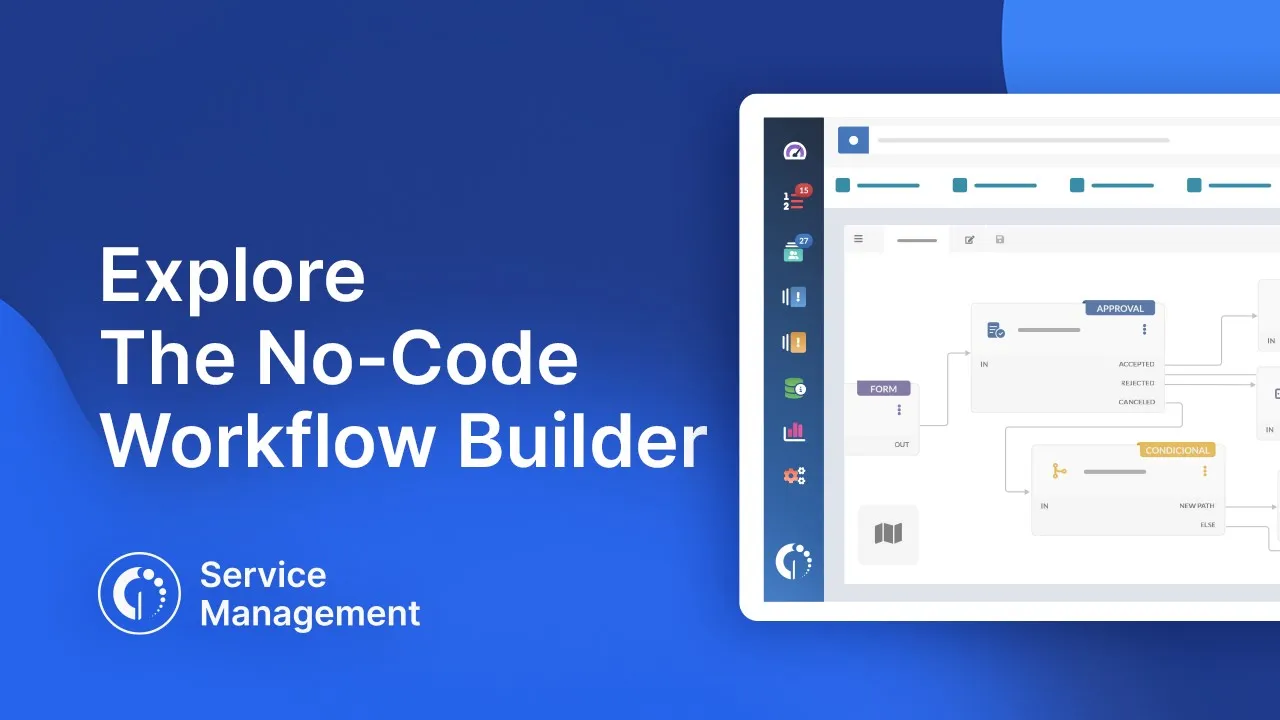
With InvGate Service Management, organizations can create customized workflows to automate every stage of the vendor lifecycle. This includes onboarding, approval processes, periodic evaluations, document validations, and contract renewals, all orchestrated through configurable business rules.
Common examples include onboarding a new supplier, automating SaaS renewal approvals, or running an annual risk assessment workflow. These workflows standardize processes, reduce manual effort, and ensure vendor operations remain compliant and auditable.
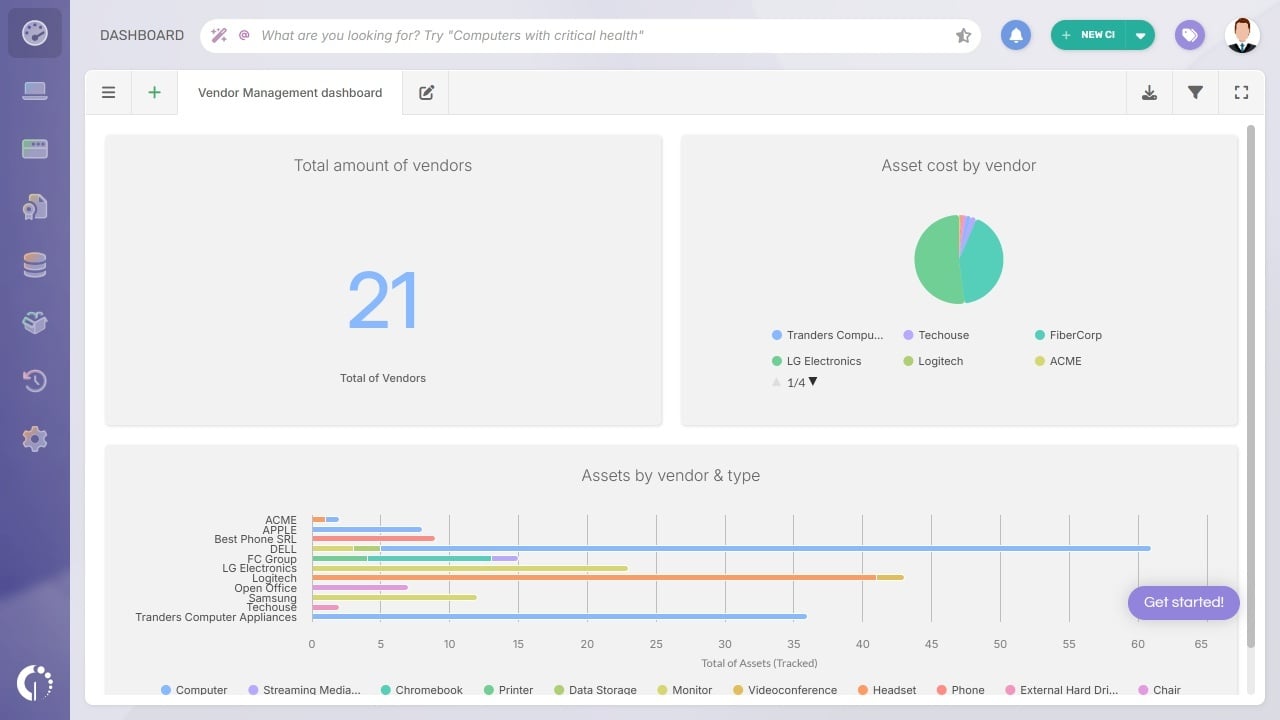
InvGate Asset Management enables teams to build dashboards with key Vendor Management metrics, such as acquisition cost by vendor, total spending over time, asset inventory by vendor, and contract relationships. These insights help identify concentration risk, evaluate performance, and guide budgeting or negotiation strategies.
The platform also integrates with a wide range of systems, including ITSM tools like InvGate Service Management, financial and procurement systems, security platforms, and external tools via API. This ensures vendor data stays synchronized across the ecosystem and supports more reliable, data-driven operations.
InvGate Asset Management and InvGate Service Management give you everything you need to build a robust Vendor Management System, from centralized visibility to automated workflows and integrated reporting. Try them together and see how much easier vendor relationships, compliance, and spending control can be.
Start your 30-day free trial or book a call with our sales team to see InvGate in action.

