A lot of teams keep their real knowledge in Notion. Runbooks, SOPs, onboarding checklists, access policies, project pages, team wikis — the documentation that actually explains how things get done lives there. The service desk is where the work gets done: the tickets, the approvals, the resolutions. When knowledge sits in one place and work happens in another, agents tab-switch, copy-paste, or rebuild a second knowledge base inside the service desk that slowly drifts out of sync with the Notion original.
Connecting your service desk to Notion brings the documentation to the point of work. In this guide, we look at five service desk platforms with Notion integrations, and how directly each one reaches into your Notion content: from surfacing an article inside a ticket, to reading pages and databases live inside an automated workflow.
Key takeaways
- Teams that document in Notion end up maintaining a second, drifting copy inside the service desk. A Notion integration lets the service desk read the original instead.
- The most useful integrations pull Notion content at the point of work — into a ticket reply or a running workflow — rather than syncing a duplicate that has to be kept current.
- Many service desk tools reach Notion through automation platforms like Zapier or Make. A few connect directly, which matters for reliability and for live lookups.
- Keeping Notion as the single source of truth, and reading from it, avoids the content duplication that breaks documentation over time.
Why connect your service desk to Notion
Effective Knowledge Management depends on making documentation available where work happens. While Notion is a popular place to create and organize internal knowledge, that information is most valuable when service desk teams can use it directly as part of their daily processes.
Connecting your service desk to Notion brings documentation into automated workflows, so teams can reference the latest procedures, policies, and knowledge without interrupting their work or maintaining the same information in multiple systems. Instead of treating documentation as a separate destination, it becomes part of how requests are fulfilled, incidents are resolved, and operational tasks are completed.
Some common use cases include:
- Employee onboarding: Retrieve onboarding guides, role-specific checklists, and documentation for provisioning new employees.
- Incident Management: Access troubleshooting guides, runbooks, and recovery procedures during incident response.
- Request fulfillment: Reference software installation instructions, hardware standards, or approval guidelines while processing service requests.
- Change Management: Pull implementation plans, maintenance procedures, or rollback documentation into change workflows.
- Operational processes: Look up documentation, project information, or structured data stored in Notion databases as workflows progress.
Keeping Knowledge Management connected to the service desk helps teams work from the latest documentation, reduces time spent searching for information, and encourages a single source of truth for operational knowledge. Instead of copying content between platforms, documentation stays in Notion while service desk workflows use it whenever it's needed.
What to look for
The tools below were evaluated against the following criteria, with equal weight given to each vendor.
1. Direct connection vs middleware. Some platforms connect to Notion natively; others reach it only through an automation platform like Zapier or Make. A direct connection is more reliable for live lookups and removes a third-party dependency from the workflow.
2. Reading at the point of work. The highest-leverage pattern is pulling Notion content into a ticket or a running workflow exactly when it's needed, rather than syncing a full copy into the service desk that then has to be maintained.
3. Where the automation lives. Notion logic built in a visual, no-code workflow builder stays with the team that runs the service desk, with nothing to script and no engineering ticket to change a step.
4. Single source of truth. An integration that reads from Notion keeps the documentation canonical. One that duplicates content into a separate knowledge base creates two versions to keep aligned.
Best service desk tools with Notion integration
Methodology note: InvGate develops IT Service Management and IT Asset Management software, so we're directly involved in the same market as some of the vendors mentioned here. Even so, our purpose is to share reliable and unbiased information to help you evaluate your options with confidence. Our assessment is based on publicly available data, including vendor sites, documentation, and integration guides. All information reflects the state of the market as of July 2026. We update our content regularly to keep it aligned with product changes and new releases.
1. InvGate Service Management
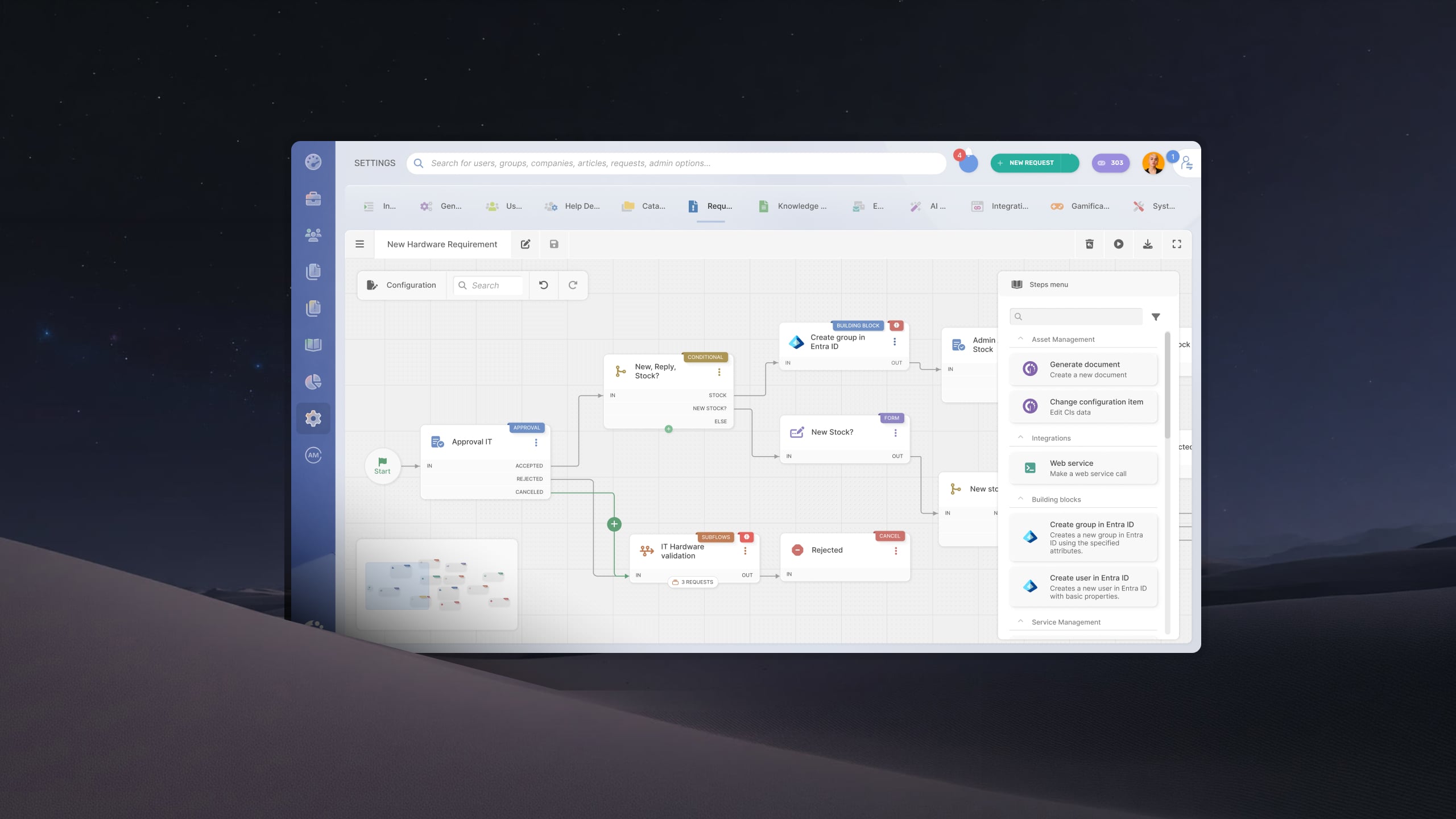
InvGate Service Management is a flexible, no-code ITSM platform for IT teams that want ITIL-aligned structure and full control over their workflows without professional-services overhead. On the Notion side, its Connector brings Notion content directly into the no-code workflow builder — retrieving pages, databases, users, and comments while a workflow runs — so automated processes read from your Notion documentation without duplicating it or switching tools.
Key features:
- Notion connector actions inside the workflow builder: retrieve pages, databases, users, and comments from within any workflow, so automated processes read live from your Notion documentation with no content duplication and no tool-switching.
- No-code workflow builder with drag-and-drop automation for routing, approvals, and escalations.
- Service catalog and self-service portal, plus a native knowledge base.
- ITIL-aligned request, incident, problem, and change management out of the box.
- Self-service deflection and AI-assisted response support for agents.
- Reporting and dashboards for request volumes, resolution times, SLA compliance, and more.
Request an InvGate Service Management 30-day trial to see the Notion Connector actions and Workflow Builder in context.
2. Freshservice
A cloud-native ITSM tool known for a familiar interface and quick onboarding, widely used by mid-market teams and organizations already in the Freshworks ecosystem. Its Notion integration is a native Marketplace app focused on knowledge: agents pull Notion articles straight into ticket conversations.
Key features:
- Native "Notion for Freshservice" app installed from the Freshworks Marketplace.
- Fetches Notion knowledge base content and links to attach as replies to requesters.
- Recommends Notion articles based on the subject of a Freshservice ticket.
- OAuth connection to a selected Notion workspace, teamspaces, and pages.
3. Jira Service Management
A service management tool from Atlassian, favored by development-centric organizations that want IT support and engineering work in the same ecosystem. Its Notion connection comes from Notion's own Jira sync, which keeps issues mirrored inside Notion workspaces.
Key features:
- Notion's native "Connect Jira" synced databases, supporting Jira Cloud products including Jira Service Management.
- Two-way sync available on Notion's Enterprise plan.
- Marketplace Forge apps, such as Getint, for field-level two-way sync of issues, comments, statuses, and attachments.
- Jira issues kept visible and current inside Notion pages and dashboards.
4. Atomicwork
An AI-native ITSM and ESM platform built for internal support that lives inside Slack and Microsoft Teams, suited to teams that want conversational, AI-first service management. Its Notion integration is native: Atomicwork connects Notion as a knowledge source so its AI assistant answers employee questions straight from your Notion pages and wikis.
Key features:
- Native Notion integration that connects Notion pages and wikis as a knowledge source
- Atom, an AI assistant that answers employee questions from Notion content inside Slack and Microsoft Teams.
- Automatic re-sync of Notion source documents on a recurring basis, with manual sync available on demand.
- Permission-aware retrieval, so answers respect the access controls on the source content.
5. ManageEngine ServiceDesk Plus
An ITIL-oriented help desk and ITSM suite popular with SMBs and enterprises that want asset and project management alongside the service desk. Its Notion connection is delivered through automation platforms, covering both the Cloud and On-premise editions.
Key features:
- Notion connection through automation platforms such as Zapier.
- Triggers from new tickets, requests, or assets in ServiceDesk Plus.
- Notion actions to retrieve pages, databases, and comments, or add content to a page.
- No-code templates for common ticket-to-Notion flows.
Disclaimer: All product names, logos, and brands are property of their respective owners. All company, product, and service names used on this site are for identification purposes only. Use of these names, trademarks, and brands does not imply endorsement. Comparisons are based on publicly available information as of July 2026 and are provided for informational purposes only.
How to choose
The integration is one piece of the decision. The platform it plugs into is what your team works in every day, so weigh the surrounding capabilities as heavily as the connection itself.
Two questions tend to settle it. First, who owns the automation? A service desk where routing, approvals, and knowledge lookups are built in a visual, no-code workflow builder keeps that logic with the people who run the service desk, with nothing to script and no engineering ticket to change a step. Second, what surrounds the Notion content once it arrives? A service catalog for clean intake, a self-service portal, a native knowledge base, and reporting on resolution times are what turn a retrieved document into a resolved ticket.
Start from the ITSM platform that fits your operation, then confirm it reaches into Notion the way your processes need, and check whether it reads your docs live or keeps a separate copy to maintain. A tool that pairs a strong service desk with a direct Notion connection will serve you longer than one chosen on the integration alone.
FAQs
What can a service desk actually do with a Notion integration?
It depends on how directly the two connect. At the simplest level, agents can pull a Notion article into a ticket reply so they answer from the team's real documentation. At the most capable level, an automated workflow reads Notion pages, databases, and comments while it runs, so onboarding, approvals, and incident processes use live content from Notion without anyone looking it up by hand.
Do I have to move my knowledge base out of Notion?
No. The value of these integrations is keeping Notion as the source of truth and reading from it. An approach that copies your content into a second knowledge base inside the service desk gives you two versions to maintain, which is the outcome most teams are trying to avoid.
Is a native Notion integration better than connecting through Zapier or Make?
For live lookups inside a workflow, a native or in-workflow connection is more immediate and removes a third-party dependency. Automation platforms like Zapier and Make are a reasonable fit for periodic syncs and simpler ticket-to-page flows, and they add a layer to configure and monitor.