Teams use a priority matrix to decide what needs attention first when multiple tickets compete for the same resources. In ITIL®, that decision comes from combining impact and urgency into a single priority level that agents, managers, and escalation teams can follow consistently.
Without a defined matrix, prioritization often depends on whoever picks up the ticket first. One agent may treat a payroll outage as critical, while another marks it as high priority but delays escalation. Over time, inconsistent prioritization affects SLAs, increases backlog volume, and creates friction between support teams and the business.
This guide explains how the ITIL priority matrix works and how to apply it in a service desk environment. You’ll learn how impact and urgency differ, how priority levels are calculated, how to build a practical matrix for incidents, requests, and changes, and what common mistakes to avoid when implementing the framework.
Key takeaways
- The ITIL priority matrix combines impact and urgency to assign a consistent priority level (P1–P5) to every ticket.
- Getting the matrix wrong means your team firefights by noise, not by business impact — high-urgency issues get ignored while low-stakes requests jump the queue.
- The matrix applies to incidents, problems, service requests, and changes — not just incidents.
- A matrix only works if it's embedded in your ITSM tool and enforced through automation, not left in a spreadsheet.
- InvGate Service Management lets you configure impact and urgency levels directly in the service catalog and automate priority assignment from the first ticket submission.
What is an ITIL® priority matrix?
The ability to prioritize incidents, requests, and changes is vital for IT and business needs. Thus, in its simplest form, the priority matrix defines the importance of an incident for the service desk analyst so that they know how quickly it needs to be acted on and enable them to set an expectation with the customer on potential resolution timings.
The ITIL matrix balances the impact and urgency of the customer contact so that it can be assigned, communicated, and resolved appropriately.
How does the ITIL priority matrix work?
When dealing with priority matrices, the first thing you need to be familiar with is their terms. They organize incidents, requests, problems, and change based on two factors:
- Impact is generally the severity of the fault, for example, how much downtime or how many end users are affected.
- Urgency is how quickly the fault needs to be resolved.
So, for instance, if you have an incident where a service is down, and people need to use it immediately versus a system where it’s down, but no one is planning to use it until the following day, the first incident has greater urgency.
Most ITSM tools have a priority matrix embedded in their process workflows, so assigning a priority is included in the incident or request logging process. For example, in InvGate Service Management, the impact field is configured per category in the service catalog. When an analyst or end user submits a ticket, they select the impact level relevant to their situation — or the system pre-fills it based on the category. This removes the guesswork from the triage step.
Most practitioners use a scale of 1 to 5, whereby 1 is a critical or major incident, and 5 is a minor request or a "nice to have."
Impact vs. urgency: How to determine priority
Before you can build the matrix, you need clear definitions of its two inputs. Organizations that skip this step end up with inconsistent prioritization.
Defining impact
Impact measures the extent of business disruption an incident causes.
A practical three-level scale looks like this:
- High impact: The entire organization is affected. A core ERP system is down, all business operations have stopped, or there is a risk to revenue, regulatory compliance, or organizational reputation.
- Medium impact: A department or a significant group of users is affected. Key workflows are impaired but the organization is still partially operational.
- Low impact: A single user or a non-critical system is affected. Day-to-day operations for the rest of the organization continue normally.
Defining urgency
Urgency measures how quickly the issue needs to be resolved to prevent further harm or escalation. It's important to know that urgency is independent of impact — a ticket can be low impact and still carry maximum urgency if timing is the constraint.
A three-level urgency scale:
- High urgency: The issue must be resolved immediately. There is a hard business deadline, a time-sensitive operation is blocked, or further delay will cause cascading failures.
- Medium urgency: The issue needs to be resolved within a business day. It is affecting productivity, but a short-term workaround exists, or the timeline is flexible.
- Low urgency: The issue can be scheduled. There is no immediate deadline, and normal operations can continue in the meantime.
The clearest example: your payroll system goes down the morning of payroll processing day. The number of users directly affected might be small (the payroll team), which would suggest low impact. But the urgency is maximum — a two-hour delay has organizational consequences that a two-hour delay on any other day would not. That combination moves the ticket up the priority scale significantly.
How impact and urgency combine into priority levels
The matrix is not something agents calculate manually every time a ticket arrives. In most service desks, the organization defines the logic beforehand, documents it in operational procedures, and configures it directly in the ITSM platform.
A common approach is to define three levels of impact and urgency, then map every possible combination to a priority level:
| Impact ↓ / Urgency → | High urgency | Medium urgency | Low urgency |
| High impact | P1 | P2 | P3 |
| Medium impact | P2 | P3 | P4 |
| Low impact | P3 | P4 | P5 |
Each priority level carries an SLA obligation that defines how fast the team must respond and resolve:
- P1: Acknowledge within 10 minutes, resolve within 4 hours.
- P2: Acknowledge within 15 minutes, resolve within 8 hours.
- P3: Acknowledge within 1 hour, resolve within two working days.
- P4: Acknowledge within 4 hours, resolve within five working days.
- P5: Acknowledge within one business day, resolve within ten working days.
These are reference SLAs — your organization will calibrate them based on business hours, service type, and contractual obligations. The key is that every priority level has a defined target.
How priority classification works in service desks
In many service desks, agents do not assign the final priority manually. Instead, they classify the ticket using predefined fields such as category, affected service, impact, or urgency, and the ITSM platform calculates the priority automatically through rules and workflows.
Most organizations also define who can override or reclassify tickets. A common structure looks like this:
- Service desk agents classify tickets during intake and initial triage.
- Team leads or incident managers approve escalations to P1 or major incident status.
- Problem managers or service owners may later adjust priorities if the business impact changes.
- Automated workflows can suggest or assign priorities based on affected services, users, or categories.
The process normally lives inside Incident Management procedures or SLA policies, so everyone uses the same criteria. Mature teams document situations that justify reclassification, such as:
- The number of affected users increases.
- A workaround stops working.
- A business-critical system becomes unavailable.
- Regulatory or financial deadlines are affected.
Without those rules, priority inflation becomes common because users and teams naturally push for faster attention. Many organizations, therefore, restrict who can approve the highest priority levels and audit tickets regularly to verify that classifications remain consistent across teams and shifts.
How to use the ITIL priority matrix in InvGate Service Management
In InvGate Service Management, priorities can be managed through SLAs, automation rules, custom fields, and ticket classification workflows. That allows teams to move beyond manual prioritization and apply the matrix operationally across the service desk.
Build the matrix using impact and urgency fields
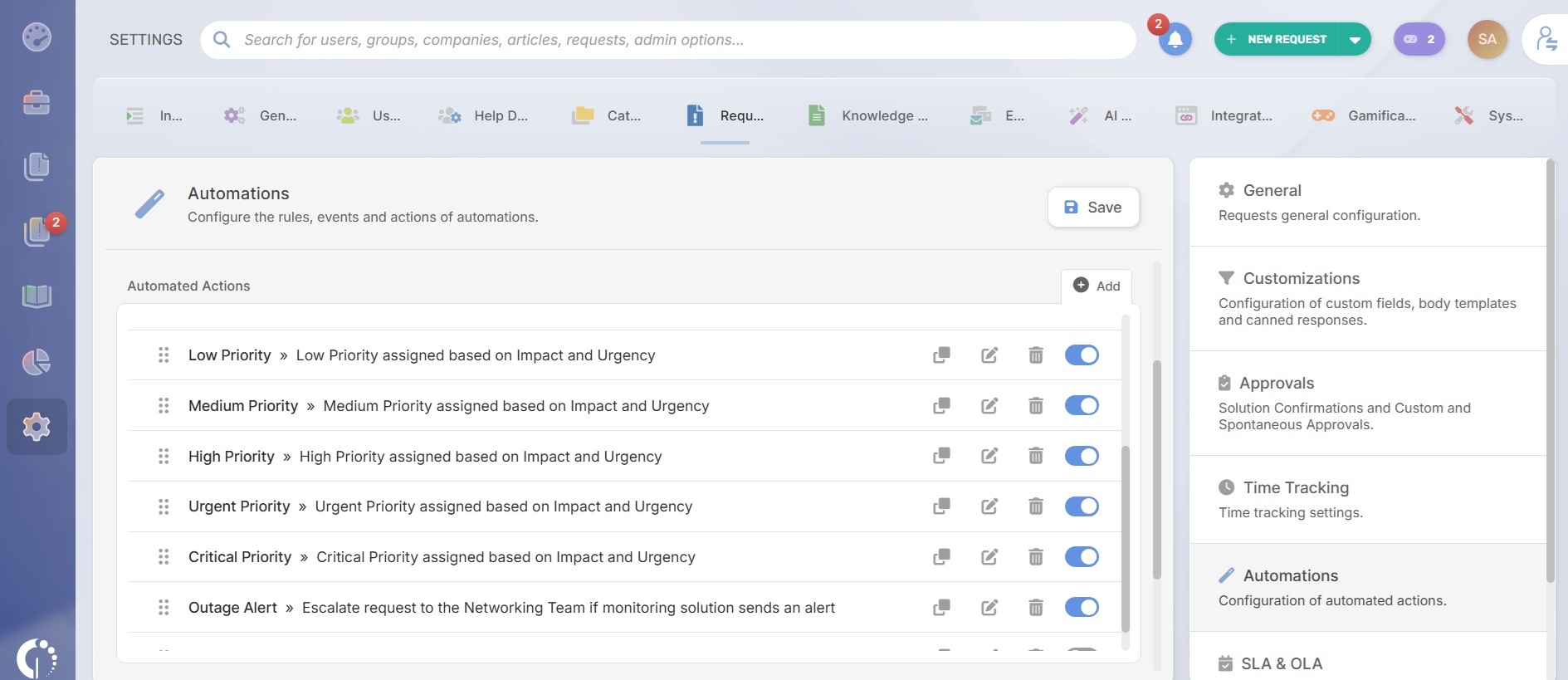
A structured way to implement the ITIL priority matrix in InvGate Service Management is configuring impact and urgency as custom ticket fields and using automation rules to calculate the resulting priority automatically.
In many environments, those fields are only available to trained technicians or specific help desks to keep classifications consistent during triage. Analysts select the appropriate impact and urgency values, and the platform applies the corresponding priority through automation.
From Settings → Requests → Automations teams can create conditions based on impact and urgency combinations so the system updates the ticket priority automatically.
Change priority with automation rules
InvGate Service Management allows teams to create automation rules and change ticket priority when predefined conditions are met.
For example:
- If the customer belongs to a VIP group, assign a higher urgency.
- If the subject contains terms like “major outage” or “production down,” escalate priority automatically.
- If the ticket category is “Email outage” or “Network disruption,” assign a predefined impact level.
- If a custom field, such as an error code, matches a known critical issue, assign a higher priority.
Automation helps standardize decisions across analysts and reduces delays during triage.
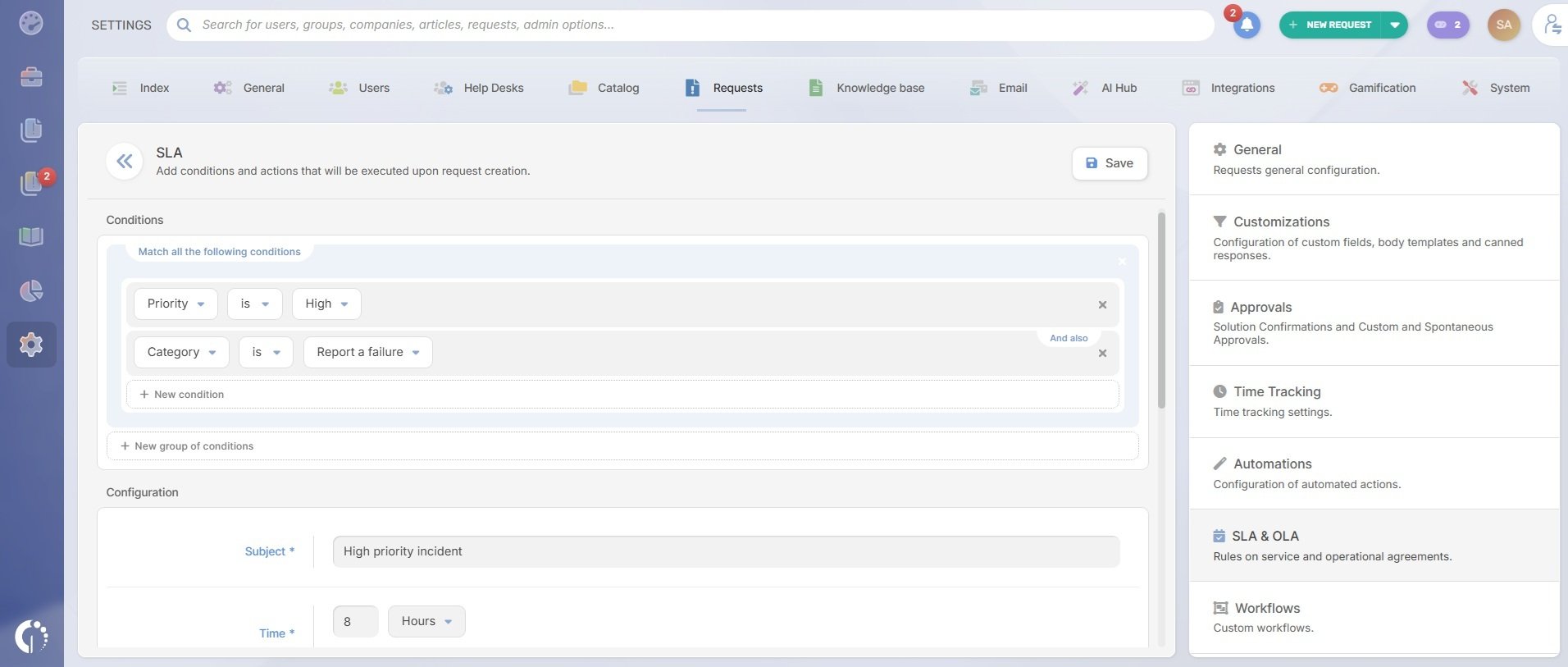
Define SLA targets for each priority level

In InvGate Service Management, SLA rules are configured under: Settings → Requests → SLA
There, teams can create separate rules for first response SLAs and resolution SLAs.
After clicking Add, the first step is defining the condition that will trigger the SLA. For a priority matrix setup, the condition will be: Priority is → Low, Medium, High, Urgent, or Critical.
Then, teams define the expiration time for that SLA in hours or minutes depending on the operational target.
For example:
- Critical → first response in 15 minutes.
- High → resolution in 8 hours.
- Medium → resolution in 2 business days.
The final step is configuring actions that trigger when a percentage of the SLA time has elapsed.
For example:
- At 70% elapsed time, notify the assigned agent.
- At 80%, escalate the request to a supervisor.
- When the SLA expires, send alerts or trigger escalation workflows.
To see how the matrix and automations work in the platform, request a 30-day free trial.
5 best practices when using a priority matrix
A priority matrix only works when teams apply it consistently across workflows, SLAs, escalations, and ticket triage. The following practices help service desks keep prioritization operational, measurable, and aligned with real business impact.
1. Define impact and urgency with operational criteria
Teams should not rely on personal interpretation when classifying tickets. Define impact and urgency using measurable conditions such as:
- Number of affected users.
- Business service availability.
- Financial or compliance impact.
- Availability of workarounds.
- Operational deadlines.
The more concrete the criteria, the more consistent prioritization becomes across shifts and teams.
2. Keep the matrix simple
Many organizations start adding too many priority levels, exceptions, or custom rules until the model becomes difficult to apply consistently. A simple 3×3 impact and urgency model is easier to maintain, audit, automate, and explain to stakeholders. Complexity rarely improves prioritization quality in day-to-day operations.
3. Restrict who can approve critical priorities
If every agent can freely escalate tickets to P1, priority inflation quickly becomes a problem. Mature service desks define who can approve critical classifications, major incidents, or emergency escalations. That responsibility should fall to:
- Service desk leads.
- Incident managers.
- Major incident coordinators.
- On-call managers.
4. Use automation where possible
Priority assignment becomes more reliable when the ITSM platform applies predefined rules automatically. Organizations commonly automate prioritization based on:
-
Ticket category.
-
Affected service.
-
Number of impacted users.
-
VIP users or business units.
-
Monitoring alerts.
-
Service catalog items.
5. Review priorities regularly
Priority models should evolve with the business. A service that was once low-impact may later become operationally critical. Teams should periodically review:
- Tickets being frequently reclassified after creation.
- Overuse of high priorities.
- SLA breach patterns.
The priority matrix across ITIL practices
Up to this point, the discussion has focused mostly on Incident Management. That reflects how most organizations use — and search for — the ITIL priority matrix in practice. Incident queues depend heavily on fast prioritization because teams must decide quickly which outages, degradations, or user disruptions need immediate attention.
Still, incident management is not the only ITIL practice where impact and urgency matter. Service desks and ITSM teams also apply priority models to problems, changes, and service requests, although the operational logic differs in each case.
Problem Management
In Problem Management, the matrix helps teams decide which root-cause investigations deserve immediate attention.
A recurring issue affecting a business-critical application may receive higher priority than a low-frequency technical error with limited operational impact. The urgency also changes depending on whether incidents are actively occurring or if the issue is currently stable.
Priority influences:
- Root cause analysis timelines.
- Assignment to specialized teams.
- Escalation decisions.
- Known error documentation.
- Permanent fix planning.
Some organizations automatically raise the priority of problems linked to multiple high-priority incidents or repeated SLA breaches.
Change Management
Change Management uses prioritization differently because the focus shifts from service restoration to risk, timing, and business impact.
Emergency changes often bypass standard approval timelines because delaying implementation creates greater operational risk than the change itself. Low-risk routine changes, on the other hand, may follow preapproved workflows with minimal review.
Priority affects:
- CAB escalation requirements.
- Approval speed.
- Change scheduling.
- Communication workflows.
- Rollback preparation.
- Resource allocation.
Many ITSM platforms automate this process using change categories, affected services, and risk scores. InvGate Service Management, for instance, can analyze historical records and past change activity to suggest risk and impact levels based on similar tickets and operational patterns.
For example, if previous database patch requests affecting a payment platform repeatedly required emergency approvals, involved after-hours implementation windows, and generated elevated risk assessments, the system can detect that pattern when a similar change request appears. Instead of starting from scratch, the platform may suggest a higher-risk classification.
Service Request Management
Service request prioritization tends to be more operational and SLA-driven than Incident Management.
Most requests are predefined, repeatable, and tied to catalog workflows, which makes automation and ticket triage easier. Organizations often associate request types directly with predefined priority levels and fulfillment targets.
For example:
- Password resets may receive high urgency because they block user access.
- Hardware upgrade requests may follow longer fulfillment windows.
- Access requests for regulated systems may trigger additional approvals despite moderate urgency.
In mature service desks, request categorization, approvals, routing, and priority assignment are automated together through service catalog rules and workflow engines rather than decided manually, ticket by ticket.