















Employee offboarding often moves faster than access removal. Accounts stay active longer than they should, licenses remain assigned, and shared tools keep former employees listed as active users. Each delay increases the risk of unauthorized access and leaves IT teams cleaning up issues that could have been avoided with a clear, automated revocation process.
Asset revocation refers to the removal of access to company-owned resources when an employee leaves. It typically covers software licenses, user accounts, cloud applications, shared folders, and internal systems.
Done manually, it depends on checklists and follow-ups across teams. Automated access revocation centralizes those steps, triggers them at the right moment in the offboarding process, and reduces the chance of missed or late removals.
Access revocation closes the gap between an employee leaving and their accounts being disabled. When that gap exists, former employees can still reach internal systems, cloud tools, or shared data without oversight. Security teams often point to delayed access removal as a recurring cause of data exposure incidents, especially in SaaS-heavy environments where access is spread across many tools.
Findings from a recent report showed that 90% of companies had former employees who could still access SaaS applications after leaving. Each lingering account represents an open door to internal tools, shared data, and customer information.
The risk is not theoretical. In a widely reported case, a former Cash App employee accessed sensitive data for 8.2 million customers months after termination. Incidents like this rarely come from a single failure. They usually point to offboarding processes where access removal depends on manual steps, delayed notifications, or incomplete system coverage.
Manual revocation also creates operational issues. Unused licenses keep generating costs, shared accounts remain cluttered, and audits become harder to pass when access records are incomplete or outdated. Automated access revocation reduces that exposure by linking removal actions directly to offboarding events. User accounts are disabled, licenses reclaimed, and permissions removed according to predefined rules.
Organizations revoke access in more situations than full employee exits. Offboarding is the most visible case, but several everyday scenarios require the same level of control.
Common examples include:
Each of these scenarios benefits from having predefined revocation rules instead of relying on ad hoc decisions or manual cleanup.
You can quickly set up an employee offboarding automation through the workflow template available in InvGate Service Management. The template already defines the full process and connects HR, IT, facilities, and asset-related steps into a single flow, making it easier to add access-removal actions without having to design everything from scratch.
The workflow begins when an employee is identified for offboarding. HR handles the exit interview and completes administrative tasks through a structured checklist, covering record updates, benefits, and final payroll steps. Once those tasks are completed, the process naturally moves into access-related activities without manual handoffs.
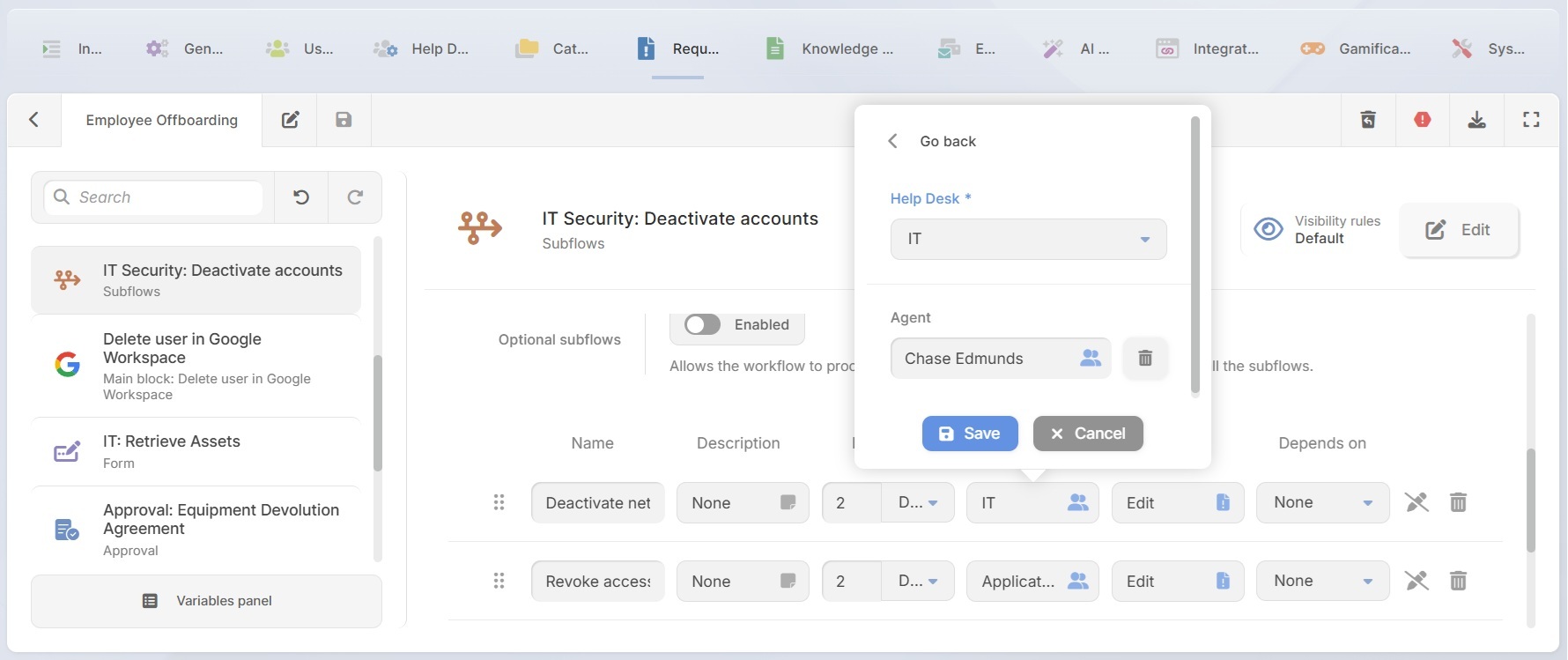
After the initial HR steps, the workflow reaches a key point where access revocation is coordinated across teams. This is done through subflows that trigger requests to other help desks, following your internal structure and responsibilities.
Common examples include requests to:
Each of these requests becomes a ticket assigned to the appropriate team. You define the description, responsible help desk or individual, due date, and priority. In most cases, priority is set to high, reflecting the security impact of delayed access removal.
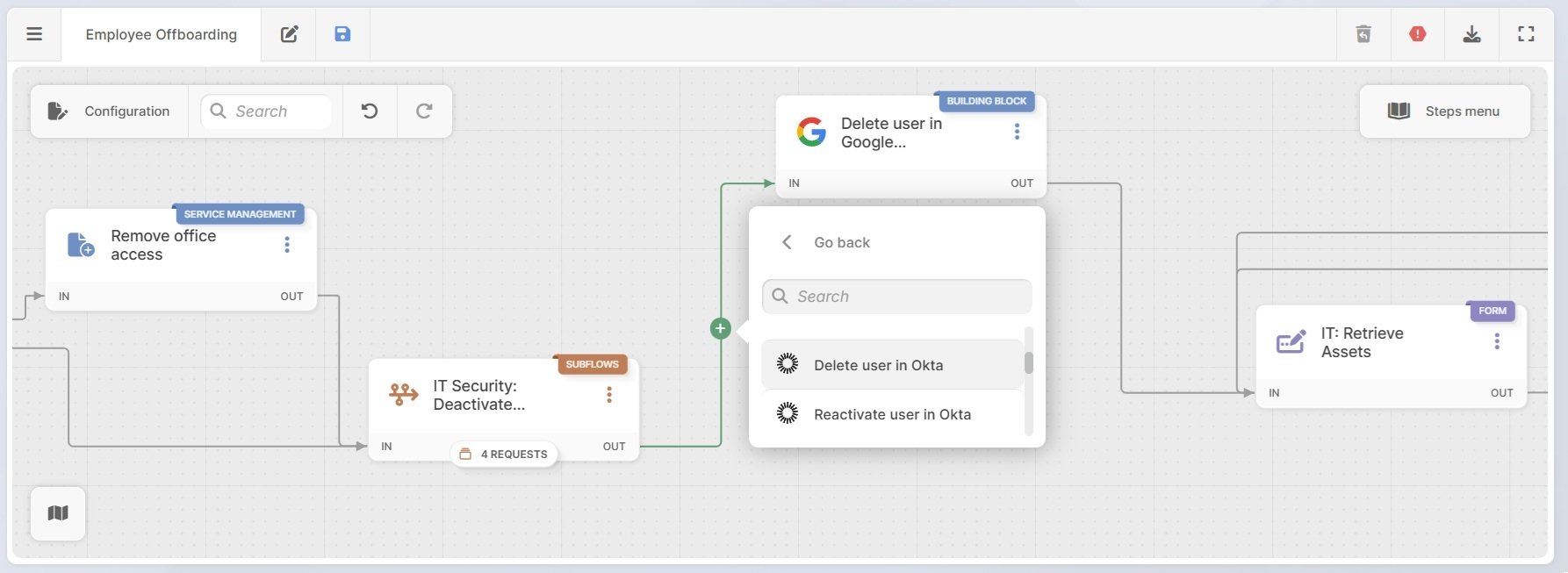
Subflows handle coordination, but the workflow can also execute access changes directly. At this stage, you can use building blocks to trigger actions instead of only assigning tasks.
Using built-in action connectors, you can automate steps like:
Combining subflows with action-based steps gives teams flexibility. Some access changes can be executed automatically, while others still generate tickets when human validation is required. Either way, access revocation becomes part of a defined process that runs at the right time, with clear ownership and traceability.
Once access is removed, the workflow shifts to asset recovery and closure. IT initiates asset retrieval, and managers review and approve the equipment return. Returned assets are documented in InvGate Asset Management, where ownership, status, and location are updated, keeping inventory aligned with access changes.
To complete the process, an automated email notifies the line manager that offboarding is finished and access has been revoked across systems and facilities. That final confirmation helps prevent follow-up questions and leaves a traceable record of compliance.
Ready to bring structure and consistency to employee offboarding? With InvGate Service Management, you can use ready-made workflow templates and no-code automation to revoke access, coordinate teams, and keep offboarding under control from start to finish. Get started with a 30-day free trial!

