A WhatsApp ticketing system helps support teams deal with a problem many organizations already face: employees asking for help through chat instead of formal support channels.
Employees rarely think in terms of “support channels.” When they need assistance, they simply open the tool closest at hand. In many workplaces, that means sending a quick message through WhatsApp.
For support teams, though, those messages often turn into scattered conversations, missed requests, and follow-ups spread across personal and shared phones. Trying to keep up by constantly checking chats doesn’t scale. A more sustainable approach is to centralize request intake while still meeting employees where they already are.
With InvGate Service Management, WhatsApp can become an official support channel, where messages are captured as tickets and managed in the same system as other requests come from. Your help desk gets a single queue to work from, while employees keep reaching out through a tool they already trust.
In this article, we’ll look at:
- What a WhatsApp ticketing system is and how it turns chat messages into trackable support requests, and what teams need in place to get started.
- How to connect WhatsApp to InvGate Service Management so it works as an official support channel.
- When WhatsApp works well as a support channel, and where it may not be the best option.
Key takeaways:
- WhatsApp fits internal IT support when employees already use it daily, and requests are short, conversational, or status-related.
- To enable this setup, organizations typically require a WhatsApp Business Platform account, connected to help desk software like InvGate Service Management, plus a solid knowledge base and clear request categories.
- How it works in practice: Messages can be resolved through self-service or converted into tickets, all managed from a shared queue inside the service desk with full conversation history.
- Security considerations: End-to-end encryption protects messages, while access controls and audit logs in the help desk keep interactions governed like any other support channel.
What is a WhatsApp ticketing system?
A WhatsApp ticketing system connects WhatsApp to a help desk or service desk so chat messages become trackable tickets.
In a service desk context, this applies to internal support (IT, HR, facilities). Users send messages through WhatsApp, the system suggests relevant articles when possible, and if the issue requires follow-up, it creates or updates a ticket automatically. Agents reply from the platform, and the full conversation remains attached to the request.
This is different from customer service use cases, where WhatsApp is used to interact with external customers. Here, the focus is on internal request management, visibility, and controlled intake.
Why support teams need a WhatsApp ticketing system
Employees often use WhatsApp to ask for IT help because it’s quick and familiar. When WhatsApp isn’t connected to the service desk, requests can go untracked, SLAs and routing rules don’t apply, and managers lose visibility into response times and ticket volume.
A service desk software connected to WhatsApp, such as InvGate Service Management, brings those conversations into the same system as email, portals, and other channels. Teams can apply routing, SLAs, workflows, and automations while keeping the conversation history tied to the ticket.
Key features of a WhatsApp ticketing system
When evaluating a WhatsApp ticketing system, a few capabilities determine whether the channel can work as part of a structured support operation.
- Automatic ticket creation - Incoming messages that become tickets automatically, capturing the conversation and linking it to the right user without manual intake.
- Shared queue with routing rules - Teams should be able to manage WhatsApp requests from the same workspace used for email or portal tickets, with routing rules that assign requests based on category, priority, or team.
- SLA tracking across channels - Support for the same response targets, escalation rules, and resolution tracking used for email or portal tickets.
- AI-powered conversation handling - Modern platforms increasingly support AI and natural language processing (NLP), allowing users to describe issues naturally instead of relying only on commands or menus. Some systems combine both approaches, using structured flows for predictable actions and AI for more flexible conversations.
- Escalation to human agents - When self-service is not enough, the conversation must move into the support workflow with the full chat history attached to the ticket, so agents can continue without losing context.
How to turn WhatsApp into a help desk with InvGate Service Management
InvGate Service Management's Virtual Service Agent for WhatsApp is an AI-based interface that lets users interact with the service desk through natural chat conversations. Employees describe their issue or question in plain language, and the agent interprets the intent using natural language processing.
It connects directly to the knowledge base in InvGate Service Management and suggests relevant articles inside the chat, so users can review information before opening a ticket.
If the conversation indicates a request that needs action, it can extract the required details and guide the user to create a support ticket. Conversations are not used to train external language models, and all interactions remain within your Service Management environment.
This section explains how to set up InvGate's Virtual Service Agent and integrate WhatsApp, so it works as an official support channel.
Prerequisites: What do you need before you start?
Before configuring WhatsApp as a support channel within InvGate, make sure the following prerequisites are in place:
- WhatsApp Business account (WABA) - You’ll need a WhatsApp Business account linked to a dedicated phone number that isn’t used in other applications.
- InvGate Service Management with Virtual Service Agent enabled - The Virtual Service Agent (VSA) must be active to handle conversations, suggest answers, and create tickets from WhatsApp messages.
- Outgoing email server configured - Needed to send one-time verification codes during user authentication. Without it, users won’t be able to validate their identity when starting a conversation.
- Knowledge base ready: Keep articles clear, relevant, and up to date so the agent can return accurate answers.
- Request categories defined: Use clear names and descriptions so the agent can classify requests and fill ticket fields correctly.
Step 1: Set up the WhatsApp integration
In this step, you connect WhatsApp to InvGate Service Management so it can act as an entry point for the Virtual Service Agent. Once configured, messages sent to your WhatsApp number are received in InvGate and handled as part of your support workflow.
To configure it go to: Settings > Integrations > Virtual Service Agent and enable Whatsapp
What to configure
- Name: Internal label for the Virtual Service Agent. This is the name users will see when interacting through WhatsApp.
- Enabled users: Define which users or groups can access and interact with the agent through this channel.
- Credentials configuration: Opens the Meta authentication flow. You’ll need to be logged into your Meta account in the same browser session to link your WhatsApp Business account.
- PIN: Set or enter the PIN associated with your WhatsApp Business account. It will be required to complete the connection.
After the integration is created, you can review and adjust its settings from InvGate Service Management. For this, go to: Settings → Integrations → Applications, and open the WhatsApp integration.
What you can see and manage:
-
The WhatsApp Business account linked to InvGate.
-
The phone number configured, plus a QR code to quickly start a conversation with the Virtual Service Agent.
-
The users or groups allowed to interact with the agent through WhatsApp.
Note: This integration is not available for On-Premise instances of InvGate Service Management.
Step 2: Configure your Virtual Service Agent (VSA)
InvGate's Virtual Service Agent (VSA) is the component that handles conversations in WhatsApp. It interprets user messages, suggests answers from the knowledge base, and creates tickets when needed. In this step, you define how the agent behaves and what it can do.
What you can configure
- Greeting message: Set the first message users see when they start a conversation. You can personalize it using variables like .
- Request categories: Control which categories users can select when creating requests from WhatsApp. You can allow all categories or limit the channel to specific ones (for example, only IT support).
- Notifications via WhatsApp: Enable this option to send updates about request status directly through WhatsApp. Keep in mind that some notifications may incur costs depending on Meta’s messaging rules.
- External knowledge usage: Decide whether the agent can use external sources in addition to your knowledge base. If disabled, responses will rely only on internal content.
- Conversation visibility in tickets: Choose whether the WhatsApp conversation is attached to the generated request. Keeping it enabled helps agents see the full context without switching tools.
Step 3: Set up authentication for end users
When a user contacts the Virtual Service Agent for the first time, the system validates their identity:
- The agent asks for the user’s email address.
- The user enters an email that matches their account in InvGate Service Management.
- The system sends a security code through the outgoing email server.
- The user enters the code to confirm their identity, and the system links the session to their account.
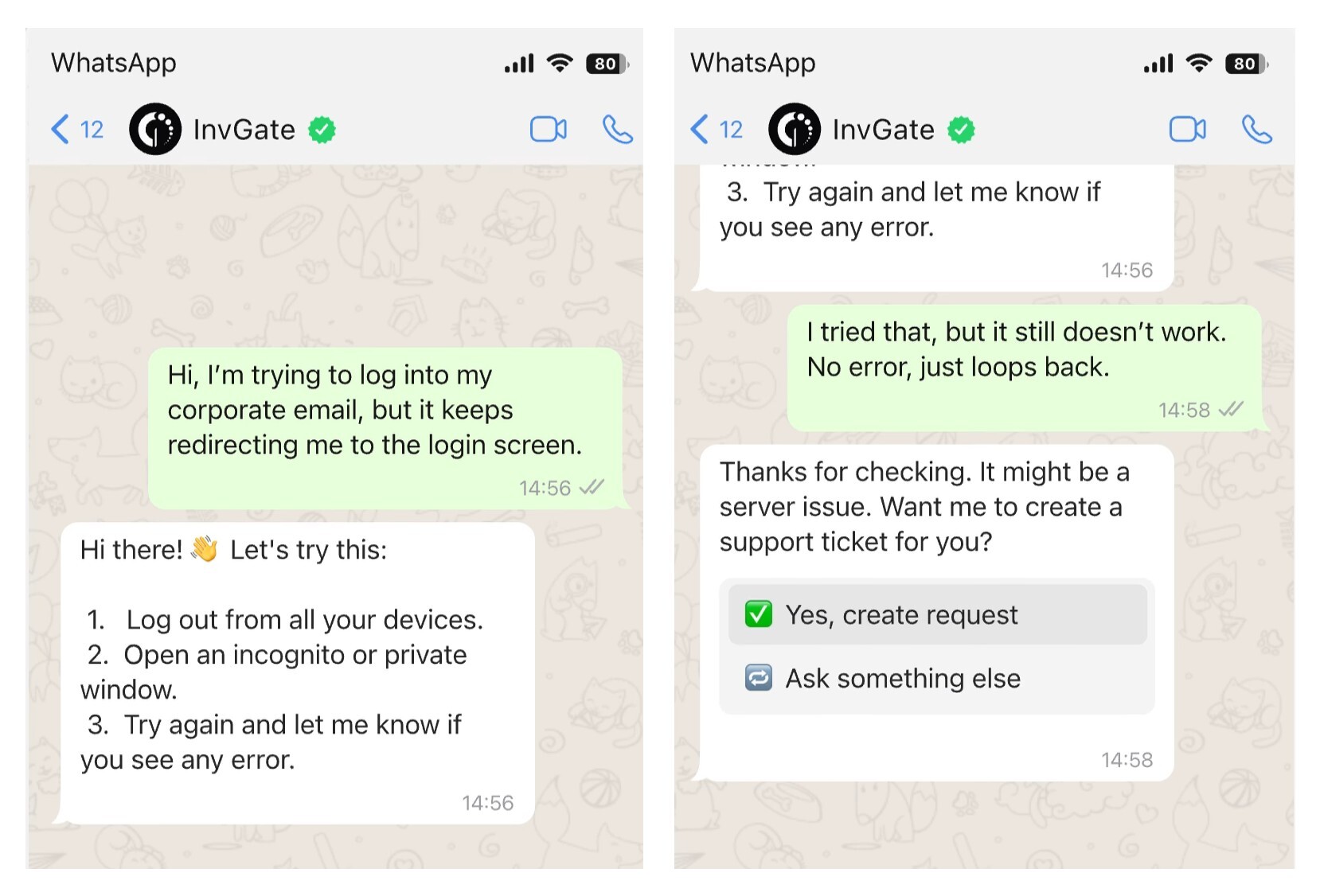
From that point on, requests and updates are tied to the correct account. After authentication, users can interact with the Virtual Service Agent in three main ways:
-
Get answers: Users describe an issue in plain language. The agent suggests relevant knowledge base articles directly in the chat.
-
Create requests: If the issue needs follow-up, the agent analyzes the conversation, suggests a category, and creates a ticket.
-
Check request status: Users can ask for updates on existing requests without leaving WhatsApp.
If no internal article applies, the agent may consult external sources, but knowledge base content always takes priority.
Step 4: Test and go live
Before rolling out WhatsApp to the whole organization, validate that the setup works as expected from both the user and agent side.
What to verify
- Authentication flow works: users receive the email code and can complete validation.
- Knowledge base responses are relevant: common questions return useful articles.
- Ticket creation is accurate: messages map to the right categories and fields.
- Notifications behave as expected: updates are sent (or not) according to your settings.
- Agent visibility is complete: conversations appear inside the ticket with full context.
Finally, communicate the new channel so users start using WhatsApp as a support option. A short internal announcement or onboarding note is usually enough to drive initial adoption.
- Share the phone number or QR code with employees.
- Explain what types of requests fit this channel (quick questions, common issues, status checks).
- Clarify when to use other channels like the portal or email for more complex or formal requests.
Start a 30-day free trial of InvGate Service Management and see how the Virtual Service Agent turns WhatsApp messages into trackable tickets.
When WhatsApp works for ticketing (and when it doesn't)
WhatsApp works well as a support channel when it matches how employees already communicate. In many organizations, that means quick, mobile-first interactions rather than formal requests through a portal or long email threads. When connected to a help desk, those conversations can still follow structured workflows without changing how users reach out.
It often works best in situations like:
- Distributed or frontline teams that rely on mobile devices instead of desktops.
- Employees who already use WhatsApp daily, making adoption immediate.
- Organizations without a mature self-service portal, where WhatsApp can act as an accessible entry point.
- Short, conversational requests, such as access issues, simple troubleshooting, or status checks.
There are also cases where WhatsApp may not be the ideal channel:
- Not suited for complex attachments or detailed documentation.
- Requires integration with a help desk for full traceability and control.
- Less effective for process-driven workflows that depend on forms, approvals, or strict data input.
- Complex troubleshooting that benefits from screen sharing or a live call.
WhatsApp vs. other support channels: How it fits into your stack
WhatsApp can work as a valid IT support channel when it’s integrated with a help desk and follows the same ticketing workflows as email or a portal. On its own, it’s just a messaging tool. Once connected to a service desk, it becomes another structured entry point for requests, with tracking, prioritization, and visibility.
Here’s how it compares to other common channels:
- WhatsApp
- Best for: Quick questions, simple requests, status updates, mobile-first teams
- Limitations: Not ideal for complex forms, detailed documentation, or approval-heavy processes
- Email
- Best for: Detailed requests, longer explanations, formal communication
- Limitations: Slower exchanges, harder to structure data without predefined fields
- Self-service portal
- Best for: Structured requests, approvals, workflows that require specific inputs
- Limitations: Lower adoption if users prefer faster or more familiar tools
- Native chat (e.g., Teams, Slack)
- Best for: Internal collaboration and quick back-and-forth with support
- Limitations: Conversations can get fragmented without proper ticketing integration
The key is not choosing one channel over another, but managing them together. You can consider a model of omnichannel support with InvGate Service Management, where you centralize WhatsApp, email, portal, and chat requests into a single queue, so teams can apply the same workflows, SLAs, and automation regardless of how the request comes in.
If you’re evaluating this setup, it’s worth looking at how your service desk automation supports it for routing requests, assigning priorities, and reducing manual work.
What security and compliance considerations apply to WhatsApp IT ticketing?
WhatsApp can be used for IT support, but it introduces a different security model than email or a service portal. Messages are protected with end-to-end encryption, which means only the sender and recipient can read the content. At the same time, message delivery and account management rely on Meta’s infrastructure, so some metadata (such as timestamps or phone numbers) is still processed outside your service desk.
When you integrate WhatsApp with a platform like InvGate Service Management, the ticket becomes the system of record. The help desk adds access controls, audit logs, and data policies, so requests follow the same governance model as other channels. In practice, WhatsApp acts as the entry point, while the ticket stores the formal record of the interaction.
A few configuration choices help keep the setup under control:
- Avoid sharing sensitive data in chat (credentials, personal identifiers, regulated information).
- Use the ticket as the official record, not the WhatsApp thread.
- Limit categories available via WhatsApp to lower-risk requests.
- Control who can access conversations through roles and permissions in the help desk.
From a compliance perspective, regulations like GDPR may apply depending on your organization and user base. That means you need to consider where data is processed, how long it’s stored, and who can access it.
Frequently asked questions
Can WhatsApp be used as a ticketing system?
WhatsApp can be used as a support channel, but it doesn’t provide the ticket management features of a service desk on its own. Connected to service desk software, WhatsApp conversations can become trackable tickets with routing, SLAs, and automation.
Does a WhatsApp ticketing system need the Business API?
Yes. A service desk integration typically uses the WhatsApp Business Platform/API to connect WhatsApp with the ticketing system and manage conversations at scale.
Can employees open tickets without leaving WhatsApp?
Yes. With a WhatsApp-connected service desk, employees can start a support conversation directly in WhatsApp. The request can then be created and managed as a ticket without requiring them to open a separate portal.